







Question: Creating a new function mintf which is similar to printf(...) . return type should be **void** Only things that can be used: stdarg.h , stdbool.h,
Creating a new function "mintf" which is similar to printf(...) .
return type should be **void**
Only things that can be used: stdarg.h , stdbool.h, stdio.h, assert.h, stdlib.h
mintf() will support the following format codes:
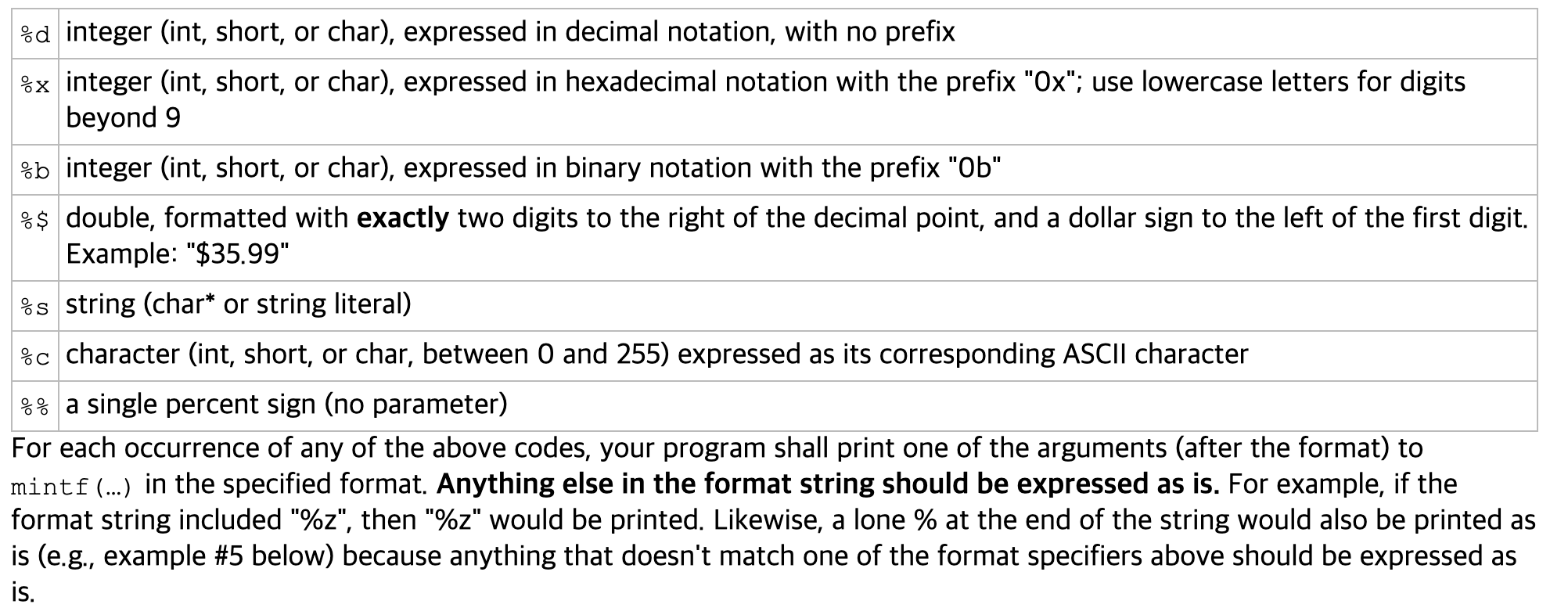
You will need to use print_integer function that I already created.
#include
#include
void print_integer(int n, int radix, char* prefix){
char *s = '0123456789abcdefghijklmnopqrstubwxyz";
char base[100];
int i,j,remain;
//printing the negative sign
if ( n
fputc('-',stdout);
n = -n;
}
else if (n == 0){
fputc('0',stdout);
}
//printing prefix
for (i = 0; prefix[i] != '\0'; i++) {
fputc(prefix[i], stdout);
}
// converting numbers to different bases
for (i = 0; n!= 0 ; i++){
r = n % radix;
base[i] = s[remain];
n = n / radix;
}
//printing the number
j = i - 1;
while( j > = 0){
fputc(base[j],stdout);
j -= 1;
}
}
-> add the code here
--------------------------------
output examples:
mint("%d",4567);
//output : 4567
mintf("%b", 1234);
//output: 0b10011010010
mintf("this is %$", 100);
//output: "this is $100.00"
I will give the thumbs up. Thank you
%d integer (int, short, or char), expressed in decimal notation, with no prefix %x integer (int, short, or char), expressed in hexadecimal notation with the prefix "Ox"; use lowercase letters for digits beyond 9 %b integer (int, short, or char), expressed in binary notation with the prefix "Ob" %$ double, formatted with exactly two digits to the right of the decimal point, and a dollar sign to the left of the first digit. Example: "$35.99" %s string (char* or string literal) %c character (int, short, or char, between 0 and 255) expressed as its corresponding ASCII character %% a single percent sign (no parameter) For each occurrence of any of the above codes, your program shall print one of the arguments (after the format) to mintf (...) in the specified format. Anything else in the format string should be expressed as is. For example, if the format string included "%z", then "%z" would be printed. Likewise, a lone % at the end of the string would also be printed as is (e.g., example #5 below) because anything that doesn't match one of the format specifiers above should be expressed as is. %d integer (int, short, or char), expressed in decimal notation, with no prefix %x integer (int, short, or char), expressed in hexadecimal notation with the prefix "Ox"; use lowercase letters for digits beyond 9 %b integer (int, short, or char), expressed in binary notation with the prefix "Ob" %$ double, formatted with exactly two digits to the right of the decimal point, and a dollar sign to the left of the first digit. Example: "$35.99" %s string (char* or string literal) %c character (int, short, or char, between 0 and 255) expressed as its corresponding ASCII character %% a single percent sign (no parameter) For each occurrence of any of the above codes, your program shall print one of the arguments (after the format) to mintf (...) in the specified format. Anything else in the format string should be expressed as is. For example, if the format string included "%z", then "%z" would be printed. Likewise, a lone % at the end of the string would also be printed as is (e.g., example #5 below) because anything that doesn't match one of the format specifiers above should be expressed as is
Step by Step Solution
There are 3 Steps involved in it

Get step-by-step solutions from verified subject matter experts
 Study Help