Question: Creating Caeser Cipher. This is what the code currently looks like: /* * To change this license header, choose License Headers in Project Properties. *
Creating Caeser Cipher. This is what the code currently looks like:
/* * To change this license header, choose License Headers in Project Properties. * To change this template file, choose Tools | Templates * and open the template in the editor. */ package testweek8;
import javafx.application.Application; import javafx.event.ActionEvent; import javafx.event.EventHandler; import javafx.geometry.Pos; import javafx.scene.Scene; import javafx.scene.control.Button; import javafx.scene.control.Label; import javafx.scene.control.TextArea; import javafx.scene.control.TextField; import javafx.scene.layout.HBox; import javafx.scene.layout.VBox; import javafx.stage.Stage;
public class TestWeek8 extends Application{ public static void main (String[] args) { //start application launch(args); } //start public void start(Stage stage) throws Exception { //create fields for input output //and buttons final TextArea txtPlain = new TextArea(); /*How do I change this to a drop down menu*/ final TextArea txtCipher = new TextArea(); final TextField txtKey = new TextField(); txtKey.setMaxWidth(100); Button btnTranslate = new Button("Encode / Decode"); Button btnClear = new Button("Clear"); //set action event for Translate button btnTranslate.setOnAction(new EventHandler(){ public void handle(ActionEvent event) { String plain, cipher; //local variables int key; plain = txtPlain.getText().trim(); //get plain text cipher = txtCipher.getText().trim(); //get cipher text if(plain.length() > 0){ /on empty plain text try{ //valid key //convert key into integer key = Integer.parseInt(txtKey.getText().trim()); } catch(Exception e){ //invalid/empty key return; } cipher = encode(plain, key); //encode plain text txtCipher.setText(cipher); //set resultant cipher text } else if(cipher.length() > 0){ //plain text is empty //but cipher text is non empty try{ //valid key //convert into integer key = Integer.parseInt(txtKey.getText().trim()); } catch(Exception e){ //invalid/empty key return; } plain = decode(cipher, key); //decode the cipher text txtPlain.setText(plain); //set resultant plain text } else{ /either plain text nor cipher text is given //do nothing return; } } }); //set event handler for clear button btnClear.setOnAction(new EventHandler(){ public void handle(ActionEvent event) { //make all text boxes blank txtPlain.setText(""); txtCipher.setText(""); txtKey.setText(""); } }); //set window title stage.setTitle("Caeser Cipher"); stage.setResizable(false); //add components to HBox HBox hbox = new HBox(); hbox.setAlignment(Pos.BASELINE_CENTER); hbox.setSpacing(10); hbox.getChildren().add(btnTranslate); hbox.getChildren().add(new Label("Key:")); hbox.getChildren().add(txtKey); hbox.getChildren().add(btnClear); //add components to VBox VBox vbox = new VBox(); vbox.setSpacing(10); vbox.setAlignment(Pos.TOP_LEFT); vbox.getChildren().add(new Label("Plain Text:")); vbox.getChildren().add(txtPlain); vbox.getChildren().add(hbox); vbox.getChildren().add(new Label("Cipher Text:")); vbox.getChildren().add(txtCipher); stage.setScene(new Scene(vbox, 500, 500)); //show the screen stage.show(); } //function to encode plain text to cipher text public String encode(String plain, int key){ StringBuilder cipher = new StringBuilder(); char pchar; int len = plain.length(); //encoding character by character for(int i = 0; i = 'A' && pchar = 'a' && pchar = 'A' && cchar = 'a' && cchar }
I need it to be able to produce this:
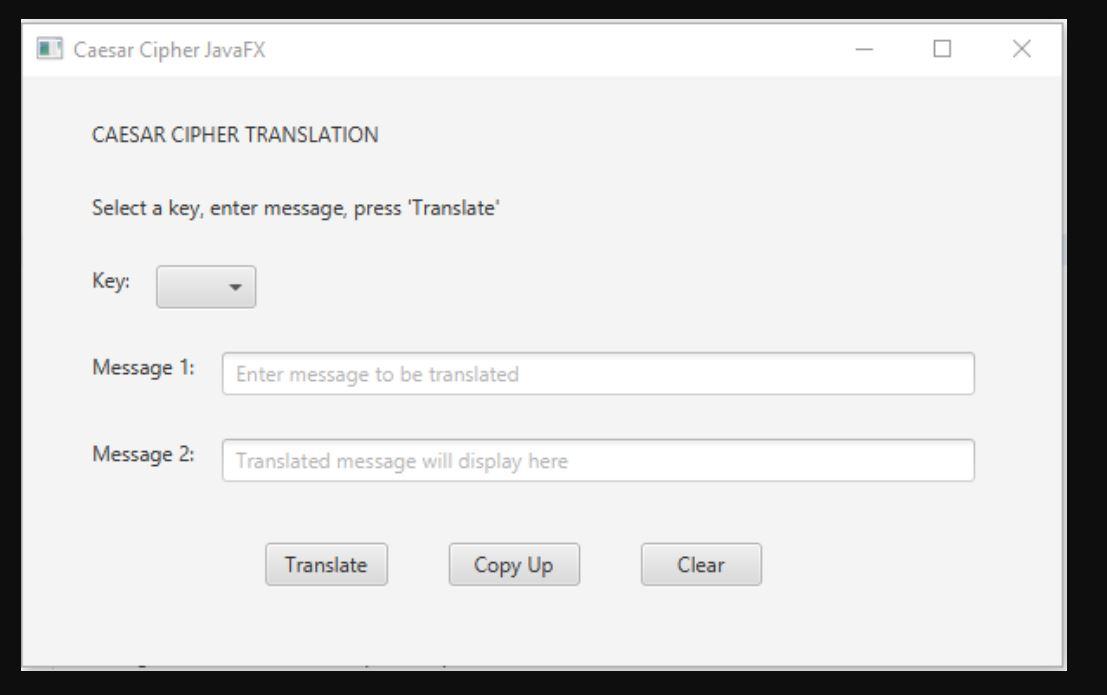
Caesar Cipher JavaFX CAESAR CIPHER TRANSLATION Select a key, enter message, press 'Translate Key: Message 1: Enter message to be translated Message 2: Translated message will display here Translate Copy Up Clear









 Study Help