







Question: Creating projects and solutions in Visual Studio Design DO NOT modify, add or subtract any members to any classes or other constructs. Fields vehicleSalePrice :
Creating projects and solutions in Visual Studio
Design
DO NOT modify, add or subtract any members to any classes or other constructs.
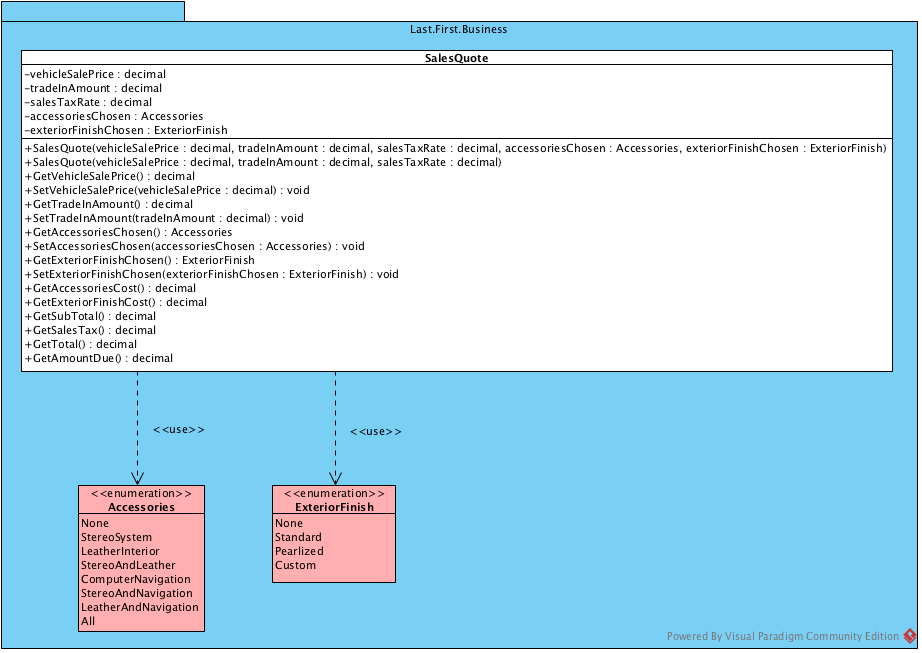
Fields
vehicleSalePrice : decimal - The selling price of the vehicle being sold.
tradeInAmount : decimal - The amount offered to the customer for the trade in of their vehicle.
salesTaxRate : decimal - The tax rate applied to the sale of a vehicle.
accessoriesChosen : Accessories - The chosen accessories.
exteriorFinishChosen : ExteriorFinish - The chosen exterior finish.
Constructors
SalesQuote(decimal, decimal, decimal, Accessories, ExteriorFinish)
Initializes an instance of SalesQuote with a vehicle price, trade-in value, sales tax rate, accessories chosen and exterior finish chosen.
Parameters:
- vehicleSalePrice - the selling price of the vehicle being sold.
- tradeInAmount - the amount offered to the customer for the trade in of their vehicle.
- salesTaxRate - the tax rate applied to the sale of a vehicle.
- accessoriesChosen - the value of the chosen accessories.
- exteriorFinishChosen - the value of the chosen exterior finish.
SalesQuote(decimal, decimal, decimal)
Initializes an instance of SalesQuote with a vehicle price, trade-in amount, sales tax rate, no accessories chosen and no exterior finish chosen.
Parameters:
- vehicleSalePrice - the selling price of the vehicle being sold.
- tradeInAmount - the amount offered to the customer for the trade in of their vehicle.
- salesTaxRate - the tax rate applied to the sale of a vehicle.
Methods
GetVehicleSalePrice() : decimal
Gets the sale price of the vehicle.
SetVehicleSalePrice(decimal) : void
Sets the sale price of the vehicle.
Parameters:
- vehicleSalesPrice : decimal - the selling price of the vehicle.
GetTradeInAmount() : decimal
Gets the trade in amount.
SetTradeInAmount(decimal) : void
Sets the trade in amount.
Parameters:
- tradeInAmount : decimal - the amount offered to the customer for the trade in of their vehicle.
GetAccessoriesChosen() : Accessories
Gets the accessories chosen for the vehicle.
SetAccessoriesChosen(Accessories) : void
Sets the accessories chosen for the vehicle.
Parameters:
- accessoriesChosen : Accessories - the chosen accessories.
GetExteriorFinishChosen() : ExteriorFinish
Gets the exterior finish chosen for the vehicle.
SetExteriorFinishChosen(ExteriorFinish) : void
Sets the exterior finish chosen for the vehicle.
Parameters:
- exteriorFinishChosen : ExteriorFinish - the chosen exterior finish.
GetAccessoriesCost() : decimal
Returns the cost of the accessories chosen.
Accessories have the following costs:
- Stereo System - $505.05
- Leather Interior - $1,010.10
- Computer Navigation - $1,515.15
GetExteriorFinishCost() : decimal
Returns the cost of the exterior finish chosen.
Exterior Finishes have the following costs:
- Standard - $202.02
- Pearlized - $404.04
- Custom - $606.06
GetSubTotal() : decimal
Returns the sum of the vehicles sale price, accessories and exterior finish costs (rounded to two decimal places).
GetSalesTax() : decimal
Returns the amount of tax to charge based on the subtotal (rounded to two decimal places).
GetTotal() : decimal
Returns the sum of the subtotal and taxes.
GetAmountDue() : decimal
Returns the difference of the total and trade-in amount (rounded to two decimal places).
Accessories Enumeration
Namespace: Last.First.Business
The Accessories enumeration has the following values:
- None
- StereoSystem
- LeatherInterior
- StereoAndLeather
- ComputerNavigation
- StereoAndNavigation
- LeatherAndNavigation
- All
ExteriorFinish Enumeration
Namespace: Last.First.Business
The ExteriorFinish enumeration has the following values:
- None
- Standard
- Pearlized
- Custom
Program Requirements
The program must include all test cases required to test the SalesQuote class. For each method (unit) being tested, ensure your client program provides output clearly describing the method being tested along with the expected and actual result.
- Each unit test will be written in a method.
- Each unit test method will test one outcome only.
- Each unit test method will be named using the standard outlined in the course material.
- When testing constructors, verify the results by calling an accessor method of the class.
- When testing mutators, use the accessor method to verify the state change.
Testing method GetVehicleSalesPrice() Test 1 Expected: 5000.00 Actual: 5000.00 Test 2 Expected: 6000.00 Actual: 6000.00 Testing method SetVehicleSalesPrice(decimal) Test 1 Expected: 9000.00 Actual: 9000.00
Last.First. Business Sales Quote -vehicleSale Price : decimal -tradelnAmount: decimal -sales Tax Rate : decimal -accessoriesChosen : Accessories -exteriorFinishChosen : ExteriorFinish +Sales Quote(vehicleSale Price : decimal, tradelnAmount: decimal, sales TaxRate : decimal, accessoriesChosen : Accessories, exterior FinishChosen : ExteriorFinish) +Sales Quote(vehicleSale Price : decimal, tradelnAmount: decimal, sales TaxRate : decimal) +GetVehicleSale Price(): decimal +SetVehicle Sale Price(vehicleSale Price : decimal) : void +Get Trade InAmount : decimal +Set TradelnAmount(tradelnAmount : decimal) : void +GetAccessoriesChosen(): Accessories +SetAccessoriesChosen(accessoriesChosen : Accessories) : void +GetExterior FinishChosen() : Exterior Finish + SetExterior FinishChosen(exterior FinishChosen : ExteriorFinish) : void +GetAccessoriesCost(): decimal +GetExterior FinishCost(): decimal +GetSub Total : decimal +GetSales Taxo: decimal +Get Total : decimal +GetAmountDue 0 : decimal 1 > > > Accessories None StereoSystem LeatherInterior Stereo And Leather ComputerNavigation StereoAndNavigation Leather And Navigation All > Exterior Finish None Standard Pearlized Custom Powered By Visual Paradigm Community Edition
Step by Step Solution
There are 3 Steps involved in it

Get step-by-step solutions from verified subject matter experts
 Study Help