







Question: Creating/ Solving the 8 Queens Problem by Creating Own GUI Chessboard and Message Display Hello! I need help with my second big project this semester
Creating/ Solving the 8 Queens Problem by Creating Own GUI Chessboard and Message Display
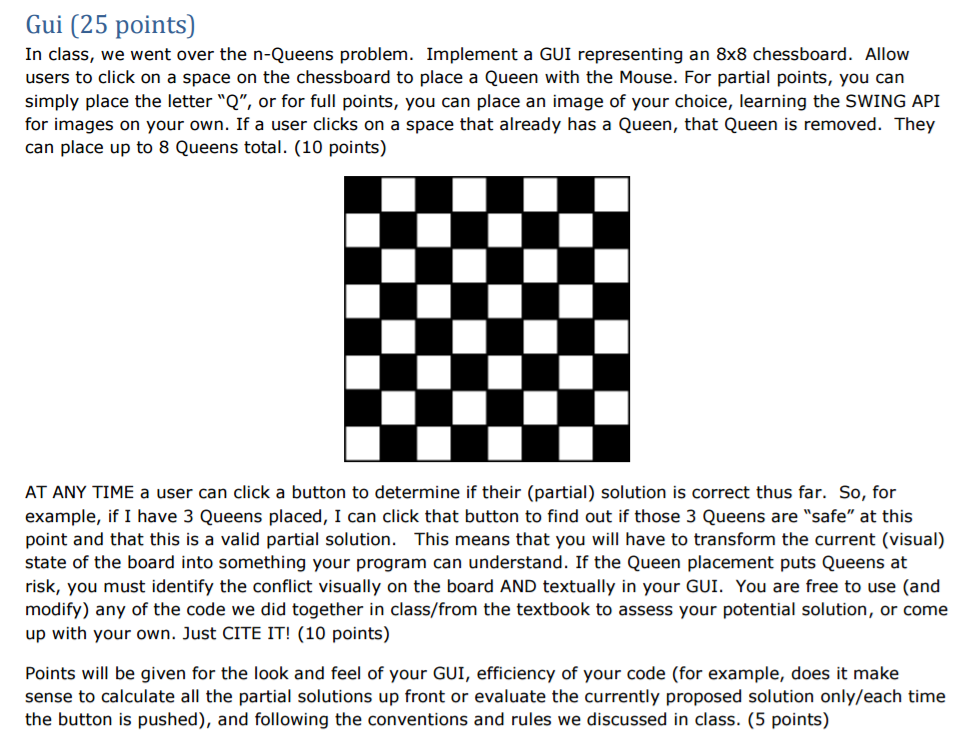
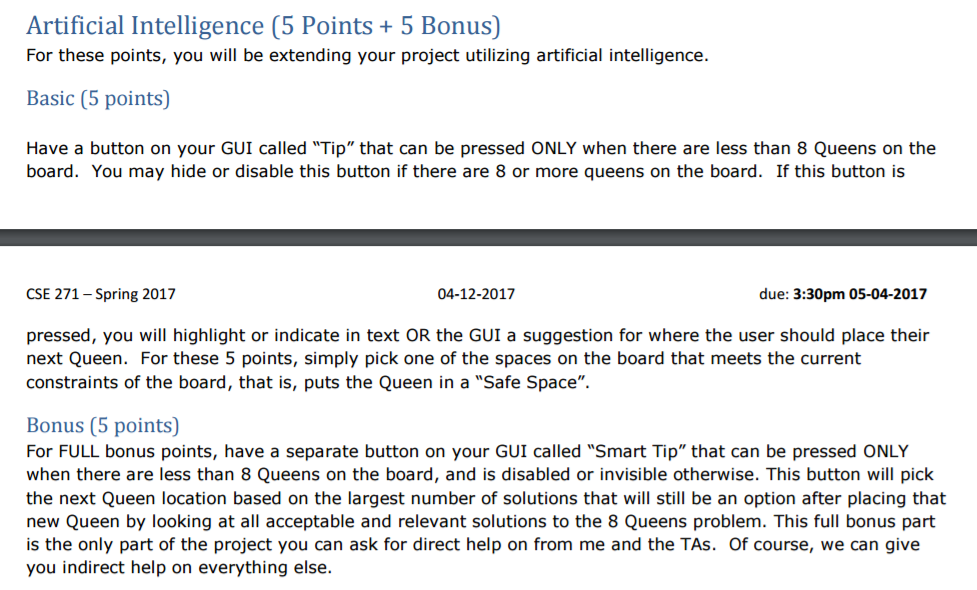
Hello! I need help with my second big project this semester in my course. The is the second introductry course to Java, so I do not know a lot of advanced programming. To create the GUI, use the Java Swing documentation. The user should be placing the Queens. Also, there should be a tip but (does not have to be using Artificial Intelligence but recommended) that shows the next viable partial solution. I HAVE POSTED PART OF CODE BELOW. Need to check if Queen is not attacking other Queen. I have a Queen class but in the listener for the submit button. It needs to check to see if the partial solution is correct. I uploaded a Queen image for piece so the code wont work unless you put in your own icon in click listener.

public class Queen { private int row; private int column; public Queen(int r, int c){ row = r; column = c; } public boolean attacks(Queen other){ return row == other.row || column == other.column || Math.abs(row - other.row) == Math.abs(column - other.column); }
public String toString(){ return "" + "abcdefgh".charAt(column) + (row + 1); } }
import javax.swing.JFrame;
public class Main { public static void main(String[] args) throws Exception { EightQueenPanel queenFrame = new EightQueenPanel(); JFrame frame = new JFrame(); frame.setSize(1000,1000); frame.setDefaultCloseOperation(JFrame.EXIT_ON_CLOSE); frame.add(queenFrame); frame.setVisible(true); } }
import java.util.*;
import javax.imageio.ImageIO; import javax.swing.*;
import java.awt.*; import java.awt.event.ActionEvent; import java.awt.event.ActionListener; import java.awt.event.KeyEvent; import java.awt.event.MouseEvent; import java.awt.event.MouseListener; import java.awt.image.BufferedImage; import java.io.File;
class EightQueenPanel extends JPanel {
private MyCanvas canvas; private EightQueen queen; private ArrayList list = null; private int count = 0; private JPanel board; private JButton submitButton = new JButton("Submit"); private JButton tipButton = new JButton("Tip?"); private JButton[] buttons = new JButton[65]; private JButton btnForClick; private int coordinate = 0; private int row = 1; private int column = 1; public EightQueenPanel() { board = createBoard(); ActionListener submitListener = new SubmitListener(); ActionListener tipListener = new TipListener(); add(board); add(submitButton); add(tipButton); } public class SubmitListener implements ActionListener{ @Override public void actionPerformed(ActionEvent event) { // A submit listener checks to see if the current queen layout is correct //Queen queen = new Queen(); if(btnForClick.getIcon()==null){ btnForClick.toString(); }else{ btnForClick.setIcon(null); btnForClick.toString(); } } } public class TipListener implements ActionListener{ @Override public void actionPerformed(ActionEvent event) { // TODO Auto-generated method stub } }
public JPanel createBoard() { class ClickListener implements ActionListener {
@Override public void actionPerformed(ActionEvent event) { JButton btnForClick =(JButton)event.getSource(); if(btnForClick.getIcon()==null){ try { String iconPath = "BQ.gif"; final BufferedImage queen = ImageIO.read(new File(iconPath)); btnForClick.setIcon(new ImageIcon(queen)); } catch (Exception ex) { System.out.println("Something wrong with icon import."); } }else{ btnForClick.setIcon(null); } } }
ClickListener listener = new ClickListener(); JPanel panel = new JPanel(new GridLayout(8, 8));
boolean evenColumn = true;
for (int i = 1; i For the second project, you will be combining your knowledge of GUIs and problem solving. In addition there is a bonus aspect that will be your first foray into Artificial Intelligence Like the other project, the TAs nor I will provide no assistance on implementation of the project, rather you can and should ask us concept questions only, which we will be happy to answer. The exception to this is the bonus aspect described below which we can work through and help you design. You w note that the requirements are stated in the voice of a non-technical customer. Thus, you must make many design and implementation choices, which we w then put on our "technical hats" to grade
Step by Step Solution
There are 3 Steps involved in it

Get step-by-step solutions from verified subject matter experts
 Study Help