







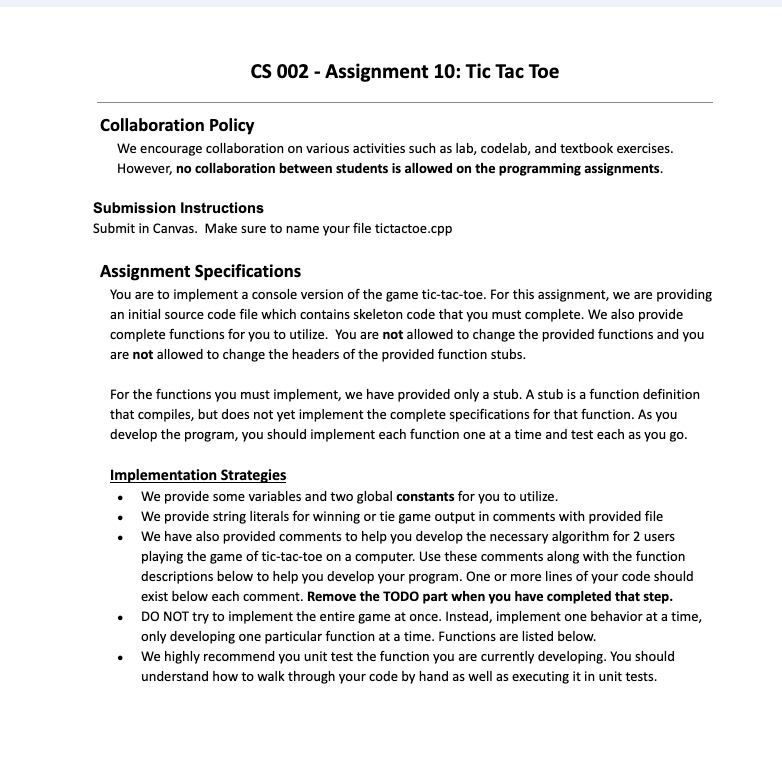
Question: CS 0 0 2 - Assignment 1 0 : Tic Tac Toe Collaboration Policy We encourage collaboration on various activities such as lab, codelab, and
CS Assignment : Tic Tac Toe
Collaboration Policy
We encourage collaboration on various activities such as lab, codelab, and textbook exercises. However, no collaboration between students is allowed on the programming assignments.
Submission Instructions
Submit in Canvas. Make sure to name your file tictactoe.cpp
Assignment Specifications
You are to implement a console version of the game tictactoe. For this assignment, we are providing an initial source code file which contains skeleton code that you must complete. We also provide complete functions for you to utilize. You are not allowed to change the provided functions and you are not allowed to change the headers of the provided function stubs.
For the functions you must implement, we have provided only a stub. A stub is a function definition that compiles, but does not yet implement the complete specifications for that function. As you develop the program, you should implement each function one at a time and test each as you go
Implementation Strategies
We provide some variables and two global constants for you to utilize.
We provide string literals for winning or tie game output in comments with provided file
We have also provided comments to help you develop the necessary algorithm for users playing the game of tictactoe on a computer. Use these comments along with the function descriptions below to help you develop your program. One or more lines of your code should exist below each comment. Remove the TODO part when you have completed that step.
DO NOT try to implement the entire game at once. Instead, implement one behavior at a time, only developing one particular function at a time. Functions are listed below.
We highly recommend you unit test the function you are currently developing. You should understand how to walk through your code by hand as well as executing it in unit tests.
Player xs wins!
Player os wins!
No one wins
Functions
Gbrief Fills vector with characters starting at lower case a
If the vector is size then it will have characters a to c
If the vector is size then it will have characters a to e
If the vector is size then it will have characters a to z
@param v the vector to initialize
Eprecondition the vector size will never be over
void initVectorvector &v
@brief Converts a character representing a cell to associated vector index
@param the position to be converted to a vector index
@return the integer index in the vector, should be to vector size
int convertPositionchar position
@brief Predicate function to determine if a spot in board is available.
Eparam board the current tictactoe board
Eparam position is an index into vector to check if available
greturn true if position's state is available not marked AND is in bounds
bool validPlacementconst vector &board, int position
@brief Predicate function to determine if the game has been won
Winning conditions in tictactoe require three marks from same
player in a single row, column or diagonal.
Eparam board the current tictactoe board
@return true if the game has been won, false otherwise
bool gameWonconst vector &board
@brief Predicate function to determine if the board is full
Eparam board the current tictactoe board
@return true iff the board is full no cell is available
bool boardFullconst vector &board
@brief Acquires a play from the user as to where to put her mark
Utilizes convertPosition and validPlacement functions to convert the
user input and then determine if the converted input is a valid play.
Tie Game Example user input is bolded and underlined for emphasis
Please choose a position: a
Please choose a position: underlinee
Please choose a position: underlinee
Please choose a position: underlineb Please choose a position: mathbfe
Please choose a position: underlinee
Please choose a position: underlinemathbfb
Please choose a position: underlineC
Please choose a position: g
Please choose a position: underlined
Please choose a position: underlinef Please choose a position: h
Please choose a position: underlinemathbfi
No one wins
PLEASE CHECK IMAGES FOR DIRECT INSTRUCTIONS
Step by Step Solution
There are 3 Steps involved in it
1 Expert Approved Answer
Step: 1 Unlock

Question Has Been Solved by an Expert!
Get step-by-step solutions from verified subject matter experts
Step: 2 Unlock
Step: 3 Unlock
 Study Help