







Question: CS 1120 (Python) - Spring 2021 LA4 Managing Students' Information Lab Assignment 4 Managing Students' Information Due Date (a two-week LA) Sections(540,543,544,545) 3/26/21 @ 11:59:59pm
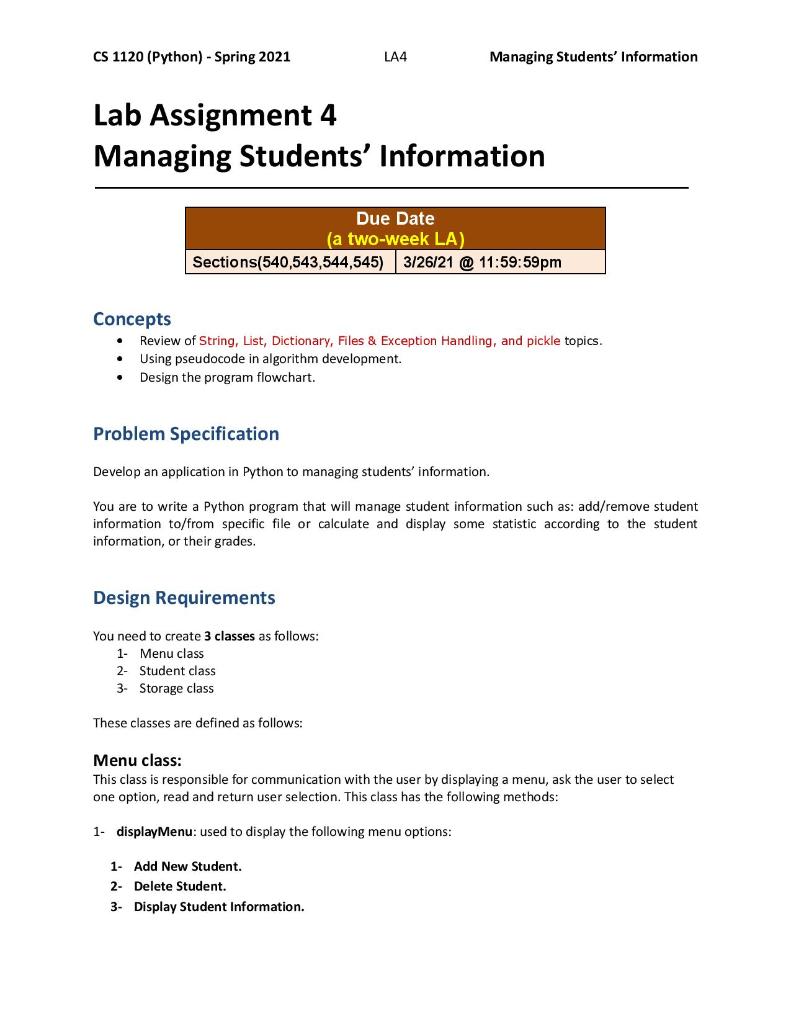
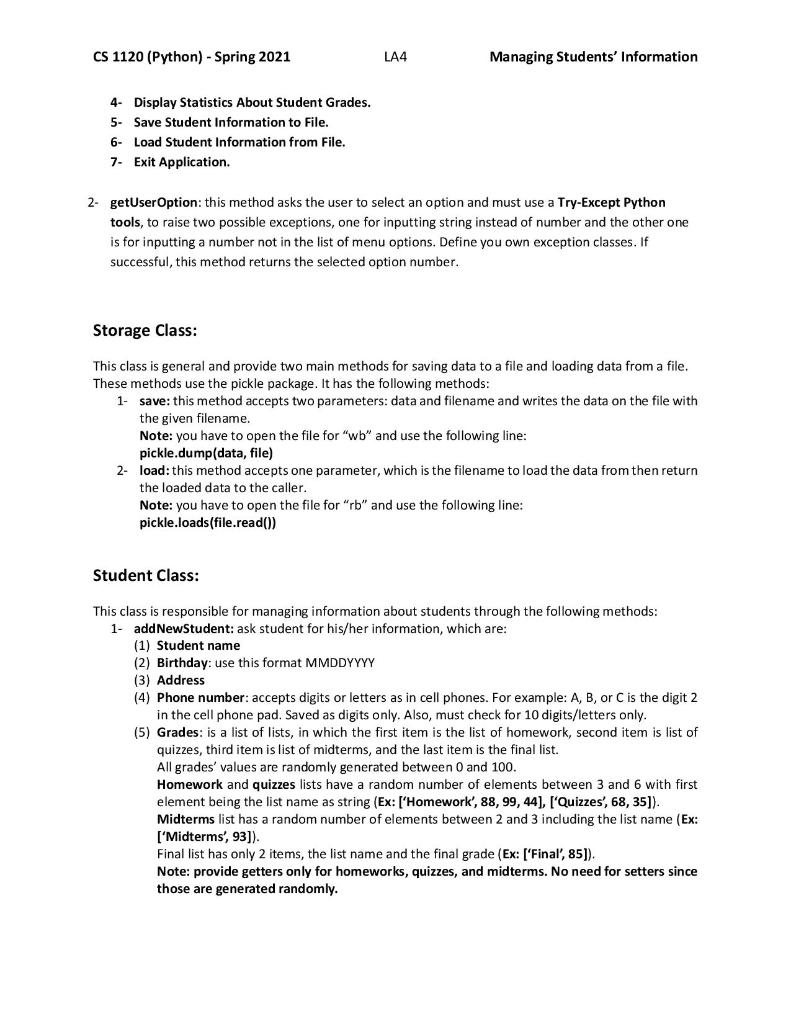
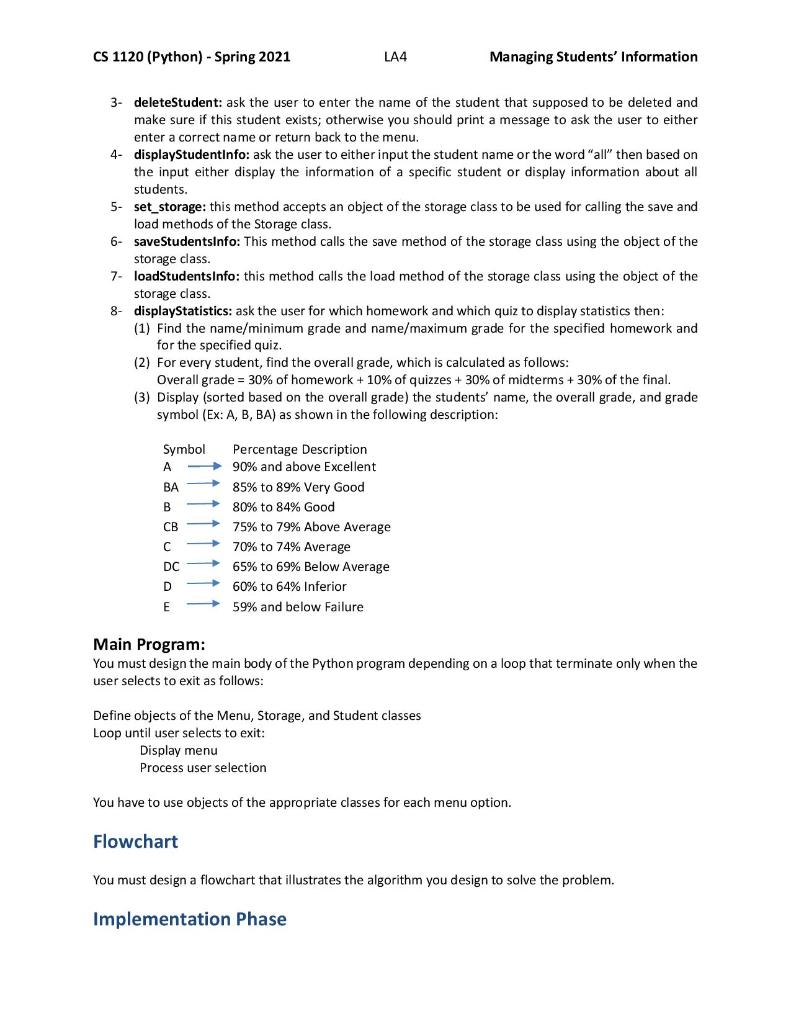
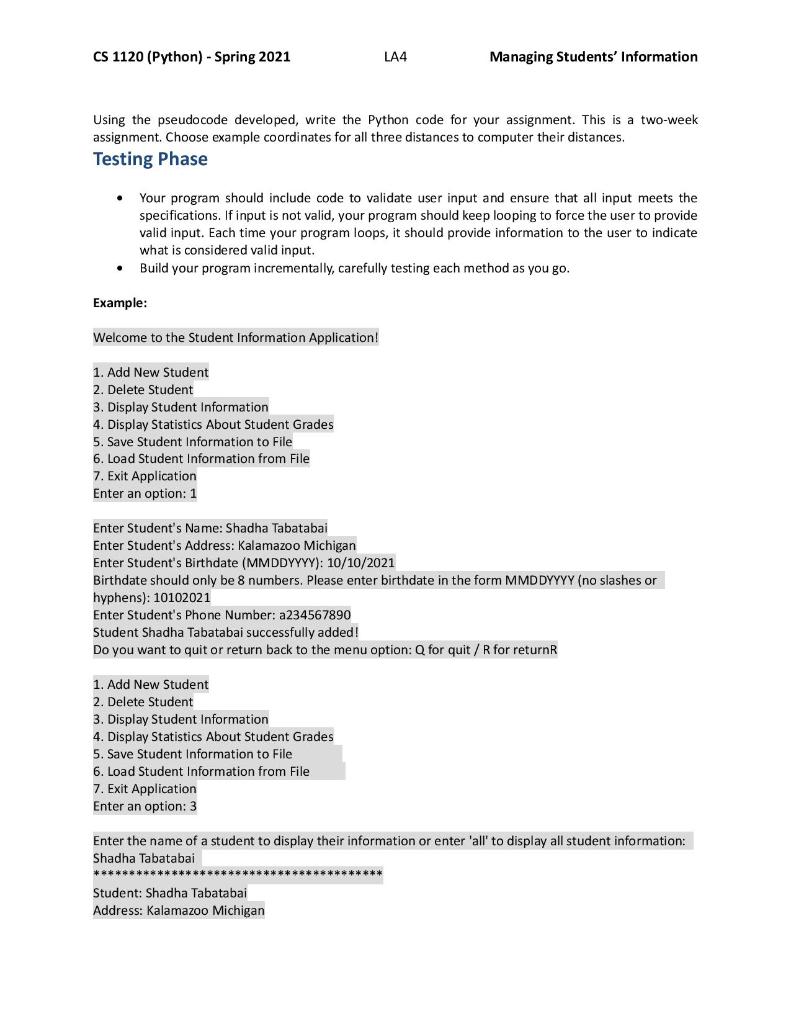
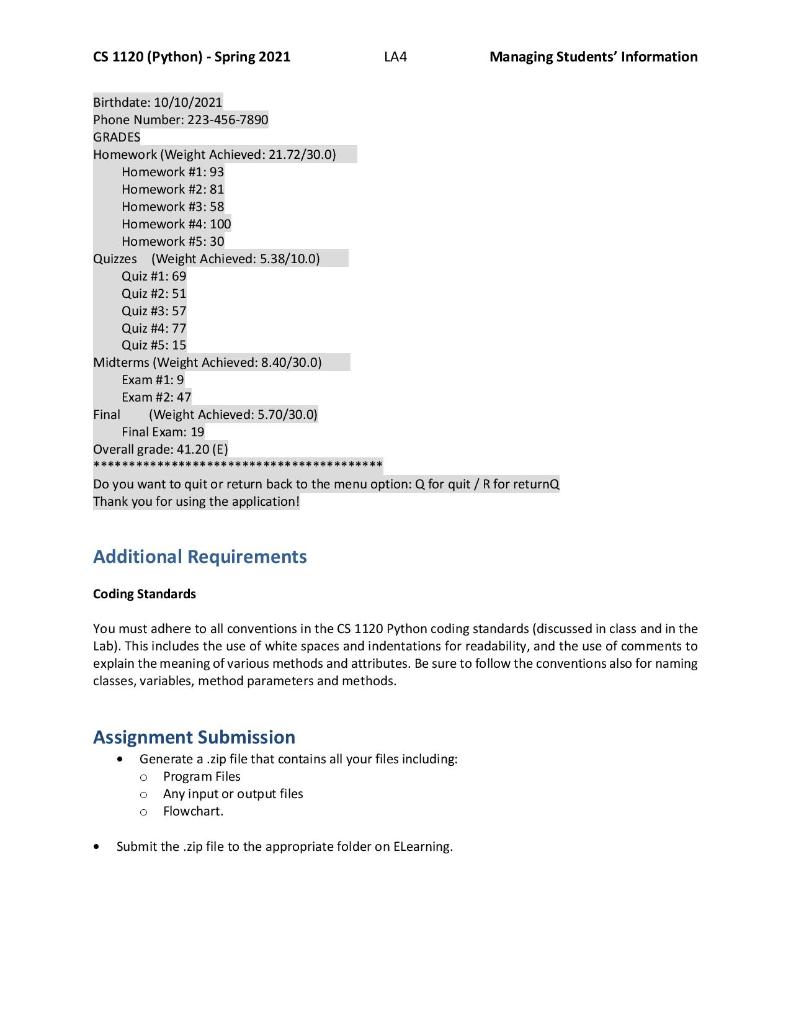
CS 1120 (Python) - Spring 2021 LA4 Managing Students' Information Lab Assignment 4 Managing Students' Information Due Date (a two-week LA) Sections(540,543,544,545) 3/26/21 @ 11:59:59pm Concepts Review of String, List, Dictionary, Files & Exception Handling, and pickle topics. Using pseudocode in algorithm development. Design the program flowchart. Problem Specification Develop an application in Python to managing students' information. You are to write a Python program that will manage student information such as: add/remove student information to/from specific file or calculate and display some statistic according to the student information, or their grades. Design Requirements You need to create 3 classes as follows: 1- Menu class 2- Student class 3- Storage class These classes are defined as follows: Menu class: This class is responsible for communication with the user by displaying a menu, ask the user to select one option, read and return user selection. This class has the following methods: 1- displayMenu: used to display the following menu options: 1. Add New Student. 2- Delete Student. 3- Display Student Information. CS 1120 (Python) - Spring 2021 LA4 Managing Students' Information 4- Display Statistics About Student Grades. 5- Save Student Information to File. 6- Load Student Information from File. 7. Exit Application. 2- getUser Option: this method asks the user to select an option and must use a Try-Except Python tools, to raise two possible exceptions, one for inputting string instead of number and the other one is for inputting a number not in the list of menu options. Define you own exception classes. If successful, this method returns the selected option number. Storage Class: This class is general and provide two main methods for saving data to a file and loading data from a file. These methods use the pickle package. It has the following methods: 1. save: this method accepts two parameters: data and filename and writes the data on the file with the given filename. Note: you have to open the file for "wb" and use the following line: pickle.dump(data, file) 2- load: this method accepts one parameter, which is the filename to load the data from then return the loaded data to the caller. Note: you have to open the file for "rb" and use the following line: pickle.loads(file.read()) Student Class: This class is responsible for managing information about students through the following methods: 1- addNewStudent: ask student for his/her information, which are: (1) Student name (2) Birthday: use this format MMDDYYYY (3) Address (4) Phone number: accepts digits or letters as in cell phones. For example: A, B, or C is the digit 2 in the cell phone pad. Saved as digits only. Also, must check for 10 digits/letters only. (5) Grades: is a list of lists, in which the first item is the list of homework, second item is list of quizzes, third item is list of midterms, and the last item is the final list. All grades' values are randomly generated between 0 and 100. Homework and quizzes lists have a random number of elements between 3 and 6 with first element being the list name as string (Ex: ['Homework', 88, 99, 44], ['Quizzes', 68, 35]). Midterms list has a random number of elements between 2 and 3 including the list name (Ex: ['Midterms', 93]). Final list has only 2 items, the list name and the final grade (Ex: ['Final', 85]). Note: provide getters only for homeworks, quizzes, and midterms. No need for setters since those are generated randomly. CS 1120 (Python) - Spring 2021 LA4 Managing Students' Information 3- deleteStudent: ask the user to enter the name of the student that supposed to be deleted and make sure if this student exists; otherwise you should print a message to ask the user to either enter a correct name or return back to the menu. 4- displayStudentinfo: ask the user to either input the student name or the word "all" then based on the input either display the information of a specific student or display information about all students. 5- set_storage: this method accepts an object of the storage class to be used for calling the save and load methods of the Storage class. 6 save StudentsInfo: This method calls the save method of the storage class using the object of the storage class. loadStudentsInfo: this method calls the load method of the storage class using the object of the storage class. 8- displayStatistics: ask the user for which homework and which quiz to display statistics then: (1) Find the name/minimum grade and name/maximum grade for the specified homework and for the specified quiz. (2) For every student, find the overall grade, which is calculated as follows: Overall grade = 30% of homework + 10% of quizzes + 30% of midterms + 30% of the final. (3) Display (sorted based on the overall grade) the students' name, the overall grade, and grade symbol (Ex: A, B, BA) as shown in the following description: 7 Symbol Percentage Description 90% and above Excellent BA 85% to 89% Very Good B 80% to 84% Good CB 75% to 79% Above Average C 70% to 74% Average DC 65% to 69% Below Average D 60% to 64% Inferior E 59% and below Failure Main Program: You must design the main body of the Python program depending on a loop that terminate only when the user selects to exit as follows: Define objects of the Menu, Storage, and Student classes Loop until user selects to exit: Display menu Process user selection You have to use objects of the appropriate classes for each menu option. Flowchart You must design a flowchart that illustrates the algorithm you design to solve the problem. Implementation Phase CS 1120 (Python) - Spring 2021 LA4 Managing Students' Information Using the pseudocode developed, write the Python code for your assignment. This is a two-week assignment. Choose example coordinates for all three distances to computer their distances. Testing Phase Your program should include code to validate user input and ensure that all input meets the specifications. If input is not valid, your program should keep looping to force the user to provide valid input. Each time your program loops, it should provide information to the user to indicate what is considered valid input. Build your program incrementally, carefully testing each method as you go. Example: Welcome to the Student Information Application! 1. Add New Student 2. Delete Student 3. Display Student Information 4. Display Statistics About Student Grades 5. Save Student Information to File 6. Load Student Information from File 7. Exit Application Enter an option: 1 Enter Student's Name: Shadha Tabatabai Enter Student's Address: Kalamazoo Michigan Enter Student's Birthdate (MMDDYYYY): 10/10/2021 Birthdate should only be 8 numbers. Please enter birthdate in the form MMD DYYYY (no slashes or hyphens): 10102021 Enter Student's Phone Number: a234567890 Student Shadha Tabatabai successfully added! Do you want to quit or return back to the menu option: Q for quit / R for return 1. Add New Student 2. Delete Student 3. Display Student Information 4. Display Statistics About Student Grades 5. Save Student Information to File 6. Load Student Information from File 7. Exit Application Enter an option: 3 Enter the name of a student to display their information or enter 'all' to display all student information: Shadha Tabatabai *********** ********** Student: Shadha Tabatabai Address: Kalamazoo Michigan CS 1120 (Python) - Spring 2021 LA4 Managing Students' Information Birthdate: 10/10/2021 Phone Number: 223-456-7890 GRADES Homework (Weight Achieved: 21.72/30.0) Homework #1: 93 Homework #2:81 Homework #3:58 Homework #4: 100 Homework #5:30 Quizzes (Weight Achieved: 5.38/10.0) Quiz #1: 69 Quiz #2:51 Quiz #3:57 Quiz #4: 77 Quiz #5:15 Midterms (Weight Achieved: 8.40/30.0) Exam #1: 9 Exam #2:47 Final (Weight Achieved: 5.70/30.0) Final Exam: 19 Overall grade: 41.20 (E) ***** Do you want to quit or return back to the menu option: Q for quit / R for returnQ Thank you for using the application! Additional Requirements Coding Standards You must adhere to all conventions in the CS 1120 Python coding standards (discussed in class and in the Lab). This includes the use of white spaces and indentations for readability, and the use of comments to explain the meaning of various methods and attributes. Be sure to follow the conventions also for naming classes, variables, method parameters and methods. Assignment Submission Generate a .zip file that contains all your files including: o Program Files o Any input or output files Flowchart. 0 Submit the .zip file to the appropriate folder on ELearning. CS 1120 (Python) - Spring 2021 LA4 Managing Students' Information Lab Assignment 4 Managing Students' Information Due Date (a two-week LA) Sections(540,543,544,545) 3/26/21 @ 11:59:59pm Concepts Review of String, List, Dictionary, Files & Exception Handling, and pickle topics. Using pseudocode in algorithm development. Design the program flowchart. Problem Specification Develop an application in Python to managing students' information. You are to write a Python program that will manage student information such as: add/remove student information to/from specific file or calculate and display some statistic according to the student information, or their grades. Design Requirements You need to create 3 classes as follows: 1- Menu class 2- Student class 3- Storage class These classes are defined as follows: Menu class: This class is responsible for communication with the user by displaying a menu, ask the user to select one option, read and return user selection. This class has the following methods: 1- displayMenu: used to display the following menu options: 1. Add New Student. 2- Delete Student. 3- Display Student Information. CS 1120 (Python) - Spring 2021 LA4 Managing Students' Information 4- Display Statistics About Student Grades. 5- Save Student Information to File. 6- Load Student Information from File. 7. Exit Application. 2- getUser Option: this method asks the user to select an option and must use a Try-Except Python tools, to raise two possible exceptions, one for inputting string instead of number and the other one is for inputting a number not in the list of menu options. Define you own exception classes. If successful, this method returns the selected option number. Storage Class: This class is general and provide two main methods for saving data to a file and loading data from a file. These methods use the pickle package. It has the following methods: 1. save: this method accepts two parameters: data and filename and writes the data on the file with the given filename. Note: you have to open the file for "wb" and use the following line: pickle.dump(data, file) 2- load: this method accepts one parameter, which is the filename to load the data from then return the loaded data to the caller. Note: you have to open the file for "rb" and use the following line: pickle.loads(file.read()) Student Class: This class is responsible for managing information about students through the following methods: 1- addNewStudent: ask student for his/her information, which are: (1) Student name (2) Birthday: use this format MMDDYYYY (3) Address (4) Phone number: accepts digits or letters as in cell phones. For example: A, B, or C is the digit 2 in the cell phone pad. Saved as digits only. Also, must check for 10 digits/letters only. (5) Grades: is a list of lists, in which the first item is the list of homework, second item is list of quizzes, third item is list of midterms, and the last item is the final list. All grades' values are randomly generated between 0 and 100. Homework and quizzes lists have a random number of elements between 3 and 6 with first element being the list name as string (Ex: ['Homework', 88, 99, 44], ['Quizzes', 68, 35]). Midterms list has a random number of elements between 2 and 3 including the list name (Ex: ['Midterms', 93]). Final list has only 2 items, the list name and the final grade (Ex: ['Final', 85]). Note: provide getters only for homeworks, quizzes, and midterms. No need for setters since those are generated randomly. CS 1120 (Python) - Spring 2021 LA4 Managing Students' Information 3- deleteStudent: ask the user to enter the name of the student that supposed to be deleted and make sure if this student exists; otherwise you should print a message to ask the user to either enter a correct name or return back to the menu. 4- displayStudentinfo: ask the user to either input the student name or the word "all" then based on the input either display the information of a specific student or display information about all students. 5- set_storage: this method accepts an object of the storage class to be used for calling the save and load methods of the Storage class. 6 save StudentsInfo: This method calls the save method of the storage class using the object of the storage class. loadStudentsInfo: this method calls the load method of the storage class using the object of the storage class. 8- displayStatistics: ask the user for which homework and which quiz to display statistics then: (1) Find the name/minimum grade and name/maximum grade for the specified homework and for the specified quiz. (2) For every student, find the overall grade, which is calculated as follows: Overall grade = 30% of homework + 10% of quizzes + 30% of midterms + 30% of the final. (3) Display (sorted based on the overall grade) the students' name, the overall grade, and grade symbol (Ex: A, B, BA) as shown in the following description: 7 Symbol Percentage Description 90% and above Excellent BA 85% to 89% Very Good B 80% to 84% Good CB 75% to 79% Above Average C 70% to 74% Average DC 65% to 69% Below Average D 60% to 64% Inferior E 59% and below Failure Main Program: You must design the main body of the Python program depending on a loop that terminate only when the user selects to exit as follows: Define objects of the Menu, Storage, and Student classes Loop until user selects to exit: Display menu Process user selection You have to use objects of the appropriate classes for each menu option. Flowchart You must design a flowchart that illustrates the algorithm you design to solve the problem. Implementation Phase CS 1120 (Python) - Spring 2021 LA4 Managing Students' Information Using the pseudocode developed, write the Python code for your assignment. This is a two-week assignment. Choose example coordinates for all three distances to computer their distances. Testing Phase Your program should include code to validate user input and ensure that all input meets the specifications. If input is not valid, your program should keep looping to force the user to provide valid input. Each time your program loops, it should provide information to the user to indicate what is considered valid input. Build your program incrementally, carefully testing each method as you go. Example: Welcome to the Student Information Application! 1. Add New Student 2. Delete Student 3. Display Student Information 4. Display Statistics About Student Grades 5. Save Student Information to File 6. Load Student Information from File 7. Exit Application Enter an option: 1 Enter Student's Name: Shadha Tabatabai Enter Student's Address: Kalamazoo Michigan Enter Student's Birthdate (MMDDYYYY): 10/10/2021 Birthdate should only be 8 numbers. Please enter birthdate in the form MMD DYYYY (no slashes or hyphens): 10102021 Enter Student's Phone Number: a234567890 Student Shadha Tabatabai successfully added! Do you want to quit or return back to the menu option: Q for quit / R for return 1. Add New Student 2. Delete Student 3. Display Student Information 4. Display Statistics About Student Grades 5. Save Student Information to File 6. Load Student Information from File 7. Exit Application Enter an option: 3 Enter the name of a student to display their information or enter 'all' to display all student information: Shadha Tabatabai *********** ********** Student: Shadha Tabatabai Address: Kalamazoo Michigan CS 1120 (Python) - Spring 2021 LA4 Managing Students' Information Birthdate: 10/10/2021 Phone Number: 223-456-7890 GRADES Homework (Weight Achieved: 21.72/30.0) Homework #1: 93 Homework #2:81 Homework #3:58 Homework #4: 100 Homework #5:30 Quizzes (Weight Achieved: 5.38/10.0) Quiz #1: 69 Quiz #2:51 Quiz #3:57 Quiz #4: 77 Quiz #5:15 Midterms (Weight Achieved: 8.40/30.0) Exam #1: 9 Exam #2:47 Final (Weight Achieved: 5.70/30.0) Final Exam: 19 Overall grade: 41.20 (E) ***** Do you want to quit or return back to the menu option: Q for quit / R for returnQ Thank you for using the application! Additional Requirements Coding Standards You must adhere to all conventions in the CS 1120 Python coding standards (discussed in class and in the Lab). This includes the use of white spaces and indentations for readability, and the use of comments to explain the meaning of various methods and attributes. Be sure to follow the conventions also for naming classes, variables, method parameters and methods. Assignment Submission Generate a .zip file that contains all your files including: o Program Files o Any input or output files Flowchart. 0 Submit the .zip file to the appropriate folder on ELearning
Step by Step Solution
There are 3 Steps involved in it
To tackle this lab assignment we need to develop a Python application that manages student information using three classes Menu Student and Storage Heres a breakdown of how to implement each class and ... View full answer

Get step-by-step solutions from verified subject matter experts
 Study Help