







Question: CS 241: Advanced Object-Oriented Programming using C++ Spring 2021 Homework 6 To practice the OOP concepts discussed in the lecture, define a C++ class that
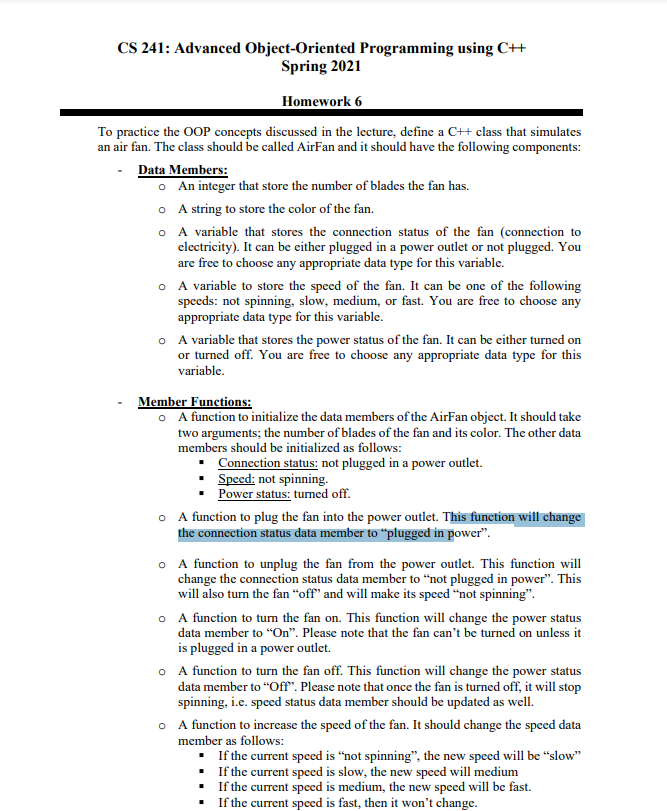
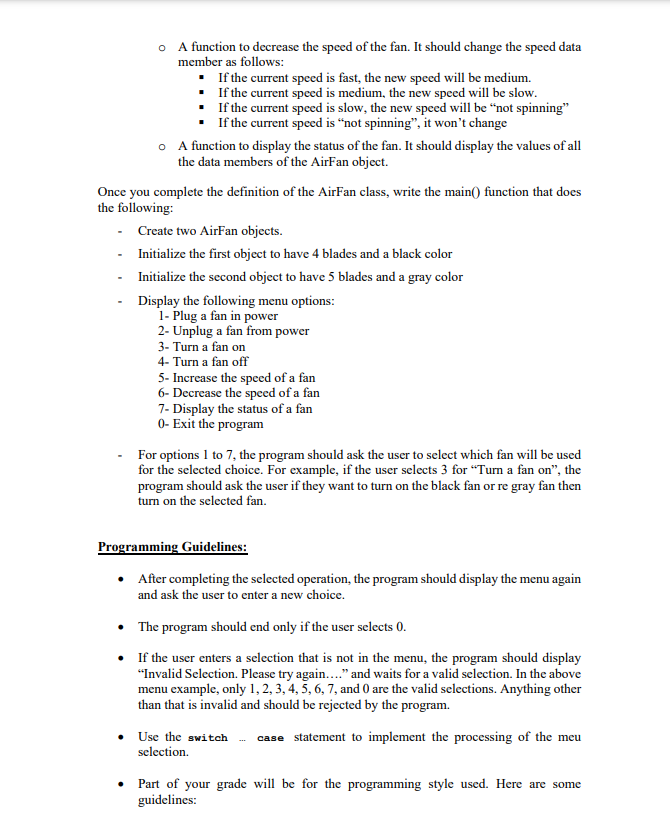
CS 241: Advanced Object-Oriented Programming using C++ Spring 2021 Homework 6 To practice the OOP concepts discussed in the lecture, define a C++ class that simulates an air fan. The class should be called AirFan and it should have the following components: Data Members: An integer that store the number of blades the fan has. o A string to store the color of the fan. O A variable that stores the connection status of the fan (connection to electricity). It can be either plugged in a power outlet or not plugged. You are free to choose any appropriate data type for this variable. O A variable to store the speed of the fan. It can be one of the following speeds: not spinning, slow, medium, or fast. You are free to choose any appropriate data type for this variable. o A variable that stores the power status of the fan. It can be either turned on or turned off. You are free to choose any appropriate data type for this variable. Member Functions: O A function to initialize the data members of the AirFan object. It should take two arguments; the number of blades of the fan and its color. The other data members should be initialized as follows: Connection status: not plugged in a power outlet. Speed: not spinning. Power status: turned off. O A function to plug the fan into the power outlet. This function will change the connection status data member to plugged in power. A function to unplug the fan from the power outlet. This function will change the connection status data member to not plugged in power". This will also turn the fan "off" and will make its speed "not spinning". O A function to turn the fan on. This function will change the power status data member to On. Please note that the fan can't be turned on unless it is plugged in a power outlet. O A function to turn the fan off. This function will change the power status data member to "Off". Please note that once the fan is turned off, it will stop spinning, i.e. speed status data member should be updated as well. A function to increase the speed of the fan. It should change the speed data member as follows: If the current speed is not spinning, the new speed will be "slow" If the current speed is slow, the new speed will medium If the current speed is medium, the new speed will be fast. If the current speed is fast, then it won't change. A function to decrease the speed of the fan. It should change the speed data member as follows: If the current speed is fast, the new speed will be medium. If the current speed is medium, the new speed will be slow. If the current speed is slow, the new speed will be not spinning" If the current speed is not spinning, it won't change O A function to display the status of the fan. It should display the values of all the data members of the AirFan object. Once you complete the definition of the AirFan class, write the main() function that does the following: - Create two AirFan objects. Initialize the first object to have 4 blades and a black color Initialize the second object to have 5 blades and a gray color Display the following menu options: 1- Plug a fan in power 2- Unplug a fan from power 3- Turn a fan on 4- Turn a fan off 5- Increase the speed of a fan 6- Decrease the speed of a fan 7- Display the status of a fan 0- Exit the program For options 1 to 7, the program should ask the user to select which fan will be used for the selected choice. For example, if the user selects 3 for "Turn a fan on", the program should ask the user if they want to turn on the black fan or re gray fan then turn on the selected fan. Programming Guidelines: After completing the selected operation, the program should display the menu again and ask the user to enter a new choice. The program should end only if the user selects 0. If the user enters a selection that is not in the menu, the program should display "Invalid Selection. Please try again...." and waits for a valid selection. In the above menu example, only 1, 2, 3, 4, 5, 6, 7, and 0 are the valid selections. Anything other than that is invalid and should be rejected by the program. Use the switch case statement to implement the processing of the meu selection. Part of your grade will be for the programming style used. Here are some guidelines
Step by Step Solution
There are 3 Steps involved in it

Get step-by-step solutions from verified subject matter experts
 Study Help