







Question: CS 250 Lab Exercise 07 Due: In Lab, the week of March 12th Main topics: Loop Statements Nested Loops Exercise This lab is designed to
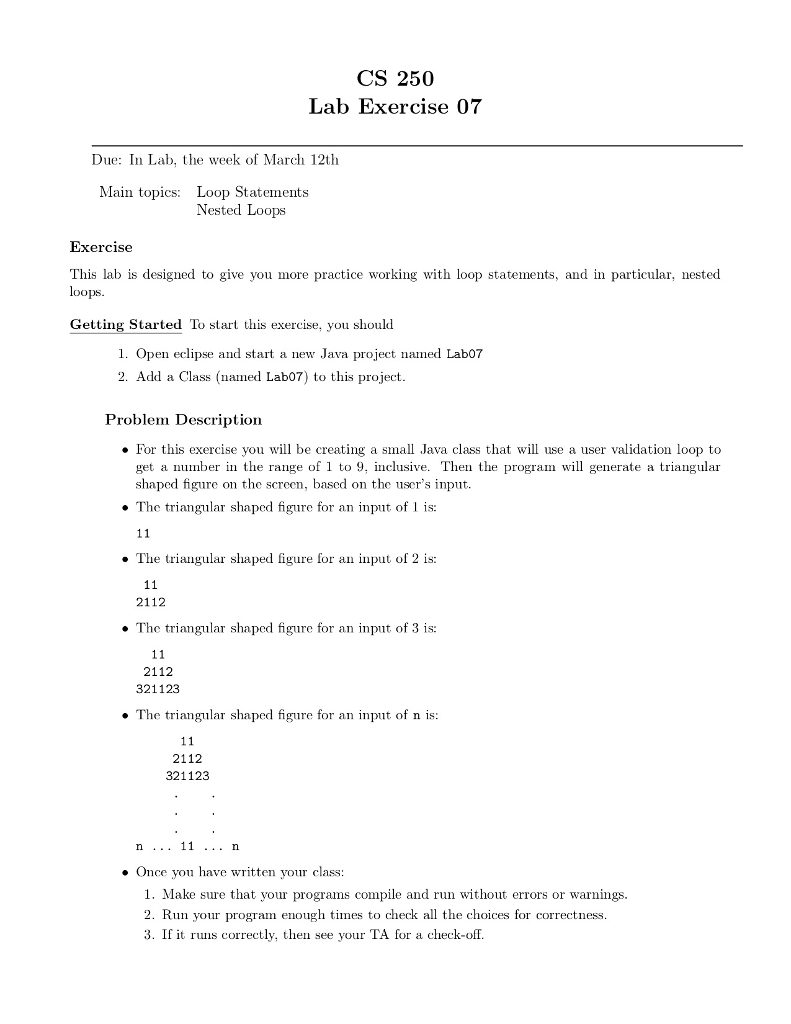
CS 250 Lab Exercise 07 Due: In Lab, the week of March 12th Main topics: Loop Statements Nested Loops Exercise This lab is designed to give you more practice working with loop statements, and in particular nested loops Getting Started To start this exercise, you should 1. Open eclipse and start a new Java project naed Lab07 2. Add a Class (named Lab07) to this project Problem Description . For this exercise you will be creating a small Java class that will use a user validation loop to get a umber in the range of 1 to 9, nclusive. Then the program will generate a triangular shaped figure on the screen, based on the user's input. . The triangular shaped figure for an input of 1 is: . The triangular shaped figure for an input of 2 is: 2112 . The triangular shaped figure for an input of 3 is: 2112 321123 . The triangular shaped figure for an input of n is: 2112 321123 Once you have written your class: 1. Make sure that your programs compile and run without errors or warnings 2. Run your program enough times to check all the choices for correctness 3. If it runs correctly, then see your TA for a check-off
Step by Step Solution
There are 3 Steps involved in it

Get step-by-step solutions from verified subject matter experts
 Study Help