







Question: CS 5 3 0 : Developing User Interfaces Assignment 2 Goals This assignment asks you to continue developing your web site for Drexel Bikes ,
CS : Developing User Interfaces
Assignment
Goals
This assignment asks you to continue developing your web site for Drexel Bikes
specifically in adding several features to make it a more realistic sitereceiving data
from a live database and allowing the user to view and change this information.
Assignment
The implementation of our Drexel Bikes web site for Assignment built the basic
styling and navigation bar for the site, and added a page Our Bikes where the user
could see the list of available bikes. In this assignment, we will enhance this site to
include a live SQLite database.
To begin, please take your site from Assignment and copy it into a new directory, a
Please note that, for this assignment, we will only be grading the parts relevant to the
current assignment and not those from Assignment ; thus, if you didnt quite get
everything working correctly in the first assignment, you dont need to worry about that
functionalityplease just focus on the functionality for this assignment.
Implementation Setup
To start this assignment, first please download the bikes.csv file that comes with the
assignment. This file contains CSV data for the bike database, with the following fields
in this order:
id text cannot be null
name text cannot be null
wheels integer
size integer
motor integer or
folding integer or
image text
available integer
The meaning of each field is the same as in Assignment
Given this file, create a SQLite database bikes.db that contains the above fields as
columns in the database, and import the data in bikes.csv To do this, please create a
text file createdbtxt with the SQLite commandline commands you used to create and
populate the database, and put this file and the bikes.csv file in a folder adev This
folder will not do anything during runtime; it simply allows us to see how you
constructed your database. At the end of this process, you should have a SQLite
database bikes.db that will serve as the backend data storage for your system.
Rent a Bike Page
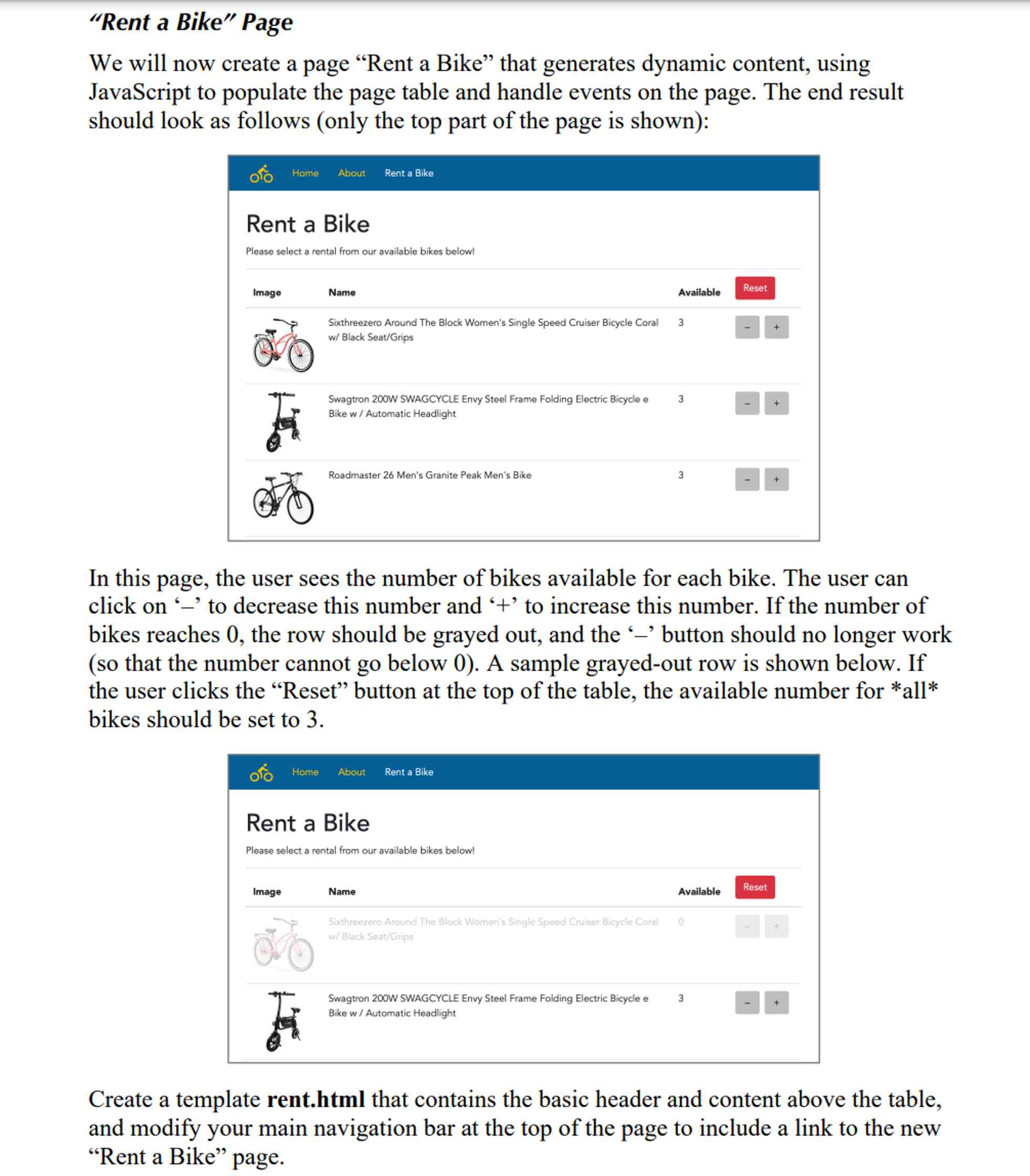
We will now create a page Rent a Bike that generates dynamic content, using
JavaScript to populate the page table and handle events on the page. The end result
should look as follows only the top part of the page is shown:
In this page, the user sees the number of bikes available for each bike. The user can
click on to decrease this number and to increase this number. If the number of
bikes reaches the row should be grayed out, and the button should no longer work
so that the number cannot go below A sample grayedout row is shown below. If
the user clicks the Reset button at the top of the table, the available number for all
bikes should be set to
Create a template rent.html that contains the basic header and content above the table,
and modify your main navigation bar at the top of the page to include a link to the new
Rent a Bike page.
Next, create a file staticjsrentViewjs that builds the view for this page, namely the
main table that includes all the bikes with their availability. We recommend creating a
JavaScript object RentView, using function RentView and then instantiating
the object with new RentView In this object, you can implement the necessary
functionality to: load data from the server, change the availability of a given
bike, and reset all bikes to have the same availability namely
For each of these functions, you will also need to implement the corresponding
functionality on the server side in the run.py file. Specifically, you should define the
following API URLs with associated AJAX functionality:
apigetbikes : a GET request that returns all bikes in the database;
apiupdatebike : a POST request with two arguments a bike ID and a
number available that updates that particular bike to have that given number
available;
apiresetbikes : a POST request with one argument a number available
that resets all bikes that have that given number available.
Recall that the functions that modify the database should be done using POST requests
instead of GET requests.
Also, please note that for the grayedout rows, you should add a class unavailable to
the table row, and then in your main.css file, give this class an opacity of You will
also need to separately disable the button, since graying out the row does not affect
the functionality of the button.
Your final page should provide all the functionality of the buttons described above, and
since you have a database back end, all data should remain the same even after
reloading the page.
Documentation
It is expected that all code written for this assignment is properly commented where
needed, especially in places where you have made particular choices about data
structures andor algorithms to employ. Also, please add the following identification
header to every file you create:
# Your Name, Your Email
#CS:DUI, Assignment#
or whatever commenting syntax is appropriate for the file at hand
Step by Step Solution
There are 3 Steps involved in it
1 Expert Approved Answer
Step: 1 Unlock

Question Has Been Solved by an Expert!
Get step-by-step solutions from verified subject matter experts
Step: 2 Unlock
Step: 3 Unlock
 Study Help