







Question: CS18 0.6: ASSIGNMENT #2 - SUPPLEMENT TIC TAC TOE Name 1: Class Day / Time: Due Date: Lab Exercise: Assign. #2 - Supplement Tic Tac
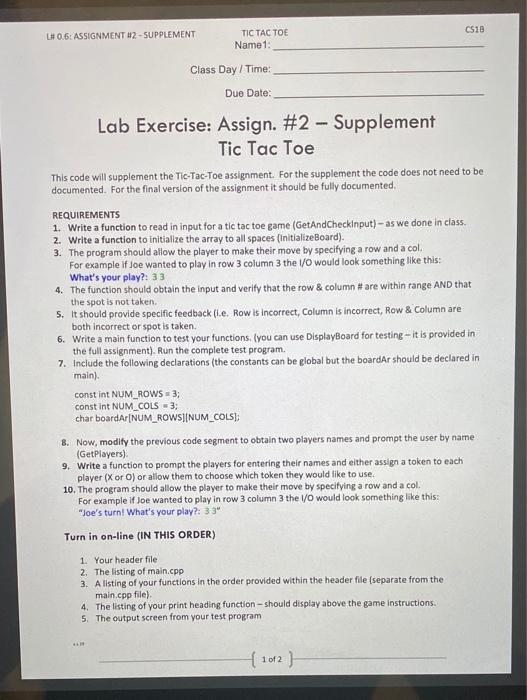
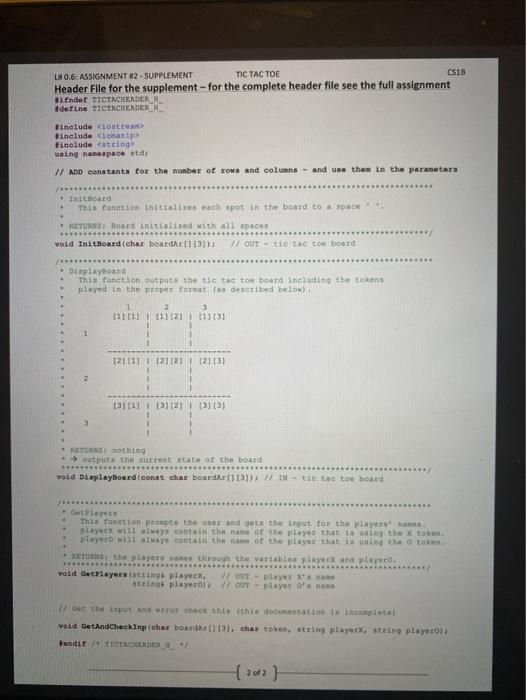
CS18 0.6: ASSIGNMENT #2 - SUPPLEMENT TIC TAC TOE Name 1: Class Day / Time: Due Date: Lab Exercise: Assign. #2 - Supplement Tic Tac Toe This code will supplement the Tic-Tac-Toe assignment. For the supplement the code does not need to be documented. For the final version of the assignment it should be fully documented, REQUIREMENTS 1. Write a function to read in input for a tic tac toe game (GetAnd Checkinput) - as we done in class. 2. Write a function to initialize the array to all spaces (InitializeBoard). 3. The program should allow the player to make their move by specifying a row and a col. For example if Joe wanted to play in row 3 column 3 the 1/0 would look something like this: What's your play?: 33 4. The function should obtain the input and verify that the row & column # are within range AND that the spot is not taken. 5. It should provide specific feedback (l.e. Row is incorrect, Column is incorrect, Row & Column are both incorrect or spot is taken. 6. Write a main function to test your functions. (you can use DisplayBoard for testing-it is provided in the full assignment). Run the complete test program. 7. Include the following declarations (the constants can be global but the boardAr should be declared in main). const int NUM_ROWS 3; const int NUM_COLS = 3; char boardAr[NUM_ROWSINUM_COLS); 8. Now, modify the previous code segment to obtain two players names and prompt the user by name (GetPlayers). 9. Write a function to prompt the players for entering their names and either assign a token to each player (X or O) or allow them to choose which token they would like to use. 10. The program should allow the player to make their move by specifying a row and a col. For example if Joe wanted to play in row 3 column 3 the I/O would look something like this: "Joe's turn! What's your play?: 33" Turn in on-line (IN THIS ORDER) 1. Your header file 2. The listing of main.cpp 3. A listing of your functions in the order provided within the header file (separate from the main.cpp file) 4. The listing of your print heading function should display above the game instructions 5. The output screen from your test program 1 of 2 LH 0.6: ASSIGNMENT #2 - SUPPLEMENT TIC TAC TOE CS18 Header File for the supplement for the complete header file see the full assignment Gifndef TICTACHEADER #define TICTACHEADER include
Step by Step Solution
There are 3 Steps involved in it

Get step-by-step solutions from verified subject matter experts
 Study Help