Question: CSC 110 - Homework 10 - Operating Systems In class we discussed the timeslice CPU scheduling algorithm. We also considered other ways that the processes
CSC 110 - Homework 10 - Operating Systems
In class we discussed the timeslice CPU scheduling algorithm. We also considered other ways that the processes in the CPU could be scheduled. For this assignment, you will modify the time-slicing CPU scheduling algorithm found here:
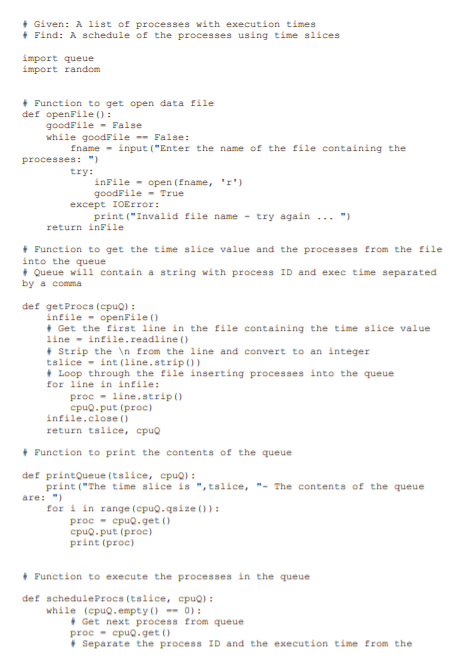
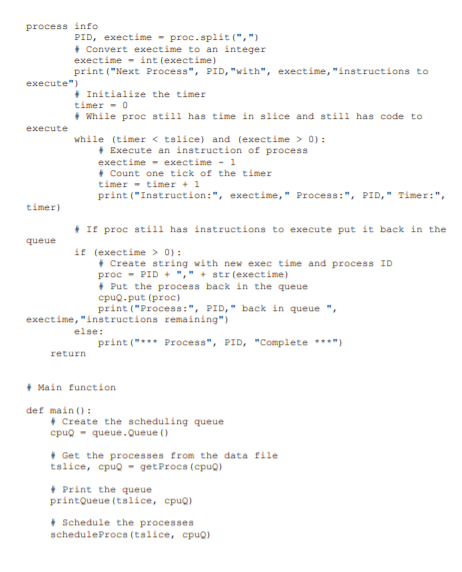
to implement a priority-based scheduling algorithm. This program is also available on the Sample Code page.
Assume that there are three priority levels in the operating system HIGH, MEDIUM and LOW. In the following data file:
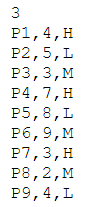
each process has associated with it a priority specified by H for high, M for medium and L for low. Write the program so that high priority processes get two times the time slice, medium priority processes get one time slice, and low priority processes only get to execute after all high and medium processes are complete, then all getting one time slice at a time.
This will require that you split the input into three values instead of two:
PID, exectime, prio = proc.split(,)
and if the process has to be put back in the queue, you have to concatenate the PID, the execution time and the priority into the string that is put into the queue:
proc = PID + , + str(exectime) + , + prio
HINTS:
-
Since the high and medium priority processes will be executed first, create two scheduling queues, one for the high and medium priority processes, and one for the low priority processes.
-
You should be able to use the scheduleProcs function to execute both queues, with some slight modifications. Your main function can call scheduleProcs twice, once for each of the two queues you create.
Your program should NOT call the main function. Gradescope is expecting that the program will not execute until it calls the main function itself.
Your output will look like this:
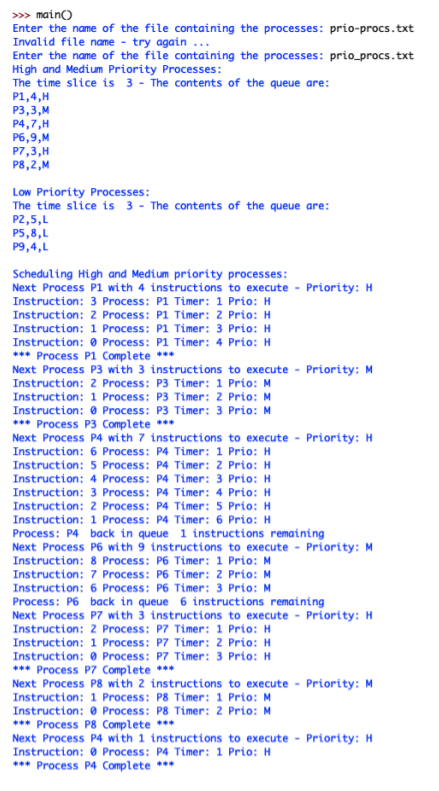
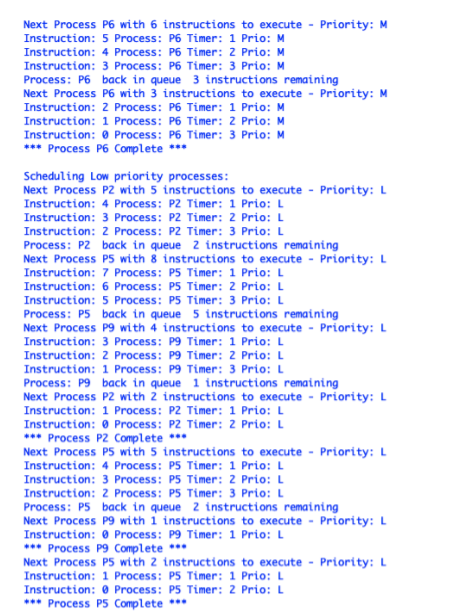
***PLEASE MAKE SURE THE OUTPUTS ARE IDENTICAL WHEN TESTING, THANK YOU!!!***
+ Given: A list of processes with execution times + Find: A schedule of the processes using time slices import queue import random Function to get open data file def openFile(): goodFile - False while goodFile -- False: fname - input ("Enter the name of the file containing the processes:") try: inFile - open (Ename, '') goodFile - True except IOError: print("Invalid file name - try again... ") return inFile + Function to get the time slice value and the processes from the file into the queue + Queue will contain a string with process ID and exec time separated by a comma def getProcs (cpu): infile - openFile() Get the first line in the file containing the time slice value line - infile.readline () Strip the from the line and convert to an integer tslice - int(line.strip) Loop through the file inserting processes into the queue for line in infile: proc-line.stripo cpuq.put (proc) infile.close() return tslice, cpuo Punction to print the contents of the queue def printQueue (tslice, cpuo): print("The time slice is "tslice, "- The contents of the queue are: ") for i in range (cpug.qsize(): proc - cpuo get cpuo.put(proc) print (proc) + Function to execute the processes in the queue def schedule Procs (tslice, cpu): while (cpuq.empty() -- 0): Get next process from queue proc - cpuq.get() - Separate the process ID and the execution time from the process info PID, exectime - proc.split(",) + Convert exectime to an integer exectime - int (exectime) print("Next Process", PID, "with", exectime, "instructions to execute") + Initialize the timer timer - 0 + while proc still has time in slice and still has code to execute while (timer 0): + Execute an instruction of process exectime - exectime - 1 + Count one tick of the timer timer - timer + 1 print("Instruction:", exectime," Process:", PID," Timer:", timer) + If proc still has instructions to execute put it back in the queue if (exectime > 0): + Create string with new exec time and process ID proc - PID + "," + str (exectime) Put the process back in the queue cpuq.put(proc) print("Process:", PID," back in queue exectime, "instructions remaining") else: print("*** Process", PID, "Complete ***) return + Main function def main(): Create the scheduling queue cpuo- queue. Queue () Get the processes from the data file talice, cpug - get Procs (cpu) + Print the queue printQueue (talice, cpu) Schedule the processes schedule Procs (talice, cpu) 3 P1,4,H P2,5, P3,3,M P4,7, H P5,8,1 P6,9,M 27,3,H P8,2,M P9,4,1 >>> maino Enter the name of the file containing the processes: prio-procs.txt Invalid file name - try again ... Enter the name of the file containing the processes: prio_procs.txt High and Medium Priority Processes: The time slice is 3 - The contents of the queue are: P1,4,H P3,3,M P4,7,H P6,9,M P7,3,H P8,2,M Low Priority Processes: The time slice is 3 - The contents of the queue are: P2,5, P5,8,1 P9,4,L Scheduling High and Medium priority processes: Next Process P1 with 4 instructions to execute - Priority: H Instruction: 3 Process: P1 Timer: 1 Prio: H Instruction: 2 Process: P1 Timer: 2 Prio: H Instruction: 1 Process: P1 Timer: 3 Prio: H Instruction: Process: P1 Timer: 4 Prio: H *** Process P1 Complete *** Next Process P3 with 3 instructions to execute - Priority: M Instruction: 2 Process: P3 Timer: 1 Prio: M Instruction: 1 Process: P3 Timer: 2 Prio: M Instruction: 0 Process: P3 Timer: 3 Prio: M *** Process P3 Complete *** Next Process P4 with 7 instructions to execute - Priority: H Instruction: 6 Process: P4 Timer: 1 Prio: H Instruction: 5 Process: P4 Timer: 2 Prio: H Instruction: 4 Process: P4 Timer: 3 Prio: H Instruction: 3 Process: P4 Timer: 4 Prio: H Instruction: 2 Process: P4 Timer: 5 Prio: H Instruction: 1 Process: P4 Timer: 6 Prio: H Process: P4 back in queue 1 instructions remaining Next Process P6 with 9 instructions to execute - Priority: M Instruction: 8 Process: P6 Timer: 1 Prio: M Instruction: 7 Process: P6 Timer: 2 Prio: M Instruction: 6 Process: P6 Timer: 3 Prio: M Process: P6 back in queue 6 instructions remaining Next Process P7 with 3 instructions to execute - Priority: H Instruction: 2 Process: P7 Timer: 1 Prio: H Instruction: 1 Process: P7 Timer: 2 Prio: H Instruction: Process: P7 Timer: 3 Prio: H *** Process P7 Complete *** Next Process P8 with 2 instructions to execute - Priority: M Instruction: 1 Process: P8 Timer: 1 Prio: M Instruction: Process: P8 Timer: 2 Prio: M *** Process P8 Complete *** Next Process P4 with 1 instructions to execute - Priority: H Instruction: Process: P4 Timer: 1 Prio: H *** Process P4 Complete *** Next Process P6 with 6 instructions to execute - Priority: M Instruction: 5 Process: P6 Timer: 1 Prio: M Instruction: 4 Process: P6 Timer: 2 Prio: M Instruction: 3 Process: P6 Timer: 3 Prio: M Process: P6 back in queue 3 instructions remaining Next Process P6 with 3 instructions to execute - Priority: M Instruction: 2 Process: P6 Timer: 1 Prio: M Instruction: 1 Process: P6 Timer: 2 Prio: M Instruction: Process: P6 Timer: 3 Prio: M *** Process P6 Complete *** Scheduling Low priority processes: Next Process P2 with 5 instructions to execute - Priority: L Instruction: 4 Process: P2 Timer: 1 Prio: L Instruction: 3 Process: P2 Timer: 2 Prio: L Instruction: 2 Process: P2 Timer: 3 Prio: L Process: P2 back in queue 2 instructions remaining Next Process P5 with 8 instructions to execute - Priority: L Instruction: 7 Process: P5 Timer: 1 Prio: L Instruction: 6 Process: P5 Timer: 2 Prio: L Instruction: 5 Process: P5 Timer: 3 Prio: L Process: P5 back in queue 5 instructions remaining Next Process P9 with 4 instructions to execute - Priority: L Instruction: 3 Process: P9 Timer: 1 Prio: L Instruction: 2 Process: P9 Timer: 2 Prio: L Instruction: 1 Process: P9 Timer: 3 Prio: L Process: P9 back in queue 1 instructions remaining Next Process P2 with 2 instructions to execute - Priority: L Instruction: 1 Process: P2 Timer: 1 Prio: L Instruction: Process: P2 Timer: 2 Prio: L *** Process P2 Complete *** Next Process P5 with 5 instructions to execute - Priority: L Instruction: 4 Process: P5 Timer: 1 Prio: L Instruction: 3 Process: P5 Timer: 2 Prio: L Instruction: 2 Process: P5 Timer: 3 Prio: L Process: P5 back in queue 2 instructions remaining Next Process P9 with i instructions to execute - Priority: L Instruction: o Process: P9 Timer: 1 Prio: L *** Process P9 Complete *** Next Process P5 with 2 instructions to execute - Priority: L Instruction: 1 Process: P5 Timer: 1 Prio: L Instruction: Process: P5 Timer: 2 Prio: L *** Process P5 Complete ***









 Study Help