







Question: CSCE 1030 Fall Project 4. CSCE 1030: Homework 4 Due: 11:59 PM on Monday, December 3, 2018 PROGRAM DESCRIPTION: The purpose of this programming project
CSCE 1030 Fall Project 4.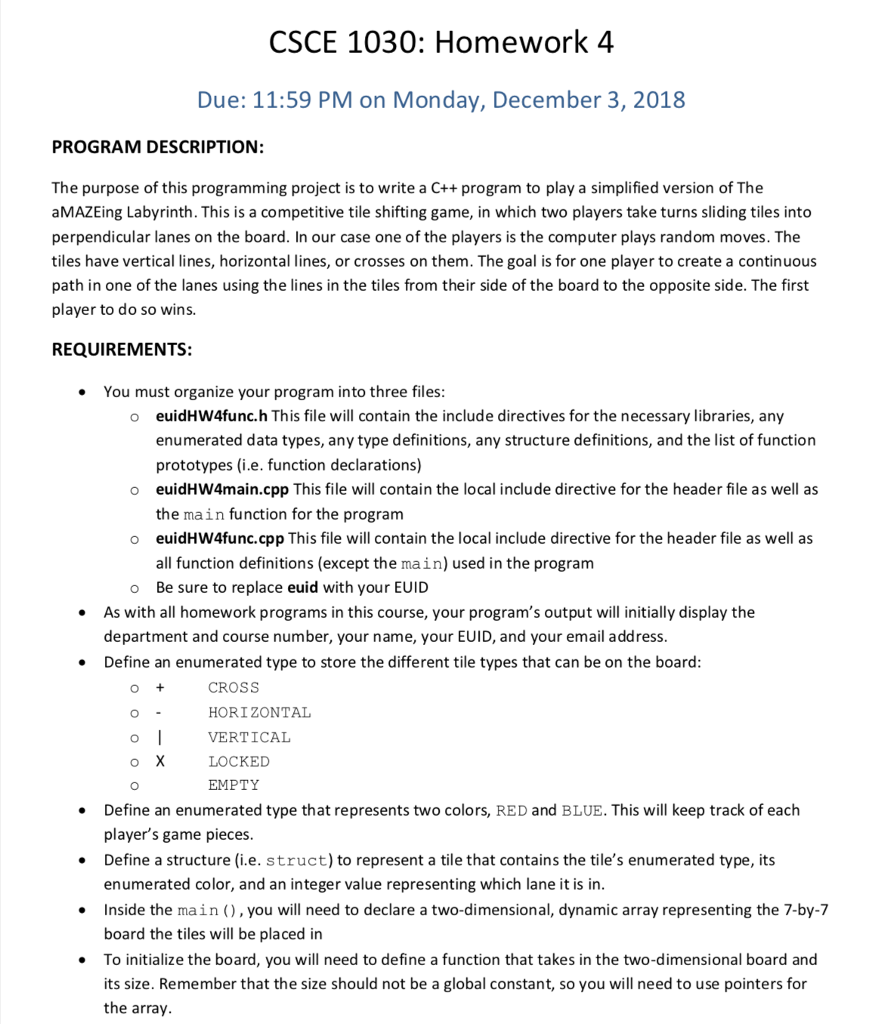
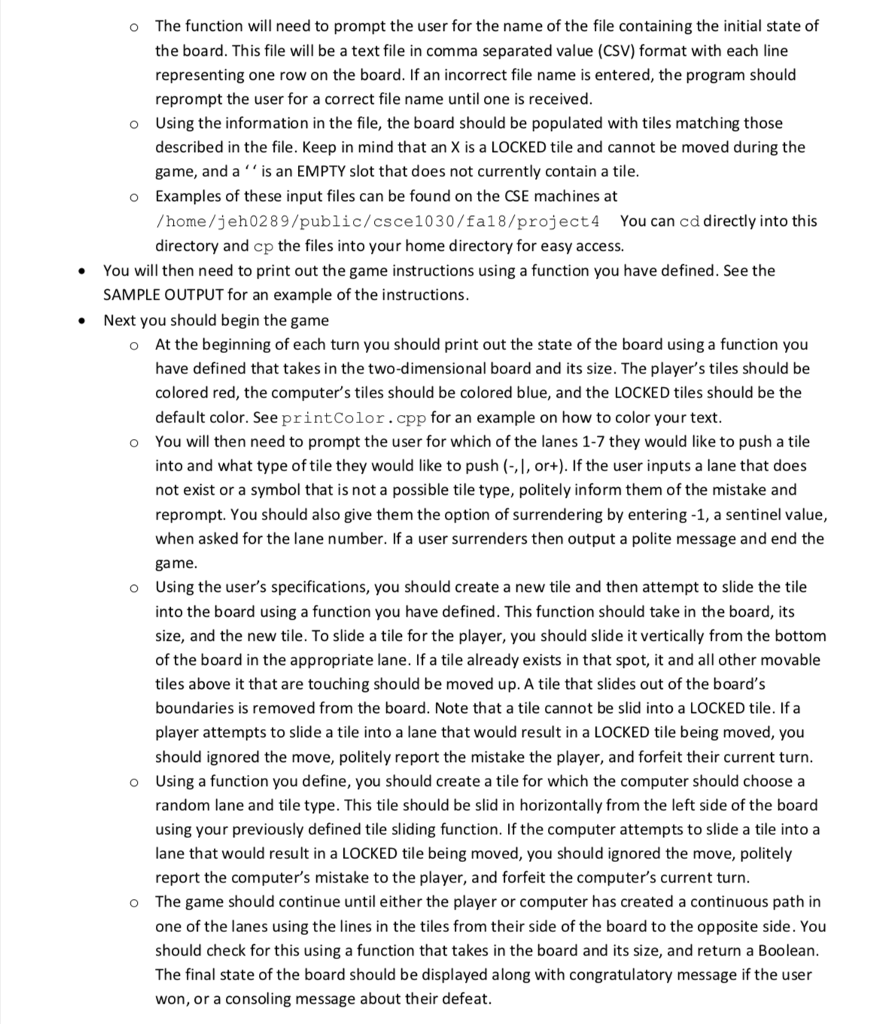
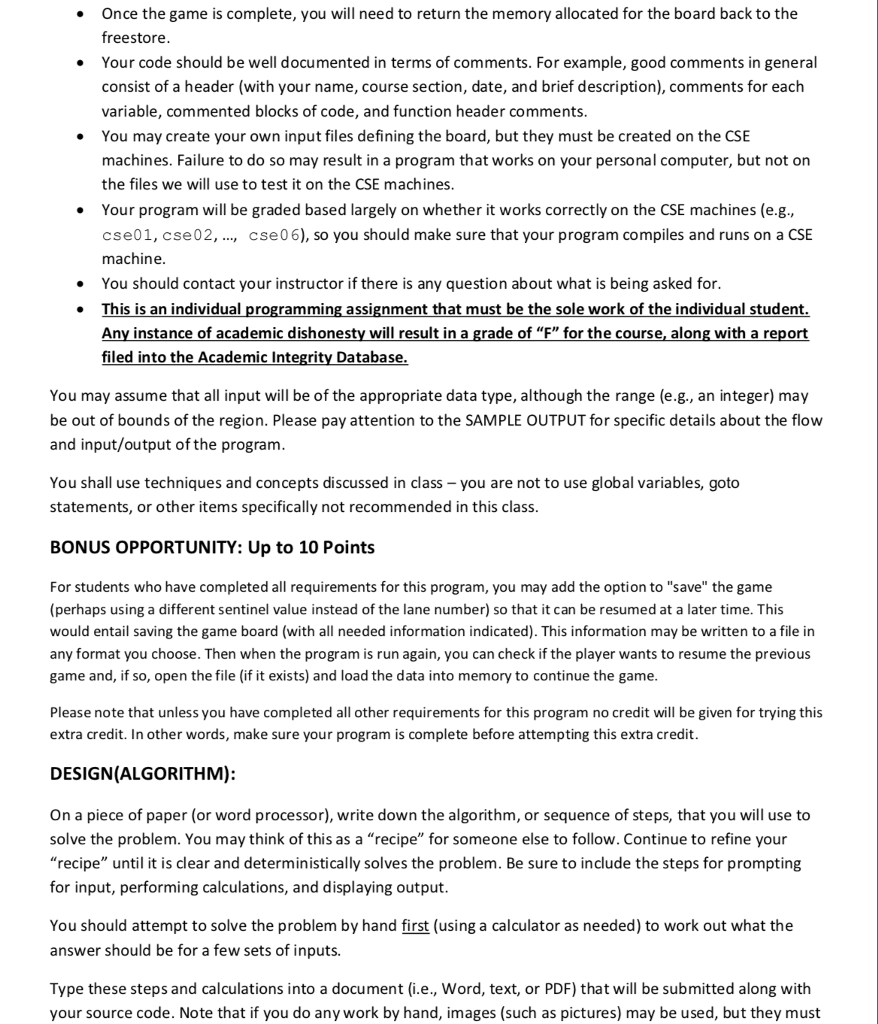
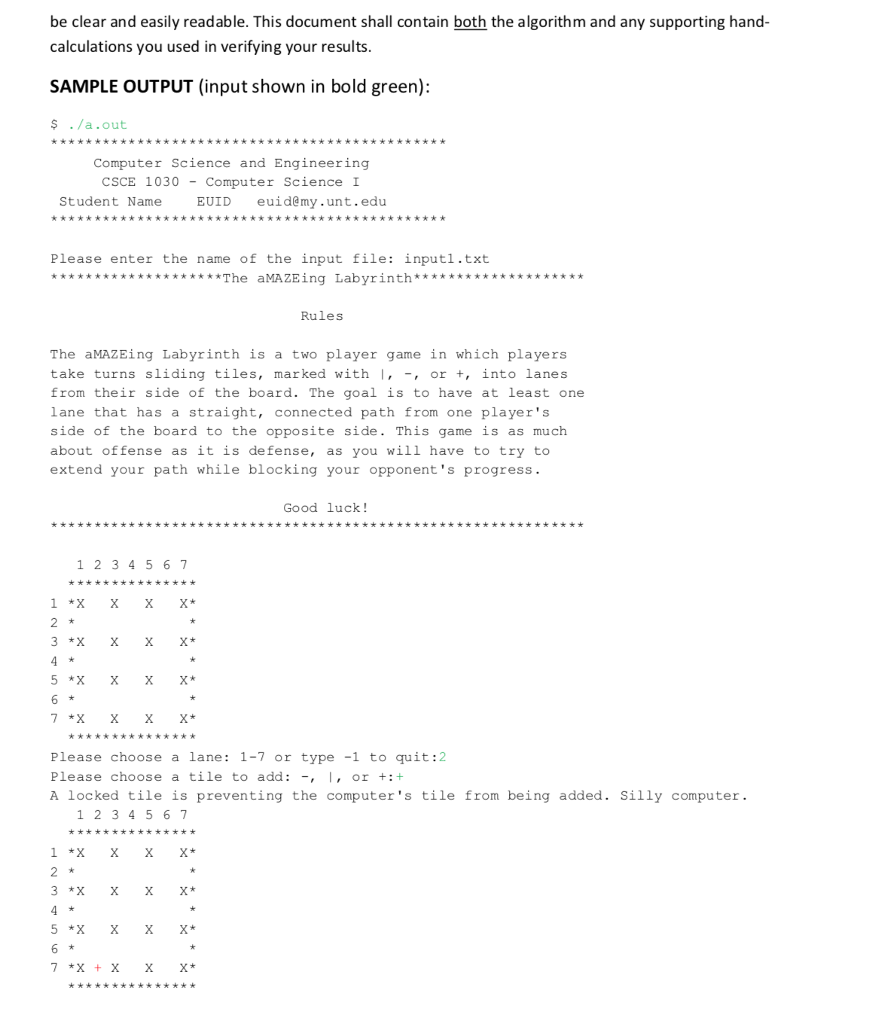
CSCE 1030: Homework 4 Due: 11:59 PM on Monday, December 3, 2018 PROGRAM DESCRIPTION: The purpose of this programming project is to write a C++ program to play a simplified version of The aMAZEing Labyrinth. This is a competitive tile shifting game, in which two players take turns sliding tiles into perpendicular lanes on the board. In our case one of the players is the computer plays random moves. The tiles have vertical lines, horizontal lines, or crosses on them. The goal is for one player to create a continuous path in one of the lanes using the lines in the tiles from their side of the board to the opposite side. The first player to do so wins. REQUIREMENTS: You must organize your program into three files euidHW4func.h This file will contain the include directives for the necessary libraries, any enumerated data types, any type definitions, any structure definitions, and the list of function prototypes (i.e. function declarations) o o euidHW4main.cpp This file will contain the local include directive for the header file as well as the main function for the program euidHW4func.cpp This file will contain the local include directive for the header file as well as all function definitions (except the main) used in the program o o Be sure to replace euid with your EUID As with all homework programs in this course, your program's output will initially display the department and course number, your name, your EUID, and your email address Define an enumerated type to store the different tile types that can be on the board CROSS HORIZONTAL o VERTICAL LOCKED EMPTY Define an enumerated type that represents two colors, RED and BLUE. This will keep track of each player's game pieces Define a structure (i.e. struct) to represent a tile that contains the tile's enumerated type, its enumerated color, and an integer value representing which lane it is in Inside the main), you will need to declare a two-dimensional, dynamic array representing the 7-by-7 board the tiles will be placed in To initialize the board, you will need to define a function that takes in the two-dimensional board and its size. Remember that the size should not be a global constant, so you will need to use pointers for the array The function will need to prompt the user for the name of the file containing the initial state of the board. This file will be a text file in comma separated value (CSV) format with each line representing one row on the board. If an incorrect file name is entered, the program should reprompt the user for a correct file name until one is received Using the information in the file, the board should be populated with tiles matching those described in the file. Keep in mind that an X is a LOCKED tile and cannot be moved during the game, and a is an EMPTY slot that does not currently contain a tile Examples of these input files can be found on the CSE machines at /home/jeh0289/public/csce1030/fa18/project4 You can cd directly into this directory and cp the files into your home directory for easy access. o o o You will then need to print out the game instructions using a function you have defined. See the SAMPLE OUTPUT for an example of the instructions . Next you should begin the game At the beginning of each turn you should print out the state of the board using a function you have defined that takes in the two-dimensional board and its size. The player's tiles should be colored red, the computer's tiles should be colored blue, and the LOCKED tiles should be the default color. See printColor.cpp for an example on how to color your text You will then need to prompt the user for which of the lanes 1-7 they would like to push a tile into and what type of tile they would like to push (-,|, or+). If the user inputs a lane that does not exist or a symbol that is not a possible tile type, politely inform them of the mistake and reprompt. You should also give them the option of surrendering by entering -1, a sentinel value, when asked for the lane number. If a user surrenders then output a polite message and end the game Using the user's specifications, you should create a new tile and then attempt to slide the tile into the board using a function you have defined. This function should take in the board, its size, and the new tile. To slide a tile for the player, you should slide it vertically from the bottom of the board in the appropriate lane. If a tile already exists in that spot, it and all other movable tiles above it that are touching should be moved up. A tile that slides out of the board's boundaries is removed from the board. Note that a tile cannot be slid into a LOCKED tile. If a player attempts to slide a tile into a lane that would result in a LOCKED tile being moved, you should ignored the move, politely report the mistake the player, and forfeit their current turn Using a function you define, you should create a tile for which the computer should choose a random lane and tile type. This tile should be slid in horizontally from the left side of the board using your previously defined tile sliding function. If the computer attempts to slide a tile into a lane that would result in a LOCKED tile being moved, you should ignored the move, politely report the computer's mistake to the player, and forfeit the computer's current turn The game should continue until either the player or computer has created a continuous path in one of the lanes using the lines in the tiles from their side of the board to the opposite side. You should check for this using a function that takes in the board and its size, and return a Boolean The final state of the board should be displayed along with congratulatory message if the user won, or a consoling message about their defeat o o o o o Once the game is complete, you will need to return the memory allocated for the board back to the freestore Your code should be well documented in terms of comments. For example, good comments in general consist of a header (with your name, course section, date, and brief description), comments for each variable, commented blocks of code, and function header comments You may create your own input files defining the board, but they must be created on the CSE machines. Failure to do so may result in a program that works on your personal computer, but not on the files we will use to test it on the CSE machines Your program will be graded based largely on whether it works correctly on the CSE machines (e.g., cse01, cse02,, cse06), so you should make sure that your program compiles and runs on a CSE machine You should contact your instructor if there is any question about what is being asked for. is is an individual programming assignment that must be the sole work of the individual student Any instance of academic dishonesty will result in a grade of "F" for the course, along with a report filed into the Academic Integrity Database You may assume that all input will be of the appropriate data type, although the range (e.g., an integer) may be out of bounds of the region. Please pay attention to the SAMPLE OUTPUT for specific details about the flow and input/output of the program You shall use techniques and concepts discussed in class you are not to use global variables, goto statements, or other items specifically not recommended in this class BONUS OPPORTUNITY: Up to 10 Points For students who have completed all requirements for this program, you may add the option to "save" the game (perhaps using a different sentinel value instead of the lane number) so that it can be resumed at a later time. This would entail saving the game board (with all needed information indicated). This information may be written to a file in any format you choose. Then when the program is run again, you can check if the player wants to resume the previous game and, if so, open the file (if it exists) and load the data into memory to continue the game Please note that unless you have completed all other requirements for this program no credit will be given for trying this extra credit. In other words, make sure your program is complete before attempting this extra credit DESIGN(ALGORITHM): On a piece of paper (or word processor), write down the algorithm, or sequence of steps, that you will use to solve the problem. You may think of this as a recipe" for someone else to follow. Continue to refine your recipe" until it is clear and deterministically solves the problem. Be sure to include the steps for prompting for input, performing calculations, and displaying output You should attempt to solve the problem by hand first (using a calculator as needed) to work out what the answer should be for a few sets of inputs. Type these steps and calculations into a document (i.e., Word, text, or PDF) that will be submitted along with your source code. Note that if you do any work by hand, images (such as pictures) may be used, but they must be clear and easily readable. This document shall contain both the algorithm and any supporting hand- calculations you used in verifying your results SAMPLE OUTPUT (input shown in bold green): $ ./a.out Computer Science and Engineering CSCE 1030-Computer Science I Student Name EUID euidemy.unt.edu Please enter the name of the input file: input1.txt Rules The aMAZEing Labyrinth is a two player game in which players take turns sliding tiles, marked with , , or +, into lanes from their side of the board. The goal is to have at least one lane that has a straight, connected path from one player's side of the board to the opposite side. This game is as much about offense as it is defense, as you will have to try to extend your path while blocking your opponent's progress. Good luck! 1 2345 6 -1 to quit:2 Please choose a lane: 1-7 or type Please choose a tile to add: -,I, or+:+ A locked tile is preventing the computer 's tile from being added. Silly computer. 1 2345 6 CSCE 1030: Homework 4 Due: 11:59 PM on Monday, December 3, 2018 PROGRAM DESCRIPTION: The purpose of this programming project is to write a C++ program to play a simplified version of The aMAZEing Labyrinth. This is a competitive tile shifting game, in which two players take turns sliding tiles into perpendicular lanes on the board. In our case one of the players is the computer plays random moves. The tiles have vertical lines, horizontal lines, or crosses on them. The goal is for one player to create a continuous path in one of the lanes using the lines in the tiles from their side of the board to the opposite side. The first player to do so wins. REQUIREMENTS: You must organize your program into three files euidHW4func.h This file will contain the include directives for the necessary libraries, any enumerated data types, any type definitions, any structure definitions, and the list of function prototypes (i.e. function declarations) o o euidHW4main.cpp This file will contain the local include directive for the header file as well as the main function for the program euidHW4func.cpp This file will contain the local include directive for the header file as well as all function definitions (except the main) used in the program o o Be sure to replace euid with your EUID As with all homework programs in this course, your program's output will initially display the department and course number, your name, your EUID, and your email address Define an enumerated type to store the different tile types that can be on the board CROSS HORIZONTAL o VERTICAL LOCKED EMPTY Define an enumerated type that represents two colors, RED and BLUE. This will keep track of each player's game pieces Define a structure (i.e. struct) to represent a tile that contains the tile's enumerated type, its enumerated color, and an integer value representing which lane it is in Inside the main), you will need to declare a two-dimensional, dynamic array representing the 7-by-7 board the tiles will be placed in To initialize the board, you will need to define a function that takes in the two-dimensional board and its size. Remember that the size should not be a global constant, so you will need to use pointers for the array The function will need to prompt the user for the name of the file containing the initial state of the board. This file will be a text file in comma separated value (CSV) format with each line representing one row on the board. If an incorrect file name is entered, the program should reprompt the user for a correct file name until one is received Using the information in the file, the board should be populated with tiles matching those described in the file. Keep in mind that an X is a LOCKED tile and cannot be moved during the game, and a is an EMPTY slot that does not currently contain a tile Examples of these input files can be found on the CSE machines at /home/jeh0289/public/csce1030/fa18/project4 You can cd directly into this directory and cp the files into your home directory for easy access. o o o You will then need to print out the game instructions using a function you have defined. See the SAMPLE OUTPUT for an example of the instructions . Next you should begin the game At the beginning of each turn you should print out the state of the board using a function you have defined that takes in the two-dimensional board and its size. The player's tiles should be colored red, the computer's tiles should be colored blue, and the LOCKED tiles should be the default color. See printColor.cpp for an example on how to color your text You will then need to prompt the user for which of the lanes 1-7 they would like to push a tile into and what type of tile they would like to push (-,|, or+). If the user inputs a lane that does not exist or a symbol that is not a possible tile type, politely inform them of the mistake and reprompt. You should also give them the option of surrendering by entering -1, a sentinel value, when asked for the lane number. If a user surrenders then output a polite message and end the game Using the user's specifications, you should create a new tile and then attempt to slide the tile into the board using a function you have defined. This function should take in the board, its size, and the new tile. To slide a tile for the player, you should slide it vertically from the bottom of the board in the appropriate lane. If a tile already exists in that spot, it and all other movable tiles above it that are touching should be moved up. A tile that slides out of the board's boundaries is removed from the board. Note that a tile cannot be slid into a LOCKED tile. If a player attempts to slide a tile into a lane that would result in a LOCKED tile being moved, you should ignored the move, politely report the mistake the player, and forfeit their current turn Using a function you define, you should create a tile for which the computer should choose a random lane and tile type. This tile should be slid in horizontally from the left side of the board using your previously defined tile sliding function. If the computer attempts to slide a tile into a lane that would result in a LOCKED tile being moved, you should ignored the move, politely report the computer's mistake to the player, and forfeit the computer's current turn The game should continue until either the player or computer has created a continuous path in one of the lanes using the lines in the tiles from their side of the board to the opposite side. You should check for this using a function that takes in the board and its size, and return a Boolean The final state of the board should be displayed along with congratulatory message if the user won, or a consoling message about their defeat o o o o o Once the game is complete, you will need to return the memory allocated for the board back to the freestore Your code should be well documented in terms of comments. For example, good comments in general consist of a header (with your name, course section, date, and brief description), comments for each variable, commented blocks of code, and function header comments You may create your own input files defining the board, but they must be created on the CSE machines. Failure to do so may result in a program that works on your personal computer, but not on the files we will use to test it on the CSE machines Your program will be graded based largely on whether it works correctly on the CSE machines (e.g., cse01, cse02,, cse06), so you should make sure that your program compiles and runs on a CSE machine You should contact your instructor if there is any question about what is being asked for. is is an individual programming assignment that must be the sole work of the individual student Any instance of academic dishonesty will result in a grade of "F" for the course, along with a report filed into the Academic Integrity Database You may assume that all input will be of the appropriate data type, although the range (e.g., an integer) may be out of bounds of the region. Please pay attention to the SAMPLE OUTPUT for specific details about the flow and input/output of the program You shall use techniques and concepts discussed in class you are not to use global variables, goto statements, or other items specifically not recommended in this class BONUS OPPORTUNITY: Up to 10 Points For students who have completed all requirements for this program, you may add the option to "save" the game (perhaps using a different sentinel value instead of the lane number) so that it can be resumed at a later time. This would entail saving the game board (with all needed information indicated). This information may be written to a file in any format you choose. Then when the program is run again, you can check if the player wants to resume the previous game and, if so, open the file (if it exists) and load the data into memory to continue the game Please note that unless you have completed all other requirements for this program no credit will be given for trying this extra credit. In other words, make sure your program is complete before attempting this extra credit DESIGN(ALGORITHM): On a piece of paper (or word processor), write down the algorithm, or sequence of steps, that you will use to solve the problem. You may think of this as a recipe" for someone else to follow. Continue to refine your recipe" until it is clear and deterministically solves the problem. Be sure to include the steps for prompting for input, performing calculations, and displaying output You should attempt to solve the problem by hand first (using a calculator as needed) to work out what the answer should be for a few sets of inputs. Type these steps and calculations into a document (i.e., Word, text, or PDF) that will be submitted along with your source code. Note that if you do any work by hand, images (such as pictures) may be used, but they must be clear and easily readable. This document shall contain both the algorithm and any supporting hand- calculations you used in verifying your results SAMPLE OUTPUT (input shown in bold green): $ ./a.out Computer Science and Engineering CSCE 1030-Computer Science I Student Name EUID euidemy.unt.edu Please enter the name of the input file: input1.txt Rules The aMAZEing Labyrinth is a two player game in which players take turns sliding tiles, marked with , , or +, into lanes from their side of the board. The goal is to have at least one lane that has a straight, connected path from one player's side of the board to the opposite side. This game is as much about offense as it is defense, as you will have to try to extend your path while blocking your opponent's progress. Good luck! 1 2345 6 -1 to quit:2 Please choose a lane: 1-7 or type Please choose a tile to add: -,I, or+:+ A locked tile is preventing the computer 's tile from being added. Silly computer. 1 2345 6
Step by Step Solution
There are 3 Steps involved in it

Get step-by-step solutions from verified subject matter experts
 Study Help