



Question: CSCI 1302 Principles of Programming In this project, you will develop a graphical user interface (GUI) for new user registration. The GUI can eveloped using
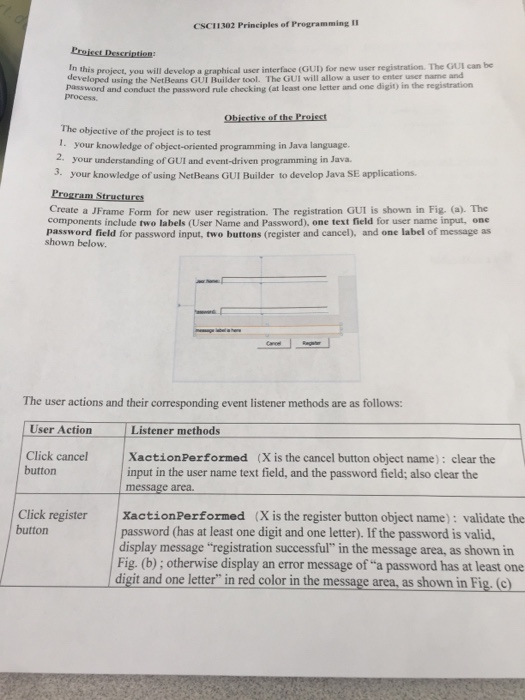
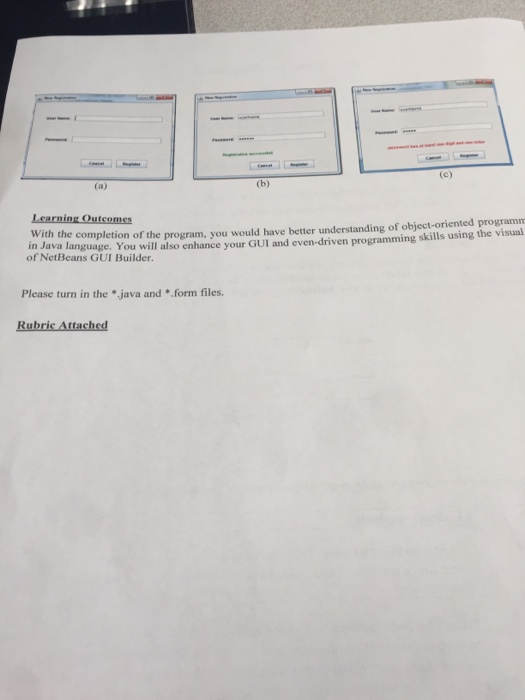
CSCI 1302 Principles of Programming In this project, you will develop a graphical user interface (GUI) for new user registration. The GUI can eveloped using the NetBeans GUI Builder tool. The GUI will allow a user to enter user name and prossord and conduct the password rule checking (at least one letter and one digit) in the registration process The objective of the project is to test 1. your knowledge of object-oriented programming in Java language. 2, your understanding of GUI and event-driven programming in Java 3. your knowledge of using NetBeans GUI Builder to develop Java SE applications. Create a JFrame Form for new user registration. The registration GUI is shown in Fig. (a). The components include two labels (User Name and Password), one text field for user name input, one password field for password input, two buttons (register and cancel), and one label of message as shown below. The user actions and their corresponding event listener methods are as follows: User Action Listener methods Click cancel button XactionPerformed (X is the cancel button object name): clear the input in the user name text field, and the password field; also clear the message area. XactionPerformed (X is the register button object name): validate the password (has at least one digit and one letter). If the password is valid display message "registration successful" in the message area, as shown in Fig. (b); otherwise display an error message of "a password has at least one digit and one letter" in red color in the message area, as shown in Fig.(c Click register button
Step by Step Solution
There are 3 Steps involved in it

Get step-by-step solutions from verified subject matter experts