







Question: CSCI 155 - Intro to Programming Lab 5 - Arrays Objective: The objective of this lab is to create a program to allow the user
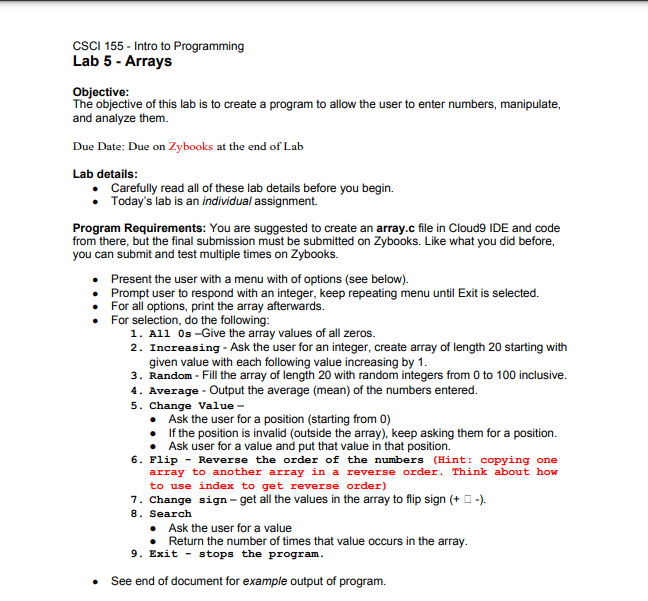
CSCI 155 - Intro to Programming Lab 5 - Arrays Objective: The objective of this lab is to create a program to allow the user to enter numbers, manipulate, and analyze them. Due Date: Due on Zybooks at the end of Lab Lab details: Carefully read all of these lab details before you begin. Today's lab is an individual assignment. Program Requirements: You are suggested to create an array.c file in Cloud9 IDE and code from there, but the final submission must be submitted on Zybooks. Like what you did before, you can submit and test multiple times on Zybooks. Present the user with a menu with of options (see below). Prompt user to respond with an integer, keep repeating menu until Exit is selected. For all options, print the array afterwards. For selection, do the following: 1. All os -Give the array values of all zeros. 2. Increasing - Ask the user for an integer, create array of length 20 starting with given value with each following value increasing by 1. 3. Random - Fill the array of length 20 with random integers from 0 to 100 inclusive. 4. Average - Output the average (mean) of the numbers entered. 5. Change Value - Ask the user for a position (starting from ) If the position is invalid (outside the array), keep asking them for a position. Ask user for a value and put that value in that position. 6. Flip - Reverse the order of the numbers (Hint: copying one array to another array in a reverse order. Think about how to use index to get reverse order) 7. Change sign-get all the values in the array to flip sign (+ -). 8. Search Ask the user for a value Return the number of times that value occurs in the array 9. Exit - stops the program. See end of document for example output of program
Step by Step Solution
There are 3 Steps involved in it

Get step-by-step solutions from verified subject matter experts
 Study Help