







Question: CSCI 2822 Lab 5 Purpose: Use the Eclipse IDE. Gain familiarity with different types of loops, the switch statement, and UML Activity Diagrams. Directions Use
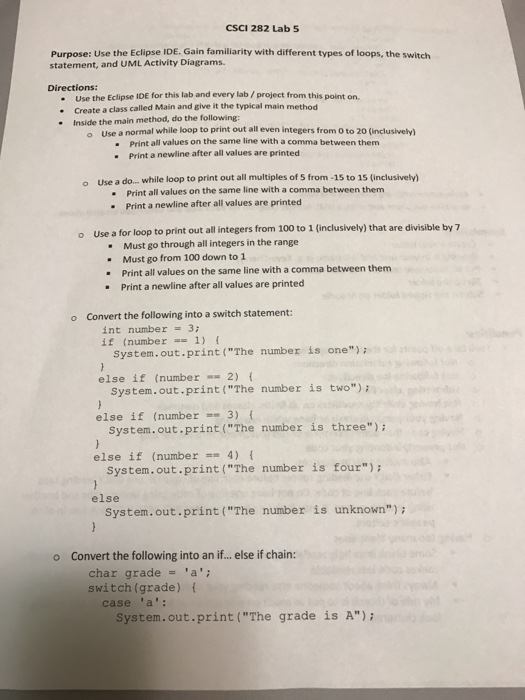
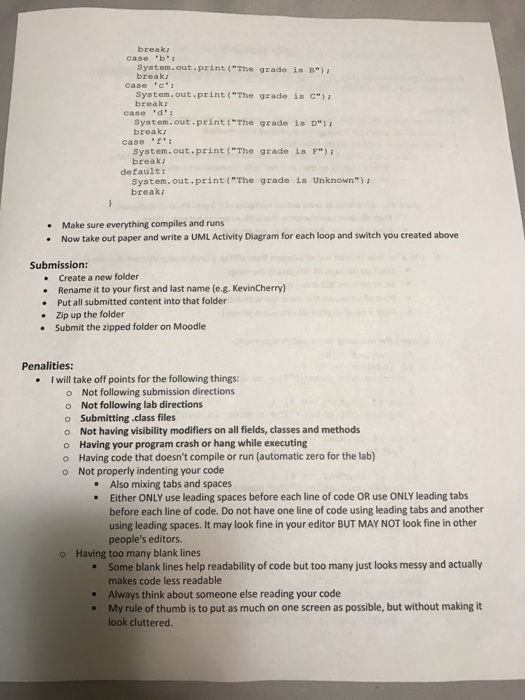

CSCI 2822 Lab 5 Purpose: Use the Eclipse IDE. Gain familiarity with different types of loops, the switch statement, and UML Activity Diagrams. Directions Use the Eclipse IDE for this lab and even lab/project from this point on. create a class called Main and give it the typical main method Inside the main method, do the following: o use a normal while loop to print out all even integers from o to 20 (inclusively) Print all values on the same line with a comma between them Print a newline after all values are printed use a do... while loop to print out all multiples of 5 from -15 to 15 (inclusively) o Print all values on the same line with a comma between them Print a newline after all values are printed o use a for loop to print out all integers from 1 to 1 (inclusively) that are divisible by 7 Must go through all integers in the range Must go from 100 down to 1 Print all values on the same line with a comma between them Print a newline after all values are printed o Convert the following into a switch statement: int number 3; if (number 1) System. out.print ("The number is one") else if (number 2) system. out print ("The number is two") else if (number 3) system. out.print ("The number is three"); else if (number 4) system. out print ("The number is four"); else System. out.print ("The number is unknown") o Convert the following into an if... else if chain: char grade 'a'; switch (grade) case a System. out print ("The grade is A")
Step by Step Solution
There are 3 Steps involved in it

Get step-by-step solutions from verified subject matter experts
 Study Help