







Question: CSE 110-Car Loan Program PROJECT #1-File handling, Loops, and Functions Modify the Car Loan program that computed car loan information (or create a new Project)
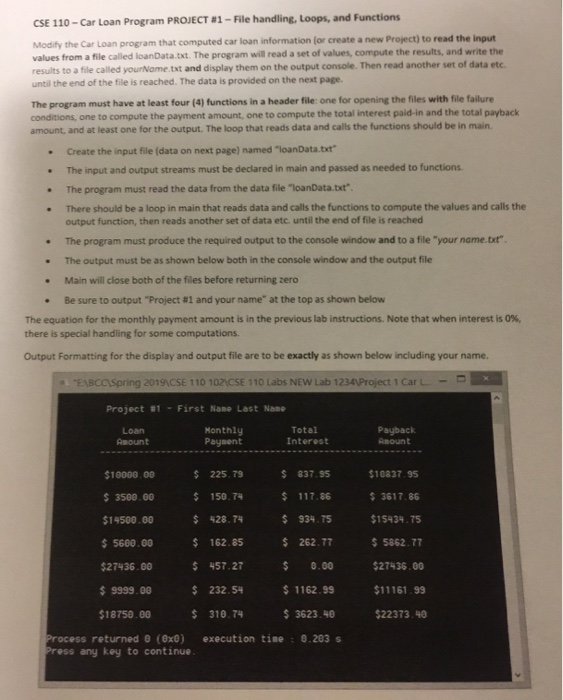
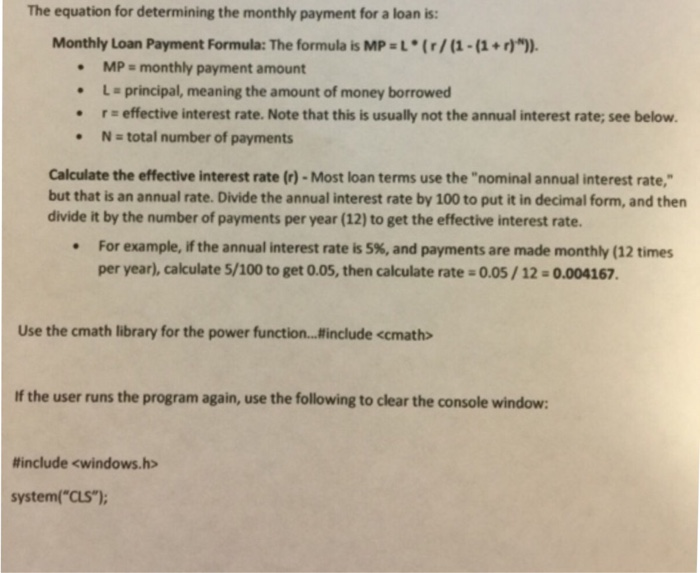
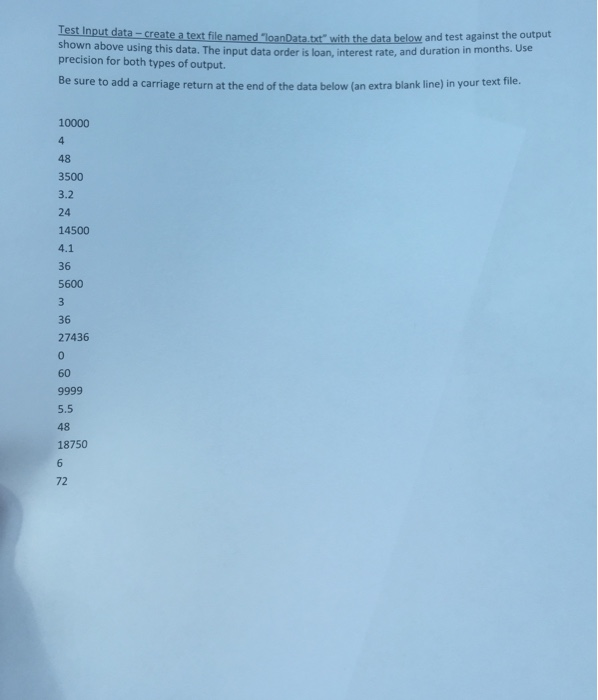
CSE 110-Car Loan Program PROJECT #1-File handling, Loops, and Functions Modify the Car Loan program that computed car loan information (or create a new Project) to read the input values from a file called loanData.txt. The program will read a set of values, compute the results, and write the results to a file called yourNome.tst and display them on the output console. Then read another set of data etc. until the end of the file is reached. The data is provided on the next page. least four (4) functions in a header file: one for opening the files with file failure The program must have at conditions, one to compute the payment amount, one to compute the total interest paid-in and the total payback amount, and at least one for the output. The loop that reads data and calls the functions should be in main. . Create the input file (data on next page) named "loanData.txt . The input and output streams must be declared in main and passed as needed to functions The program must read the data from the data file-loanData.txt' There should be a loop in main that reads data and calls the functions to compute the values and calls the output function, then reads another set of data etc. until the end of file is reached . The program must produce the required output to the console window and to a file "your name.txr . The output must be as shown below both in the console window and the output file . Main will close both of the files before returning zero * Be sure to output "Project #1 and your name" at the top as shown below The equation for the monthly payment amount is in the previous lab instructions. Note that when interest is 0%, there is special handling for some computations Output Formatting for the display and output file are to be exactly as shown below including your name. a "EABCCSpring 2019(CSE 1 10 1 02CSE 110 Labs NEW Lab 1234 Project 1 Car L- Project #1 First Nane Last Name Loan Amount Monthly Paysent Total Interest Payback Amount $10837. 95 s 3617.86 $15434 75 5862.77 5100. 00 225. 79 837.35 $10837 s 3500.00 150.74 $14500.00 $ 5600.00 162.85 $27436.00 457.27 0.00 $27436.00 $9999.00 18750.00 310.7 3623.40 $22373.40 150.74117.86 $934.75 s 428. T4 $ 232.54 1162.99 11161.99 ocess returned 0 (0x0) execution tine:.203s ess any key to continue The equation for determining the monthly payment for a loan is: Monthly Loan Payment Formula: The formula is MP L (r/(1-(1+)). MP monthly payment amount L principal, meaning the amount of money borrowed . r effective interest rate. Note that this is usually not the annual interest rate; see below N-total number of payments Calculate the effective interest rate (r)-Most loan terms use the "nominal annual interest rate, but that is an annual rate. Divide the annual interest rate by 100 to put it in decimal form, and then divide it by the number of payments per year (12) to get the effective interest rate. For example, if the annual interest rate is 5%, and payments are made monthly (12 times per year), calculate 5/100 to get 0.05, then calculate rate 0.05 / 12-0.004167. Use the cmath library for the power function...include
Step by Step Solution
There are 3 Steps involved in it

Get step-by-step solutions from verified subject matter experts
 Study Help