







Question: CSV Files For this project, the input file will be stored as comma - separated values ( csv files format ) . You can take
CSV Files
For this project, the input file will be stored as commaseparated values csv files format
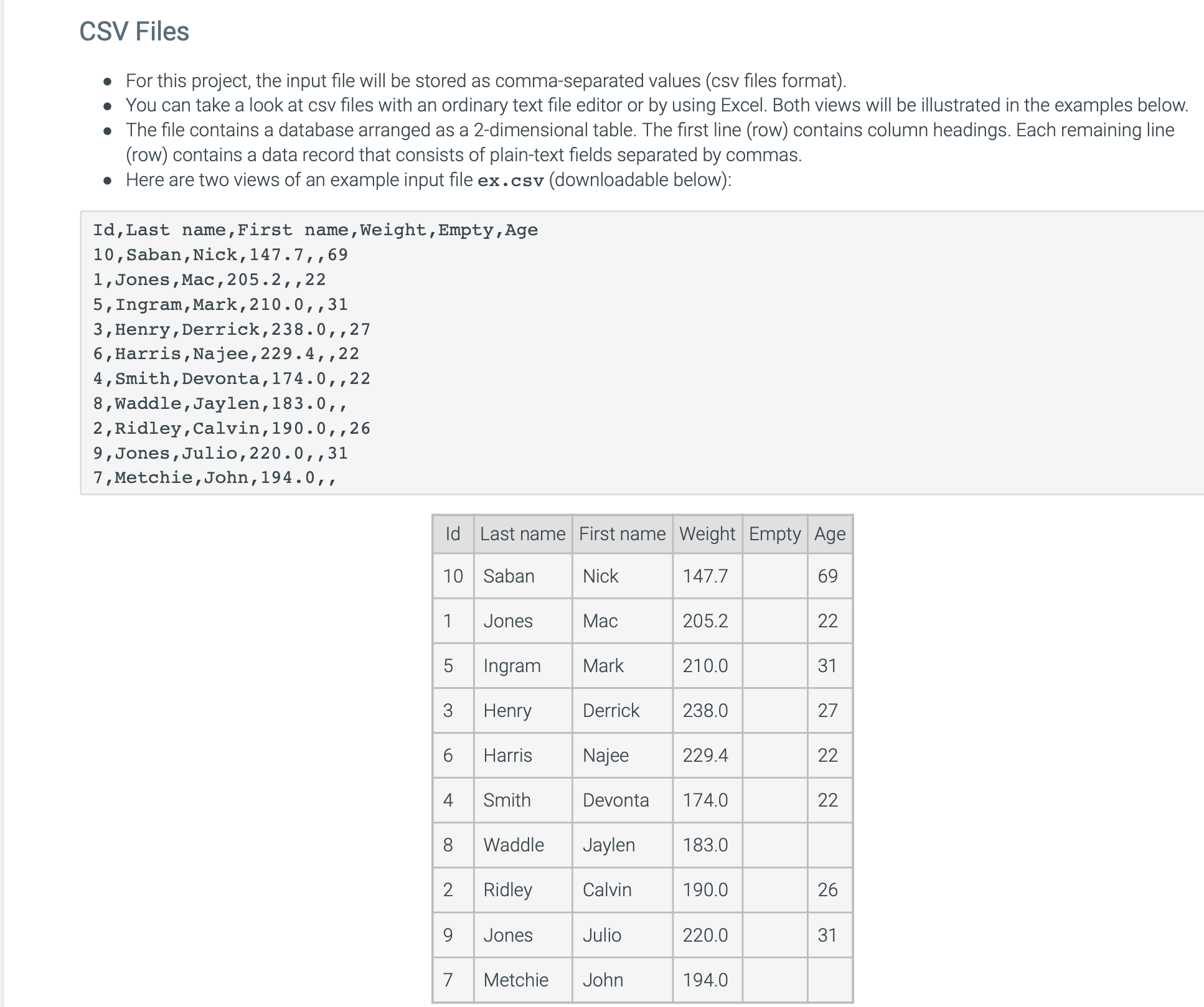
You can take a look at csv files with an ordinary text file editor or by using Excel. Both views will be illustrated in the examples below.
The file contains a database arranged as a dimensional table. The first line row contains column headings. Each remaining line
row contains a data record that consists of plaintext fields separated by commas.
Here are two views of an example input file excsv downloadable below:
IdLast name,First name,Weight,Empty,Age
Saban,Nick,
Jones,Mac,
Ingram,Mark,
Henry,Derrick,
Harris,Najee,
Smith,Devonta,
Waddle,Jaylen,
Ridley,Calvin,
Jones,Julio,
Metchie,John,
Implementation
Name the program pcpp
The program accepts two commandline arguments:
input csv filename
display column width used when printing rows and columns from the csv
Example: aout excsv
Your program will continually accept the following commands until the quit command is input:
quit
Stop accepting commands and close the program.
help
Print possible commands.
print
Print all rows and columns. Each column should be printed with a width equal to the second command line argument. Spaces should still be print for empty columns.
cols
Print all column names with each appearing on a newline.
search colname value
Formatted print all rows where the value in column colname equals the value. Each column should be printed with a width equal to the second command line argument.
If colname is then print any rows where the value appears in any column in the row. If a value appears in a row more than once, only print the row once.
If no rows match, print No results".
min colname
Determine the minimum value in the column colname. Ignore rows with blank values.
Use the normal formatting when outputting numbers ie do not use setprecision
Output: "The min for col C X where C is the column and X is the min or NA if the min cannot be computed all cells blank
max colname
Determine the maximum value in the column colname. Ignore rows with blank values.
Use the normal formatting when outputting numbers ie do not use setprecision
Output: "The max for col C X where C is the column and X is the max or NA if the max cannot be computed all cells blank
avg colname
Calculate the average value in the column colname. Ignore rows with blank values.
Use the normal formatting when outputting numbers ie do not use setprecision
Output: "The avg for col "colname" X where C is the column and X is the average or NA if the average cannot be computed all cells blank
Error messages and actions:
Invalid number of commandline arguments: "Usage: a database.csv #colwidth" and close program
Cannot open input csv file: "Failed to open "filename"" and close program
Invalid command: "Invalid command" and ask for another command, consuming all input still remaining on the line
Invalid colname in input command: "Invalid column "colname"" and do nothing
The colname and value provided in a command can appear inside quotes. For example: search Age and search "Age" and search Age and search "Age" all perform the same operation. This is useful when the column being searched has whitespace, such as when searching the column "Last name": search "Last name" "van der Woodsen". It can also be useful when searching for a column with a blank value: search Quoted inputs also work for min, max, and avg, eg max "Age".
Notes
Review commandline arguments link if necessary.
You should only include the following libraries: iostream, string, fstream, sstream, cctype, iomanip, climits
Assume valid input in the files and command except for input that is supposed to trigger the error messages
Assume that each csv file contains at most rows, and that every row contains the same number of columns, which is at most
The csv file will not always have the same columns as shown in the example, as they can have variable rows and columns.
In the csv file, the data between commas is case and whitespacesensitive
In a command, the input is casesensitive Age is not the same as "age" Any whitespace that appears inside a quoted input colnamevalue is whitespacesensitive First is not the same as First
Assume min, max, and avg will be performed on columns only containing valid doubles.
Your program should run according to the examples below.
Step by Step Solution
There are 3 Steps involved in it
1 Expert Approved Answer
Step: 1 Unlock

Question Has Been Solved by an Expert!
Get step-by-step solutions from verified subject matter experts
Step: 2 Unlock
Step: 3 Unlock
 Study Help