







Question: ctions [Read-Only] -Word Table Tools Review View PDF Architect 4 Creator Design Layout Tell me what you want to do. AaBbCcl AaBbC AaBbCcl AaBbCel AaBbCcl
![ctions [Read-Only] -Word Table Tools Review View PDF Architect 4 Creator](https://dsd5zvtm8ll6.cloudfront.net/si.experts.images/questions/2024/09/66f3b6678af15_97466f3b666ba660.jpg)
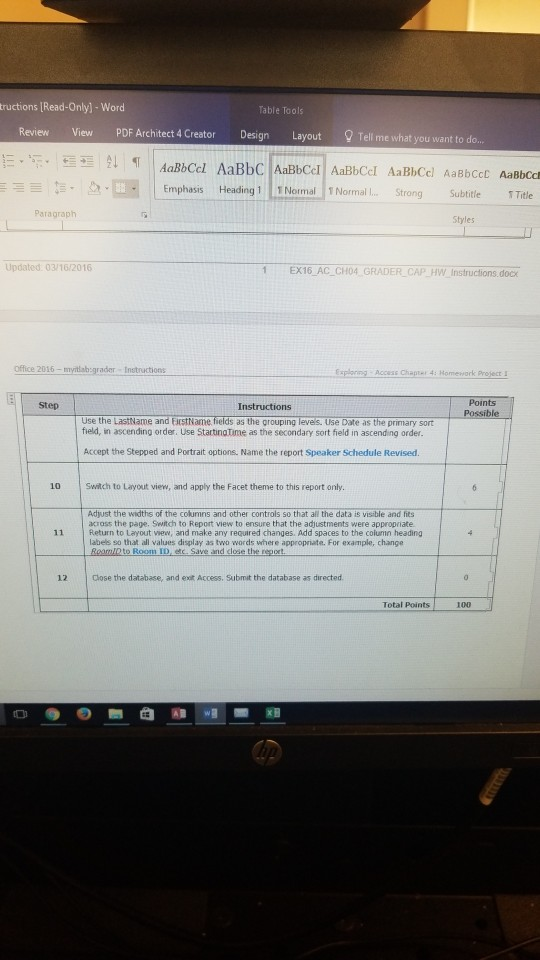
ctions [Read-Only] -Word Table Tools Review View PDF Architect 4 Creator Design Layout Tell me what you want to do. AaBbCcl AaBbC AaBbCcl AaBbCel AaBbCcl AaBbCcE AaBbccDA Emphasis Heading 1 L1 Normal 11 Normal I... Strong Subtitle Tale Paragraph Step Instructions Points Start Access, Open the file named exploring 304 grader h1.accdb. Save the database as exploring a04 grader hi LastFirst. Select the Speakers table as the record source for a form, Use the Form tool to create a new form with a stacked layout. 12 Change the title in the form header to Enter/Edit Speakers. Reduce the width of the text box controls to approximately half of their original size. Delete the Sessions subform control from the form. View the form and data in Form view, Sort the records by LastName in ascending order. Save the form as Edit Speakers. Close the form. Open the Room Information form in Layout view. Select all controls in the form, and apply the Stacked Layout. Switch to Form view, and then save and close the form. Report Wizard and use the following options as you proceed through the wizard steps and Eitsthacme as the grouping levels. Use Date as the primary sort field, in ascending order. 20 6 Select all of the available fields for the report. View the data by Speakers. Verify Lasthame aco 7 Switch to Layout view and apply the Organic theme to this report only. Save nd dose the 8 Sessions table to the desion grid, afte the Date field. Run the query. Save and close the e query, Activate the Report Wzard aon, and use t Open the Speaker and Room Schedule query in Design view. Add the SatingTime field im the Click the Speaker and Roon foll owing options Select al of the avalable fields for the report. iew the data by Speakers ctions [Read-Only] -Word Table Tools Review View PDF Architect 4 Creator Design Layout Tell me what you want to do. AaBbCcl AaBbC AaBbCcl AaBbCel AaBbCcl AaBbCcE AaBbccDA Emphasis Heading 1 L1 Normal 11 Normal I... Strong Subtitle Tale Paragraph Step Instructions Points Start Access, Open the file named exploring 304 grader h1.accdb. Save the database as exploring a04 grader hi LastFirst. Select the Speakers table as the record source for a form, Use the Form tool to create a new form with a stacked layout. 12 Change the title in the form header to Enter/Edit Speakers. Reduce the width of the text box controls to approximately half of their original size. Delete the Sessions subform control from the form. View the form and data in Form view, Sort the records by LastName in ascending order. Save the form as Edit Speakers. Close the form. Open the Room Information form in Layout view. Select all controls in the form, and apply the Stacked Layout. Switch to Form view, and then save and close the form. Report Wizard and use the following options as you proceed through the wizard steps and Eitsthacme as the grouping levels. Use Date as the primary sort field, in ascending order. 20 6 Select all of the available fields for the report. View the data by Speakers. Verify Lasthame aco 7 Switch to Layout view and apply the Organic theme to this report only. Save nd dose the 8 Sessions table to the desion grid, afte the Date field. Run the query. Save and close the e query, Activate the Report Wzard aon, and use t Open the Speaker and Room Schedule query in Design view. Add the SatingTime field im the Click the Speaker and Roon foll owing options Select al of the avalable fields for the report. iew the data by Speakers
Step by Step Solution
There are 3 Steps involved in it

Get step-by-step solutions from verified subject matter experts
 Study Help