







Question: currency.cpp // This program lets the user enter a number. The // dollarFormat function formats the number as // a dollar amount. #include #include using
currency.cpp
// This program lets the user enter a number. The
// dollarFormat function formats the number as
// a dollar amount.
#include
#include
using namespace std;
// Function prototype
void dollarFormat(string &);
int main ()
{
string input;
// Get the dollar amount from the user.
cout
cin >> input;
dollarFormat(input);
cout
cout
return 0;
}
//************************************************************
// Definition of the dollarFormat function. This function *
// accepts a string reference object, which is assumed to *
// to hold a number with a decimal point. The function *
// formats the number as a dollar amount with commas and *
// a $ symbol. *
//************************************************************
void dollarFormat(string ?)
{
/* Write your code here */
}
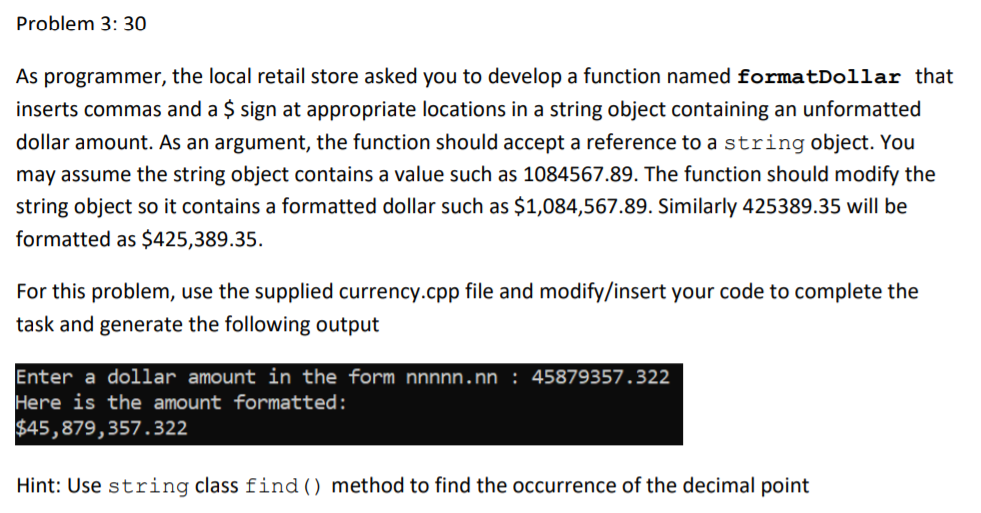
Problem 3: 30 As programmer, the local retail store asked you to develop a function named formatDollar that inserts commas and a $ sign at appropriate locations in a string object containing an unformatted dollar amount. As an argument, the function should accept a reference to a string object. You may assume the string object contains a value such as 1084567.89. The function should modify the string object so it contains a formatted dollar such as $1,084,567.89. Similarly 425389.35 will be formatted as $425,389.35. For this problem, use the supplied currency.cpp file and modify/insert your code to complete the task and generate the following output Enter a dollar amount in the form nnnnn.nn : 45879357.322 Here is the amount formatted: $45,879,357.322 Hint: Use string class find () method to find the occurrence of the decimal point
Step by Step Solution
There are 3 Steps involved in it

Get step-by-step solutions from verified subject matter experts
 Study Help