







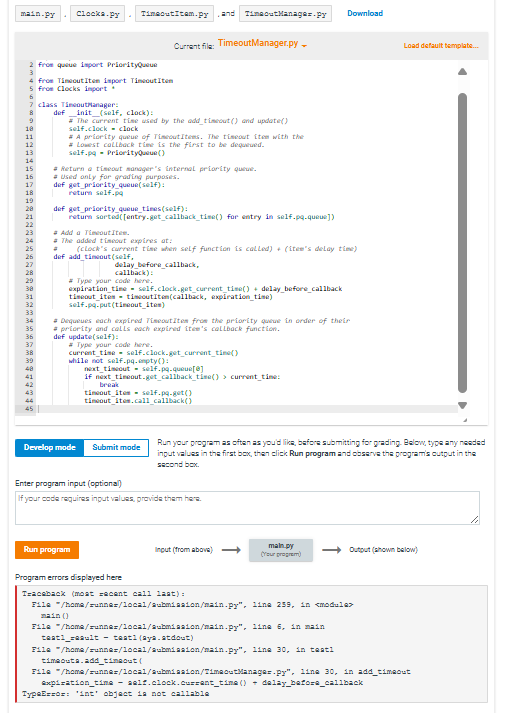
Question: Current file: TimeoutManager.py - ` ` ` from quvie import PrlorityQuve froe TinsoutIten import TinvoutIton from Clocks inport * class Tinwoutilanager: def _ _ init
Current file: TimeoutManager.py
from quvie import PrlorityQuve
froe TinsoutIten import TinvoutIton
from Clocks inport
class Tinwoutilanager:
def initself clock:
F The Gurrent tise used by the addtiseout and update
self.clock clack
If A priority queue of TiscoutItems. The tiscour itom with the
# Lomest callback tien is the first to be dequwined.
self.pQ PriorityQueve
a Return a tiscout sunager's internal pritority quewi.
a Used only for gruding purposes.
def getpricrityqueuesef:
roturn sefpa
def getpriorityqueuetleesself:
retura sortedentrygetcallbacktise for entry in self.pqqueue
a Add a TimwoutItese.
a The added tineout expires at:
a clocks corrent tise mben self function is callediteses delay time
def addtinsoutself
dolaybvforecallback,
callbck:
Type your code here.
expirationtine self.clock.getcurrenttise delaybeforecallback
tineoratiten timoutItencallback expirationtine
self.pqputtineoutIten
e poriarity and calls each expirad iter's callbacle function.
def updatesef:
Type your code here.
currenttise selfclockgetcurrenttind
while not self.pqampty:
nexttinwout self.pqqueue
If nexttireoutgetcallbacktive currenttine:
break
tinsoutIten self.pqget
tinnoutten.callcallback
Run your program as oftan as you'd lika, before submitting for grading. Below, typa any nasdad input valuas in the first bex, then eliek Run program and observe the proyramis output in the sacond box.
Enter program input optional
If your code requires input values, provide them here.
text Ingut from abovalongrightarrow text Output ahown balow
Program errors displayed here
Traceback moat acent eall aat
Eshomexunnexlocalaubmasianmalnpyna in kmodula
nain
Eshomexunnexlocalaubmiasionmainpyne in main
tagtasult tagtayaatdaut
Esa homamunnexlocalaubmiagionnainpyna in tagt
timaouta addtinaOut!
TypeEzas: fnt objact a not callahle
Step by Step Solution
There are 3 Steps involved in it
1 Expert Approved Answer
Step: 1 Unlock

Question Has Been Solved by an Expert!
Get step-by-step solutions from verified subject matter experts
Step: 2 Unlock
Step: 3 Unlock
 Study Help