







Question: Cust Cust3 109 Compiling Data From Desperate Sources 110 Let's see how a VLOOKUP can be used to combine data from multiple tables. 111 The
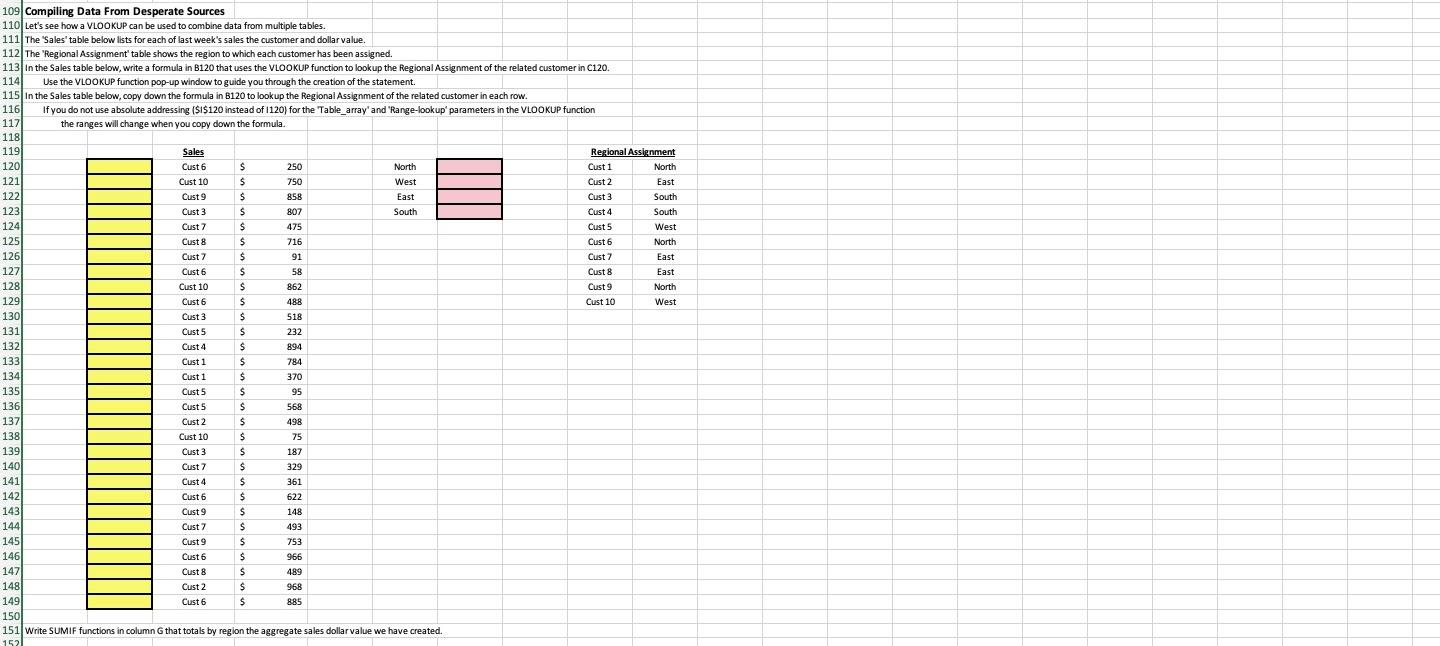
Cust Cust3 109 Compiling Data From Desperate Sources 110 Let's see how a VLOOKUP can be used to combine data from multiple tables. 111 The 'Sales'table below lists for each of last week's sales the customer and dollar value. 112 The 'Regional Assignment' table shows the region to which each customer has been assigned. 113 in the Sales table below, write a formula in B120 that uses the VLOOKUP function to look up the Regional Assignment of the related customer in C120 114 Use the VLOOKUP function pop-up window to guide you through the creation of the statement 115 in the Sales table below, copy down the formula in B120 to lookup the Regional Assignment of the related customer in each row. 116 If you do not use absolute addressing ($I$120 instead of 1120) for the Table_array' and "Range-lookup parameters in the VLOOKUP function 117 the ranges will change when you copy down the formula. 118 119 Sales Regional Assignment 120 Cust $ 250 North Cust 1 North 121 Cust 10 $ 750 West Cust2 East 122 Cust 9 S 858 East Cust 3 South 123 Cust3 $ B07 South Cust 4 South 124 Cust 7 $ 475 Cust5 West 125 $ 716 Cust 6 North 126 Cust $ 91 Cust 7 East 127 Cust 6 $ 58 Cust 8 East 128 Cust 10 $ 862 Cust 9 North 129 Cust 6 $ 488 Cust 10 West 130 $ 518 1311 Cust5 $ 232 132| Cust4 $ 894 133) Cust1 $ 784 Cust 1 $ 370 135 Cust5 $ 95 136 Cust5 S 568 137 Cust 2 $ 498 138 Cust 10 $ 75 139 Cust 3 $ 187 140 Cust 7 S 329 141 Cust 4 $ 361 Cust 6 $ 622 143 Cust 9 $ 148 144 Cust $ 493 145 Cust 9 $ 753 146) Cust 6 $ 966 147 Cust 8 $ 489 1481 Cust 2 $ 968 149 Cust 6 $ 885 150 151 Write SUMIF functions in column G that totals by region the aggregate sales dollar value we have created. 152 134 142 Cust Cust3 109 Compiling Data From Desperate Sources 110 Let's see how a VLOOKUP can be used to combine data from multiple tables. 111 The 'Sales'table below lists for each of last week's sales the customer and dollar value. 112 The 'Regional Assignment' table shows the region to which each customer has been assigned. 113 in the Sales table below, write a formula in B120 that uses the VLOOKUP function to look up the Regional Assignment of the related customer in C120 114 Use the VLOOKUP function pop-up window to guide you through the creation of the statement 115 in the Sales table below, copy down the formula in B120 to lookup the Regional Assignment of the related customer in each row. 116 If you do not use absolute addressing ($I$120 instead of 1120) for the Table_array' and "Range-lookup parameters in the VLOOKUP function 117 the ranges will change when you copy down the formula. 118 119 Sales Regional Assignment 120 Cust $ 250 North Cust 1 North 121 Cust 10 $ 750 West Cust2 East 122 Cust 9 S 858 East Cust 3 South 123 Cust3 $ B07 South Cust 4 South 124 Cust 7 $ 475 Cust5 West 125 $ 716 Cust 6 North 126 Cust $ 91 Cust 7 East 127 Cust 6 $ 58 Cust 8 East 128 Cust 10 $ 862 Cust 9 North 129 Cust 6 $ 488 Cust 10 West 130 $ 518 1311 Cust5 $ 232 132| Cust4 $ 894 133) Cust1 $ 784 Cust 1 $ 370 135 Cust5 $ 95 136 Cust5 S 568 137 Cust 2 $ 498 138 Cust 10 $ 75 139 Cust 3 $ 187 140 Cust 7 S 329 141 Cust 4 $ 361 Cust 6 $ 622 143 Cust 9 $ 148 144 Cust $ 493 145 Cust 9 $ 753 146) Cust 6 $ 966 147 Cust 8 $ 489 1481 Cust 2 $ 968 149 Cust 6 $ 885 150 151 Write SUMIF functions in column G that totals by region the aggregate sales dollar value we have created. 152 134 142
Step by Step Solution
There are 3 Steps involved in it

Get step-by-step solutions from verified subject matter experts
 Study Help