







Question: Custom JSP tag for formatting the currency //CurrencyFormatTag.java file: package murach.tags; import javax.servlet.jsp.tagext.TagSupport; public class CurrencyFormatTag extends TagSupport { } result.jsp file: Future Value Calculator
Custom JSP tag for formatting the currency
//CurrencyFormatTag.java file:
package murach.tags;
import javax.servlet.jsp.tagext.TagSupport;
public class CurrencyFormatTag extends TagSupport { }
result.jsp file:
Future Value Calculator
Investment Amount: ${calculation.monthlyInvestmentAmountCurrencyFormat}
Yearly Interest Rate: ${calculation.yearlyInterestRate}
Number of Years: ${calculation.years}
Future Value:
murach.tld file:
1.0 mma /WEB-INF/murach A custom tag that formats a double value into currency. currencyFormat murach.tags.CurrencyFormatTag empty value true true double
About to end my membership on the website if this question does not get answered soon. It has been a complete waste of money because no one on here has been smart enough to answer any of my homework problems/problems I have questions on correctly.
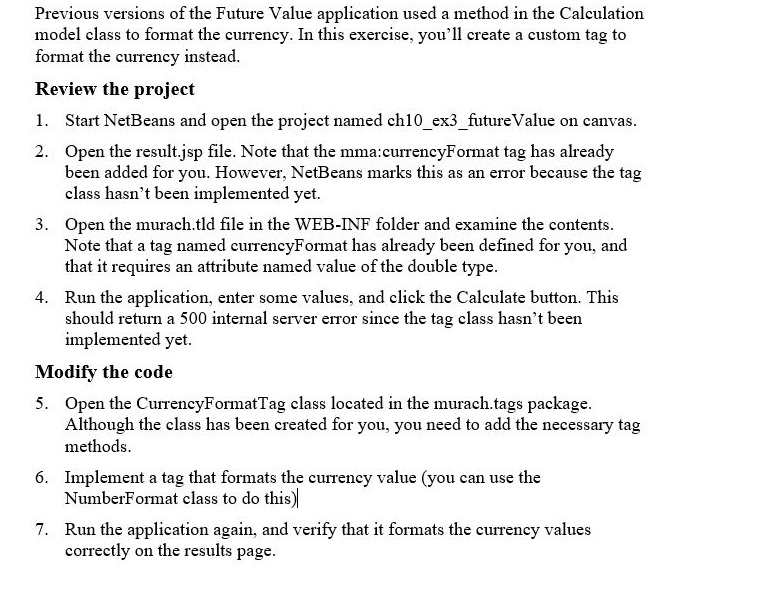
Previous versions of the Future Value application used a method in the Calculation model class to format the currency. In this exercise, you'll create a custom tag to format the currency instead Review the project 1. Start NetBeans and open the project named ch10 ex3 futureValue on canvas 2. Open the result.jsp file. Note that the mma:currencyFormat tag has already been added for you. However, NetBeans marks this as an error because the tag class hasn't been implemented yet. 3. Open the murach.tld file in the WEB-INF folder and examine the contents Note that a tag named currencyFormat has already been defined for you, and that it requires an attribute named value of the double type Run the application, enter some values, and click the Calculate button. This should return a 500 internal server error since the tag class hasn't been implemented yet 4. Modify the code 5. Open the CurrencyFormatTag class located in the murach.tags package Although the class has been created for you, you need to add the necessary tag methods plement a tag that formats the currency value (you can use the NumberFormat class to do this) Run the application again, and verify that it formats the currency values correctly on the results page 7. Previous versions of the Future Value application used a method in the Calculation model class to format the currency. In this exercise, you'll create a custom tag to format the currency instead Review the project 1. Start NetBeans and open the project named ch10 ex3 futureValue on canvas 2. Open the result.jsp file. Note that the mma:currencyFormat tag has already been added for you. However, NetBeans marks this as an error because the tag class hasn't been implemented yet. 3. Open the murach.tld file in the WEB-INF folder and examine the contents Note that a tag named currencyFormat has already been defined for you, and that it requires an attribute named value of the double type Run the application, enter some values, and click the Calculate button. This should return a 500 internal server error since the tag class hasn't been implemented yet 4. Modify the code 5. Open the CurrencyFormatTag class located in the murach.tags package Although the class has been created for you, you need to add the necessary tag methods plement a tag that formats the currency value (you can use the NumberFormat class to do this) Run the application again, and verify that it formats the currency values correctly on the results page 7
Step by Step Solution
There are 3 Steps involved in it

Get step-by-step solutions from verified subject matter experts
 Study Help