Question: CUSTOMER_T CustomerID CustomerName Customer Street CustomerCity Customer State CustomerZipcode CustomerPhone ORDERLINE_T OrderID (FK) ProductiD (FK) OrderQuantity PRODUCT_T ProductID ProductDescription StockQuantity P_UnitPrice CategoryID (FK) ORDER_T OrderID
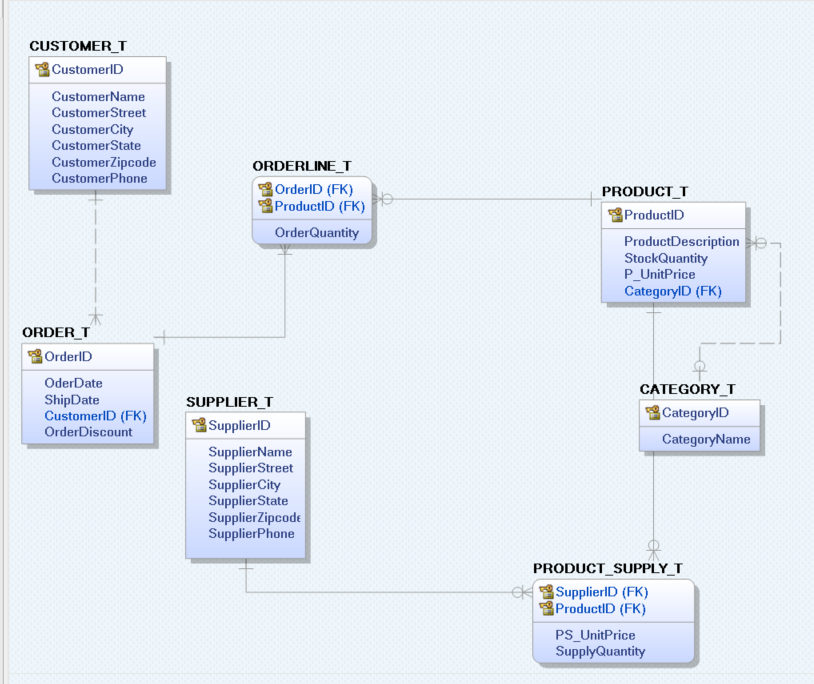
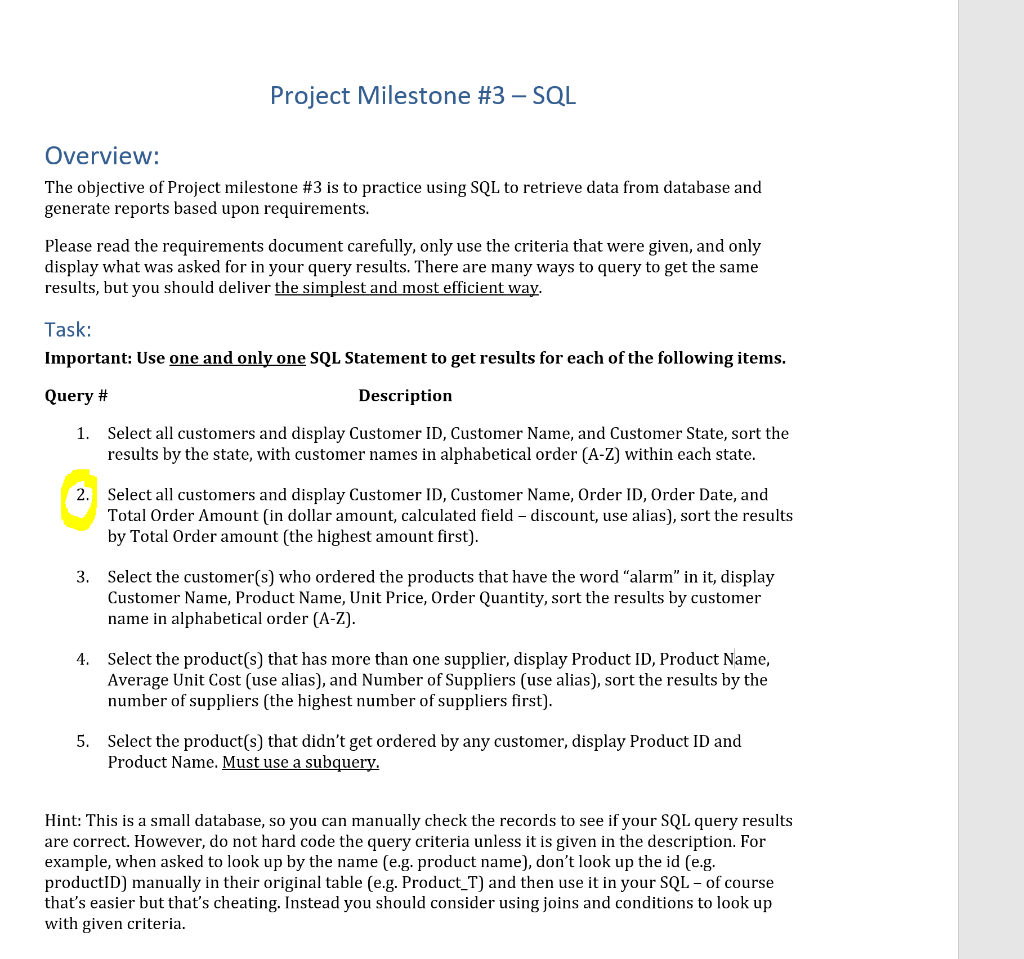
CUSTOMER_T CustomerID CustomerName Customer Street CustomerCity Customer State CustomerZipcode CustomerPhone ORDERLINE_T OrderID (FK) ProductiD (FK) OrderQuantity PRODUCT_T ProductID ProductDescription StockQuantity P_UnitPrice CategoryID (FK) ORDER_T OrderID Oder Date ShipDate CustomerID (FK) Order Discount CATEGORY_T CategoryID CategoryName SUPPLIER_T SupplierID SupplierName Supplier Street SupplierCity Supplier State SupplierZipcode SupplierPhone PRODUCT_SUPPLY_T ok SupplierID (FK) ProductID (FK) PS_UnitPrice SupplyQuantity Project Milestone #3 - SQL Overview: The objective of Project milestone #3 is to practice using SQL to retrieve data from database and generate reports based upon requirements. Please read the requirements document carefully, only use the criteria that were given, and only display what was asked for in your query results. There are many ways to query to get the same results, but you should deliver the simplest and most efficient way. Task: Important: Use one and only one SQL Statement to get results for each of the following items. Query # Description 1. Select all customers and display Customer ID, Customer Name, and Customer State, sort the results by the state, with customer names in alphabetical order (A-Z) within each state. 2. Select all customers and display Customer ID, Customer Name, Order ID, Order Date, and Total Order Amount (in dollar amount, calculated field - discount, use alias), sort the results by Total Order amount (the highest amount first). 3. Select the customer(s) who ordered the products that have the word "alarm" in it, display Customer Name, Product Name, Unit Price, Order Quantity, sort the results by customer name in alphabetical order (A-Z). 4. Select the product(s) that has more than one supplier, display Product ID, Product Name, Average Unit Cost (use alias), and Number of Suppliers (use alias), sort the results by the number of suppliers (the highest number of suppliers first). 5. Select the product(s) that didn't get ordered by any customer, display Product ID and Product Name. Must use a subquery. Hint: This is a small database, so you can manually check the records to see if your SQL query results are correct. However, do not hard code the query criteria unless it is given in the description. For example, when asked to look up by the name (e.g. product name), don't look up the id (e.g. productID) manually in their original table (e.g. Product_T) and then use it in your SQL - of course that's easier but that's cheating. Instead you should consider using joins and conditions to look up with given criteria









 Study Help