







Question: D. Create the required address pools in DHCP server based on the details from the table below, [1 Mark) [Provide a screenshot with description for
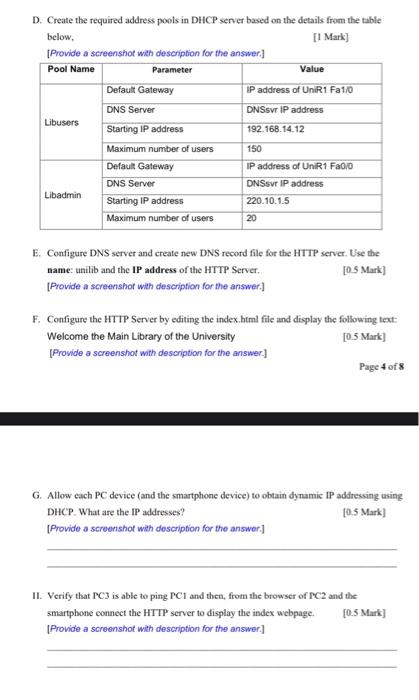
D. Create the required address pools in DHCP server based on the details from the table below, [1 Mark) [Provide a screenshot with description for the answer. Pool Name Parameter Value Default Gateway IP address of UniR1 Fa1/0 DNS Server DNSSV IP address Libusers Starting IP address 192.168.14.12 Maximum number of users 150 Default Gateway IP address of UniR1 Fa0/0 DNS Server DNSSV IP address Libadmin Starting IP address 220.10.1.5 Maximum number of users 20 E. Configure DNS server and create new DNS record file for the HTTP server. Use the name: unilib and the IP address of the HTTP Server [0.5 Mark) [Provide a screenshot with description for the answer.) F. Configure the HTTP Server by editing the index.html file and display the following text: Welcome the Main Library of the University [0.5 Mark) Provide a screenshot with description for the answer.) Page 4 of 8 G. Allow each PC device (and the smartphone device) to obtain dynamic IP addressing using DHCP. What are the IP addresses? [0.5 Mark) [Provide a screenshot with description for the answer.) II. Verify that PC3 is able to ping PCI and then, from the browser of PC2 and the smartphone connect the HTTP server to display the index webpage. [0.5 Mark) [Provide a screenshot with description for the answer.) D. Create the required address pools in DHCP server based on the details from the table below, [1 Mark) [Provide a screenshot with description for the answer. Pool Name Parameter Value Default Gateway IP address of UniR1 Fa1/0 DNS Server DNSSV IP address Libusers Starting IP address 192.168.14.12 Maximum number of users 150 Default Gateway IP address of UniR1 Fa0/0 DNS Server DNSSV IP address Libadmin Starting IP address 220.10.1.5 Maximum number of users 20 E. Configure DNS server and create new DNS record file for the HTTP server. Use the name: unilib and the IP address of the HTTP Server [0.5 Mark) [Provide a screenshot with description for the answer.) F. Configure the HTTP Server by editing the index.html file and display the following text: Welcome the Main Library of the University [0.5 Mark) Provide a screenshot with description for the answer.) Page 4 of 8 G. Allow each PC device (and the smartphone device) to obtain dynamic IP addressing using DHCP. What are the IP addresses? [0.5 Mark) [Provide a screenshot with description for the answer.) II. Verify that PC3 is able to ping PCI and then, from the browser of PC2 and the smartphone connect the HTTP server to display the index webpage. [0.5 Mark) [Provide a screenshot with description for the answer.)
Step by Step Solution
There are 3 Steps involved in it

Get step-by-step solutions from verified subject matter experts
 Study Help