





Question: d. Paste Font AutoSave OFF A @CO Exp19_Excel_Ch07_H... - Saved to my Ma HOME Insert Draw Design Layout Tell me Share A. G Paragraph Styles
d. Paste Font AutoSave OFF A @CO
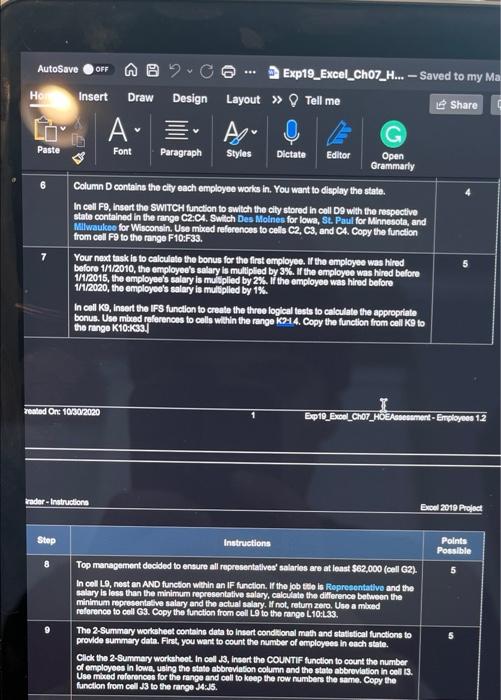
d. Paste Font AutoSave OFF A @CO Exp19_Excel_Ch07_H... - Saved to my Ma HOME Insert Draw Design Layout Tell me Share A. G Paragraph Styles Dictate Editor Open Grammarly Column D contains the city each employee works in. You want to display the stato. In cell F9, Insert the SWITCH function to switch the city stored in coll Do with the respective state contained in the range C2:C4. Switch Des Moines for lowa, St. Paul for Minnesota, and Milwaukee for Wisconsin. Use med references to cells C2, C3, and C4. Copy the function from cell F9 to the range F10:F33. 7 Your next task is to calculate the bonus for the first employee. If the employee was hired before 1/1/2010, the employee's salary is multiplied by 3%. If the employee was hired before 1/1/2015, the employee's salary is multiplied by 2%. If the employee was hired before 1/1/2020, the employee's salary is multiplied by 1%. In collK9, Insert the IFS function to create the three logical tests to calculate the appropriate bonus. Use mixed references to cells within the range 214. Copy the function from cell K9 to the range K10:K33. reated On: 10/30/2020 Expt0_Excel_Cho7_HOE Dement-Employees 12 rader - Instructions Excel 2019 Project Step Instructions Points Possible 5 Top management decided to ensure all representatives salaries are at least $62,000 (cell G2) In cell L9, nostan AND function within an IF function. If the job site is Representative and the salary is less than the minimum representative salary, calculate the difference between the minimum representative salary and the actual salary. W not, return zero. Use a mbed reference to cell G3. Copy the function from coll L9 to the range L 10:L33. The 2-Summary worksheet contains data to Insert conditional math and statistical functions to provide summary data. First, you want to count the number of employees in each state. Click the 2-Summary worksheet. In cell 3, insert the COUNTIF function to count the number of employees in lows, using the state abbreviation column and the state abbreviation in cell 3. Use mbred references for the range and call to keep the row numbers the same. Copy the function from cell J3 to the range 34:J6

Step by Step Solution

There are 3 Steps involved in it

1 Expert Approved Answer
Step: 1 Unlock blur-text-image

Question Has Been Solved by an Expert!

Get step-by-step solutions from verified subject matter experts

Step: 2 Unlock
Step: 3 Unlock

Students Have Also Explored These Related General Management Questions!