







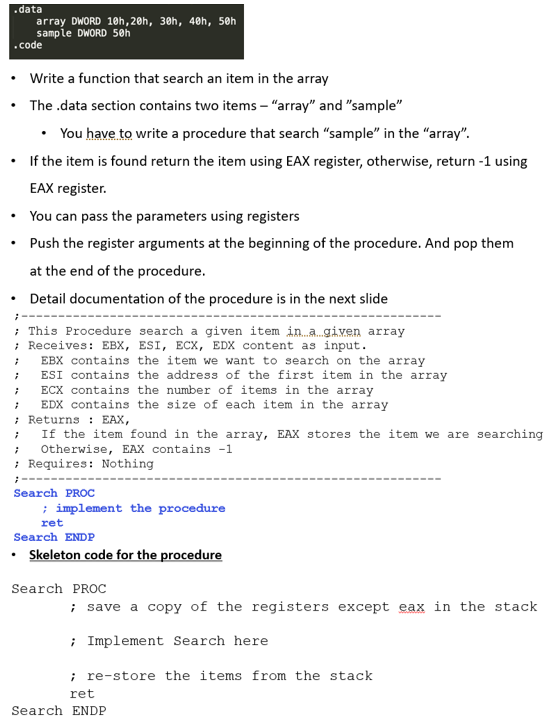
Question: . data array DWORD 1 0 h , 2 0 h , 3 0 h , 4 0 h , 5 0 h sample DWORD
data
array DWORD hhhhh
sample DWORD h
code
Write a function that search an item in the array
The data section contains two items array and sample
You have to write a procedure that search sample in the array
If the item is found return the item using EAX register, otherwise, return using EAX register.
You can pass the parameters using registers
Push the register arguments at the beginning of the procedure. And pop them at the end of the procedure.
Detail documentation of the procedure is in the next slide
;
; This Procedure search a given item in a given array
; Receives: EBX, ESI, ECX, EDX content as input.
; EBX contains the item we want to search on the array
; ESI contains the address of the first item in the array
; ECX contains the number of items in the array
; EDX contains the size of each item in the array
; Returns : EAX,
; If the item found in the array, EAX stores the item we are searching
; Otherwise, EAX contains
; Requires: Nothing
;
Search PROC
; implement the procedure
ret
Search ENDP
Skeleton code for the procedure
Search PROC
; save a copy of the registers except eax in the stack
; Implement Search here
; restore the items from the stack
retWrite a function that search an item in the array
The data section contains two items "array" and "sample"
You have to write a procedure that search "sample" in the "array".
If the item is found return the item using EAX register, otherwise, return using
EAX register.
You can pass the parameters using registers
Push the register arguments at the beginning of the procedure. And pop them
at the end of the procedure.
Detail documentation of the procedure is in the next slide
Skeleton code for the procedure
Search PROC
Search ENDP
Step by Step Solution
There are 3 Steps involved in it
1 Expert Approved Answer
Step: 1 Unlock

Question Has Been Solved by an Expert!
Get step-by-step solutions from verified subject matter experts
Step: 2 Unlock
Step: 3 Unlock
 Study Help