







Question: Data Set Departure Variable Departure Delay Location Full Data Departure Delay Minimum -10 Quantitative Median 0.0 Mean 23.7 Departure Delay in minutes Quartiles Full
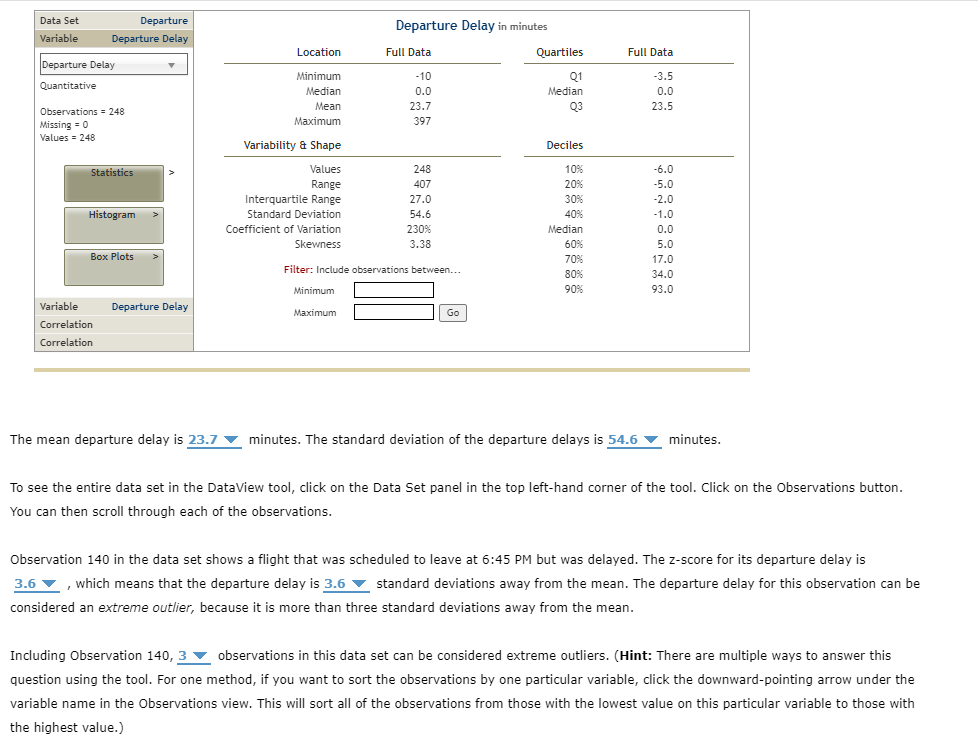
Data Set Departure Variable Departure Delay Location Full Data Departure Delay Minimum -10 Quantitative Median 0.0 Mean 23.7 Departure Delay in minutes Quartiles Full Data -3.5 0.0 23.5 Median Observations = 248 Missing = 0 Maximum 397 Values = 248 Variability & Shape Deciles Statistics Values 248 Range 407 Interquartile Range 27.0 Histogram Standard Deviation Coefficient of Variation Skewness 54.6 230% Median 3.38 Box Plots Filter: Include observations between... * * * * * * * * * * * -6.0 -5.0 -2.0 -1.0 0.0 5.0 17.0 34.0 93.0 Variable Departure Delay Correlation Correlation Minimum Maximum Go The mean departure delay is 23.7 minutes. The standard deviation of the departure delays is 54.6 minutes. To see the entire data set in the DataView tool, click on the Data Set panel in the top left-hand corner of the tool. Click on the Observations button. You can then scroll through each of the observations. Observation 140 in the data set shows a flight that was scheduled to leave at 6:45 PM but was delayed. The z-score for its departure delay is 3.6 , which means that the departure delay is 3.6 standard deviations away from the mean. The departure delay for this observation can be considered an extreme outlier, because it is more than three standard deviations away from the mean. Including Observation 140, 3 observations in this data set can be considered extreme outliers. (Hint: There are multiple ways to answer this question using the tool. For one method, if you want to sort the observations by one particular variable, click the downward-pointing arrow under the variable name in the Observations view. This will sort all of the observations from those with the lowest value on this particular variable to those with the highest value.)
Step by Step Solution
There are 3 Steps involved in it

Get step-by-step solutions from verified subject matter experts
 Study Help