







Question: Data structure and algorithms using C This daily will allow you to practice more with the bit wise operators and shifts. Consider the following modification
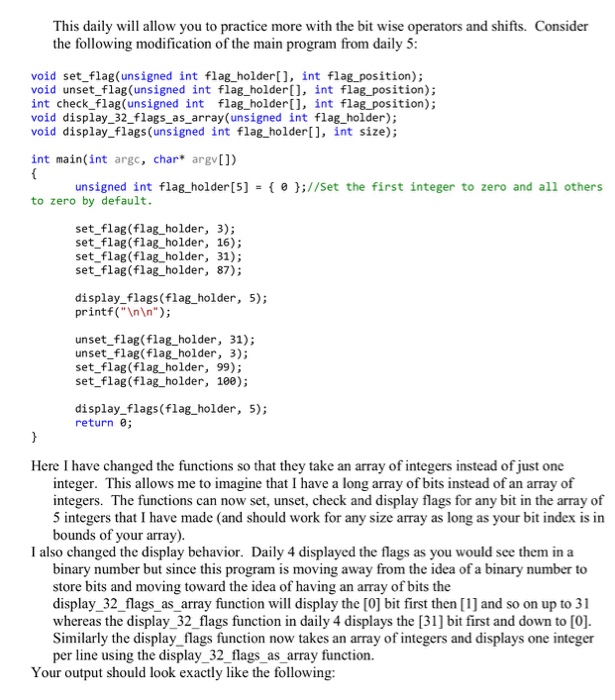
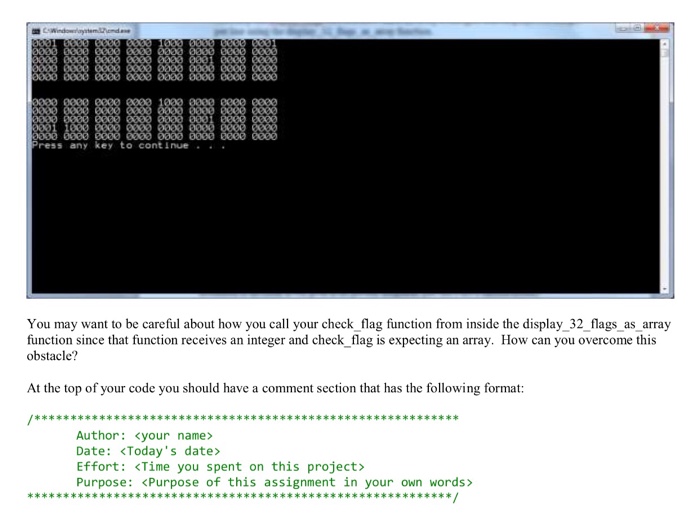
This daily will allow you to practice more with the bit wise operators and shifts. Consider the following modification of the main program from daily 5 void set_flag(unsigned int flag_holder[], int flag_position) void unset flag(unsigned int flag_holder[], int flag position); int check flag(unsigned int flag_holderl), int flag position); void display_32_flags_as_array(unsigned int flag_holder); void display flags (unsigned int flag holder, int size); int main(int argc, char* argv]) un signed int flag-holder[5] { 9 }://set the first integer to zero and all others to zero by default set_flag(flag_holder, 3); set flag (flag holder, 16); set flag (flag_ holder, 31); set flag(flag holder, 87); display_flags (flag holder, 5); printf("In ); unset flag(flag_holder, 31); unset flag(flag_holder, 3); set flag (flag_holder, 99); set flag(flag holder, 100); display flags(flag holder, 5); return 0; Here I have changed the functions so that they take an array of integers instead of just one integer. This allows me to imagine that I have a long array of bits instead of an array of integers. The functions can now set, unset, check and display flags for any bit in the array of 5 integers that I have made (and should work for any size array as long as your bit index is in bounds of your array). I also changed the display behavior. Daily 4 displayed the flags as you would see them in a binary number but since this program is moving away from the idea of a binary number to store bits and moving toward the idea of having an array of bits the display 32 flags as array function will display the [0 bit first then [1] and so on up to 31 whereas the display_32 flags function in daily 4 displays the [31] bit first and down to [0]. Similarly the display flags function now takes an array of integers and displays one integer per line using the display_32_flags as array function. Your output should look exactly like the following: This daily will allow you to practice more with the bit wise operators and shifts. Consider the following modification of the main program from daily 5 void set_flag(unsigned int flag_holder[], int flag_position) void unset flag(unsigned int flag_holder[], int flag position); int check flag(unsigned int flag_holderl), int flag position); void display_32_flags_as_array(unsigned int flag_holder); void display flags (unsigned int flag holder, int size); int main(int argc, char* argv]) un signed int flag-holder[5] { 9 }://set the first integer to zero and all others to zero by default set_flag(flag_holder, 3); set flag (flag holder, 16); set flag (flag_ holder, 31); set flag(flag holder, 87); display_flags (flag holder, 5); printf("In ); unset flag(flag_holder, 31); unset flag(flag_holder, 3); set flag (flag_holder, 99); set flag(flag holder, 100); display flags(flag holder, 5); return 0; Here I have changed the functions so that they take an array of integers instead of just one integer. This allows me to imagine that I have a long array of bits instead of an array of integers. The functions can now set, unset, check and display flags for any bit in the array of 5 integers that I have made (and should work for any size array as long as your bit index is in bounds of your array). I also changed the display behavior. Daily 4 displayed the flags as you would see them in a binary number but since this program is moving away from the idea of a binary number to store bits and moving toward the idea of having an array of bits the display 32 flags as array function will display the [0 bit first then [1] and so on up to 31 whereas the display_32 flags function in daily 4 displays the [31] bit first and down to [0]. Similarly the display flags function now takes an array of integers and displays one integer per line using the display_32_flags as array function. Your output should look exactly like the following
Step by Step Solution
There are 3 Steps involved in it

Get step-by-step solutions from verified subject matter experts
 Study Help