







Question: Database course Consider the TASK and CONTRACT tables defined by the following script, which also populates the JOB table: DROP TABLE CONTRACT CASCADE CONSTRAINTS; DROP
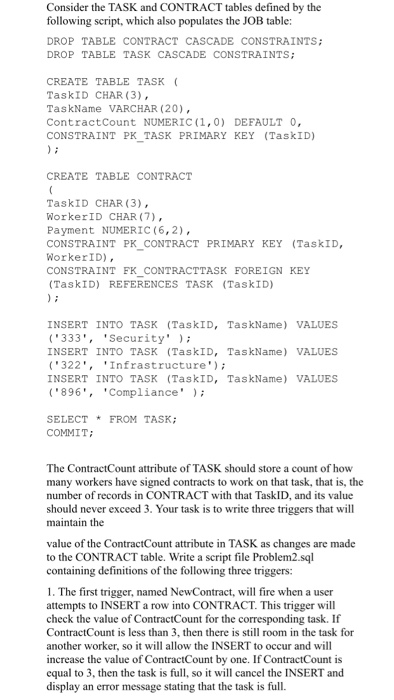
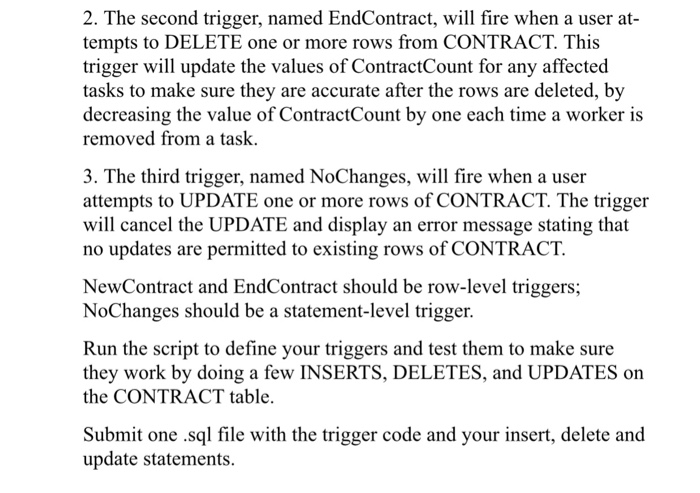
Consider the TASK and CONTRACT tables defined by the following script, which also populates the JOB table: DROP TABLE CONTRACT CASCADE CONSTRAINTS; DROP TABLE TASK CASCADE CONSTRAINTS CREATE TABLE TASK TaskID CHAR (3), TaskName VARCHAR (20) ContractCount NUMERIC (1,0) DEFAULT 0, CONSTRAINT PK_TASK PRIMARY KEY (TaskID) CREATE TABLE CONTRACT TaskID CHAR (3), WorkerID CHAR (7) Payment NUMERIC (6,2) CONSTRAINT PK CONTRACT PRIMARY KEY (TaskID, WorkerID) CONSTRAINT FKCONTRACTTASK FOREIGN KEY (TaskID) REFERENCES TASK (TaskID) INSERT INTO TASK (TaskID, TaskName) VALUES 333', 'Security' INSERT INTO TASK (TaskID, TaskName) VALUES 322','Infrastructure INSERT INTO TASK (TaskID, TaskName) VALUES 896*, 'Compliance' SELECTFROM TASK; COMMIT The ContractCount attribute of TASK should store a count of how many workers have signed contracts to work on that task, that is, the number of records in CONTRACT with that TaskID, and its value should never exceed 3. Your task is to write three triggers that will maintain the value of the ContractCount attribute in TASK as changes are made to the CONTRACT table. Write a script file Problem2.sql containing definitions of the following three triggers: 1. The first trigger, named NewContract, will fire when a user attempts to INSERT a row into CONTRACT. This trigger will check the value of ContractCount for the corresponding task. If ContractCount is less than 3, then there is still room in the task for another worker, so it will allow the INSERT to occur and will increase the value of ContractCount by one. If ContractCount is equal to 3, then the task is full, so it will cancel the INSERT and display an error message stating that the task is full
Step by Step Solution
There are 3 Steps involved in it

Get step-by-step solutions from verified subject matter experts
 Study Help