







Question: database management 2 2. Here is code for a transaction that moves rows from the Invoices table to the Invoice Archive table: Begin Try Begin
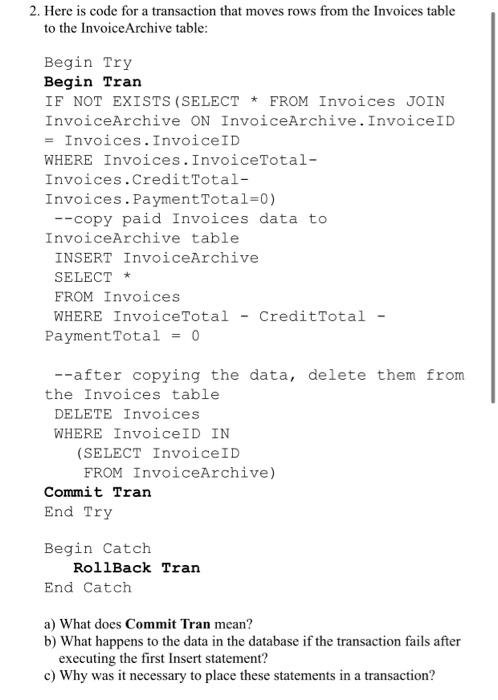
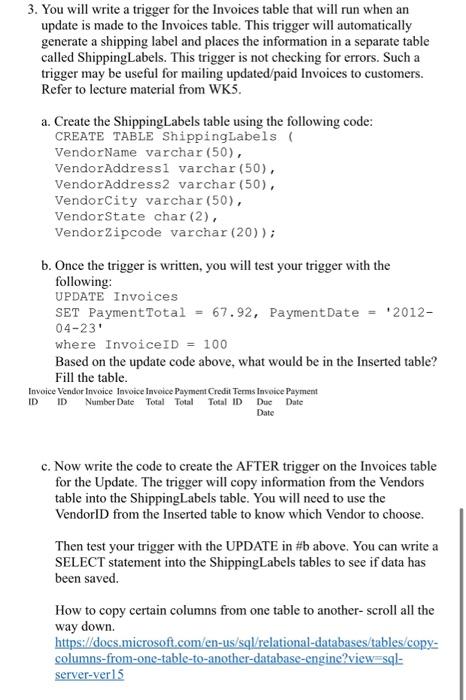
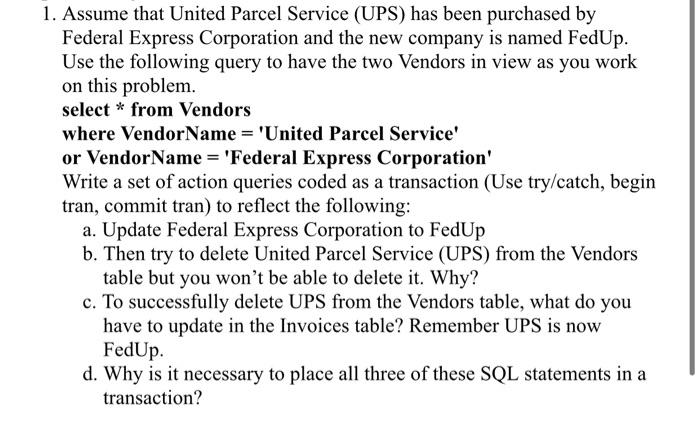
2. Here is code for a transaction that moves rows from the Invoices table to the Invoice Archive table: Begin Try Begin Tran IF NOT EXISTS (SELECT * FROM Invoices JOIN InvoiceArchive ON InvoiceArchive. InvoiceID = Invoices. InvoiceID WHERE Invoices. InvoiceTotal- Invoices.CreditTotal- Invoices. Payment Total=0) --copy paid Invoices data to InvoiceArchive table INSERT InvoiceArchive SELECT * FROM Invoices WHERE Invoice Total - CreditTotal - Payment Total = 0 --after copying the data, delete them from the Invoices table DELETE Invoices WHERE InvoiceID IN (SELECT InvoiceID FROM InvoiceArchive) Commit Tran End Try Begin Catch RollBack Tran End Catch a) What does Commit Tran mean? b) What happens to the data in the database if the transaction fails after executing the first Insert statement? c) Why was it necessary to place these statements in a transaction? 3. You will write a trigger for the invoices table that will run when an update is made to the Invoices table. This trigger will automatically generate a shipping label and places the information in a separate table called ShippingLabels. This trigger is not checking for errors. Such a trigger may be useful for mailing updated/paid Invoices to customers. Refer to lecture material from WK5. a. Create the ShippingLabels table using the following code: CREATE TABLE ShippingLabels VendorName varchar(50), VendorAddressi varchar(50), VendorAddress2 varchar (50), VendorCity varchar (50), Vendor State char (2), VendorZipcode varchar (20)); b. Once the trigger is written, you will test your trigger with the following: UPDATE Invoices SET Payment Total = 67.92, Payment Date = '2012- 04-23 where InvoiceID = 100 Based on the update code above, what would be in the Inserted table? Fill the table. Invoice Vendor Invoice Invoice Invoice Payment Credit Terms Invoice Payment Number Date Total Total Total ID Due Date ID ID Date c. Now write the code to create the AFTER trigger on the Invoices table for the Update. The trigger will copy information from the Vendors table into the ShippingLabels table. You will need to use the VendorID from the Inserted table to know which Vendor to choose. Then test your trigger with the UPDATE in #b above. You can write a SELECT statement into the ShippingLabels tables to see if data has been saved. How to copy certain columns from one table to another-scroll all the way down. https://docs.microsoft.com/en-us/sql/relational-databases/tables/copy- columns-from-one-table-to-another-database-engine?view=sql- server-vers 1. Assume that United Parcel Service (UPS) has been purchased by Federal Express Corporation and the new company is named FedUp. Use the following query to have the two Vendors in view as you work on this problem. select * from Vendors where VendorName = 'United Parcel Service or VendorName = 'Federal Express Corporation' Write a set of action queries coded as a transaction (Use try/catch, begin tran, commit tran) to reflect the following: a. Update Federal Express Corporation to FedUp b. Then try to delete United Parcel Service (UPS) from the Vendors table but you won't be able to delete it. Why? c. To successfully delete UPS from the Vendors table, what do you have to update in the Invoices table? Remember UPS is now FedUp. d. Why is it necessary to place all three of these SQL statements in a transaction
Step by Step Solution
There are 3 Steps involved in it

Get step-by-step solutions from verified subject matter experts
 Study Help