







Question: Database management (c# using visual studio) CREATING A GRADEBOOK USING WINDOWS FORMS IN C# View Pront Build Debug Dwa 1. Press on View to click
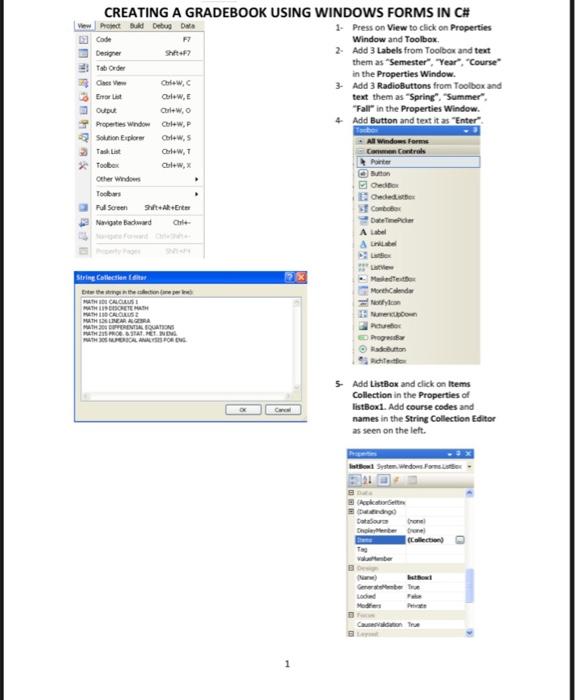
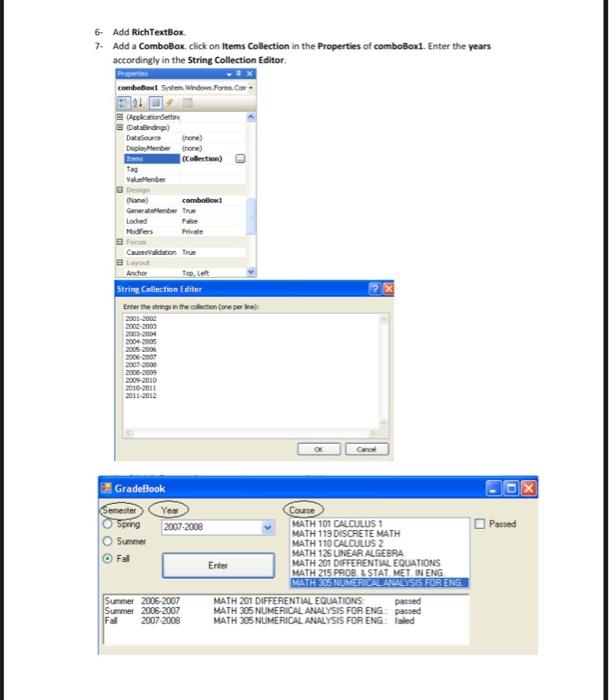
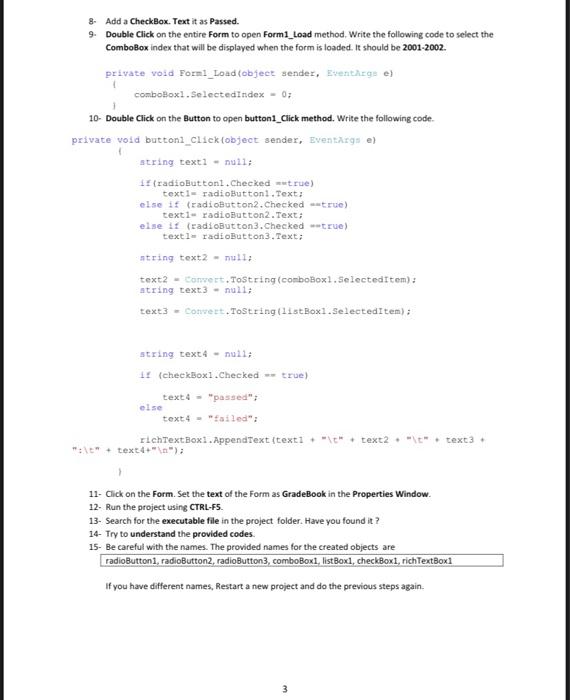
CREATING A GRADEBOOK USING WINDOWS FORMS IN C# View Pront Build Debug Dwa 1. Press on View to click on Properties Code F Window and Toolbox Designer 2. Add 3 Labels from Toolbox and text To Order them as "Semester", "Year", "Course in the Properties Window. 3 Ches Chew, 3. Add 3 RadioButtons from Toolbox and Eror Olew text them as "Spring Summer". Output Corlewo "Fall in the Properties Window. Properties Window Crew,P 4 Add Button and text it as "Enter" Solution Explorer Corlews All Windows Forms Chew, Castrol foober Porter Other Windows Credit Toobs Order Full Screen Ert Com Navigate Bawa Chile & 2X String Collection tieteen.com GALLUST MHETE CROUSE MATHEMA BUVRENTIA. OUATIONS TOT HET NING AUTHORICAL ASSO Made More con Progreso 5 Add ListBox and click on Items Collection in the Properties of listBox1. Add course codes and names in the String Collection Editor as seen on the lett. Istol System.Windows.Forms Geek Dandupanel Dhimber one Collection) Tag Gerber LOOR Case 1 6- Add RichTextBox 7. Add a ComboBox click on Items Collection in the Properties of comboBox1. Enter the years accordingly in the String Collection Editor. Properties comboBox System.Windows.Forms. 321 Aplication et Dindings DMSO none) Diplomberone) (Collection) Tag Valleber Lamel Combollow Generelleber True Loded False Modifiers Private Causes adation True Ancher Tap, latt String Collection Edite Enter the string in the collection (one per le 2001-2002 2002-2000 2003-2004 2004 2005 2005 2006 2006-2007 2008-2009 2009 2010 2010-2011 2011-2012 Cro D X 1 x Passed Gradebook Semester Yes Courte Speng 2007-2008 MATH 101 CALCULUS 1 MATH 119 DISCRETE MATH Summer MATH 110 CALCULUS 2 MATH 125 UNEAR ALGEBRA Fal Enter MATH 201 DIFFERENTIAL EQUATIONS MATH 215 PROBU STAT. MET IN ENG MATH NUMERICALAVLYSIS FOR ENG Summer 2006-2007 MATH 201 DIFFERENTIAL EQUATIONS passed Summer 2006 2007 MATH 305 NUMERICAL ANALYSIS FOR ENG passed Fall 2007-2008 MATH 305 NUMERICAL ANALYSIS FOR ENG: failed 8. Add a CheckBox. Text it as Passed. 9. Double Click on the entire Form to open Form1_Load method. Write the following code to select the ComboBox index that will be displayed when the form is loaded. It should be 2001-2002. private void Forml_Load(object sender, EventArgs e) comboBox1.SelectedIndex - 03 10- Double Click on the button to open button1_Click method. Write the following code. private void button1_Clickobject sender, Eventrgs e) string texti - null; 1 (radioButtonl. Checked true) texti radioButton1.Text; else if (radioButton2.checked true) texti radioButton2.Text: else if (radioButton3.checked true) texti radioButton3.Text; string text2- null; text2 - Comert.ToString(comboBox1.SelectedItem): string text 3 - null; text3 - Convert.ToString(listBox1. Selected Item): string text4 - nulli 11 (checkBox1.checked -- true) text4 - "passed": text 4 - "failed": richTextBox1. AppendText {texti *** text2 .. text3 . else "1" + text4" "); 11. Click on the Form. Set the text of the Form as GradeBook in the Properties Window. 12. Run the project using CTRL-F5. 13- Search for the executable file in the project folder. Have you found it? 14. Try to understand the provided codes. 15- Be careful with the names. The provided names for the created objects are radioButtoni, radioButton2, radioButton3, comboBoxi, listBoxil, checkBoxi, richTextBoxi If you have different names, Restart a new project and do the previous steps again 3
Step by Step Solution
There are 3 Steps involved in it

Get step-by-step solutions from verified subject matter experts
 Study Help