







Question: Database management (using c# on visual studio) CREATING A SIMPLE CALCULATOR USING WINDOWS FORMS IN C# 1. Select File-> New->New Project 2. Select Windows Form
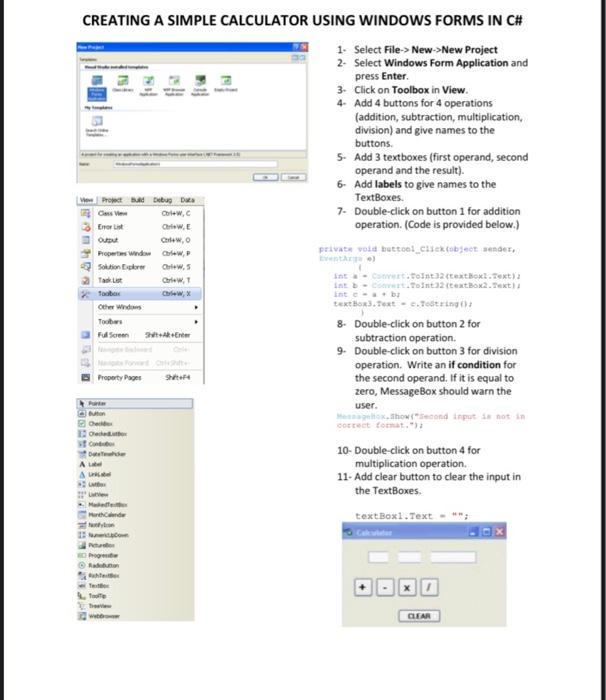
CREATING A SIMPLE CALCULATOR USING WINDOWS FORMS IN C# 1. Select File-> New->New Project 2. Select Windows Form Application and press Enter 3. Click on Toolbox in View. 4- Add 4 buttons for 4 operations (addition, subtraction, multiplication, division) and give names to the buttons. 5. Add 3 textboxes (first operand, second operand and the result). 6 Add labels to give names to the TextBoxes. 7. Double-click on button 1 for addition operation. (Code is provided below.) private void button1_Click(object sender, Protect bud Dibup Dua Cassie Colew, Enor List Crew, QUI Crew, Properts widow Crew, Solution Explore Takt Crew, Tobo Chew, Other Windows Tooters Fusce En Intertoint32 (textBox1.Text) IL C.Toint (textBox2.Text int textBox.Text. Tot 8. Double-click on button 2 for subtraction operation 9. Double-click on button 3 for division operation. Write an if condition for the second operand. If it is equal to zero, MessageBox should warn the user. totho (second input is not in Shift A 10- Double-click on button 4 for multiplication operation 11- Add clear button to clear the input in the TextBoxes textBox1.Text Pog Radeo e CLEAR
Step by Step Solution
There are 3 Steps involved in it

Get step-by-step solutions from verified subject matter experts
 Study Help