







Question: Database SQL Question Document Q Search in Document Home InsertDesign Layot References Mailings Review View Add-ins Share ^ Calibri (Body) 12 AAv A, Paste Styles
Database SQL Question
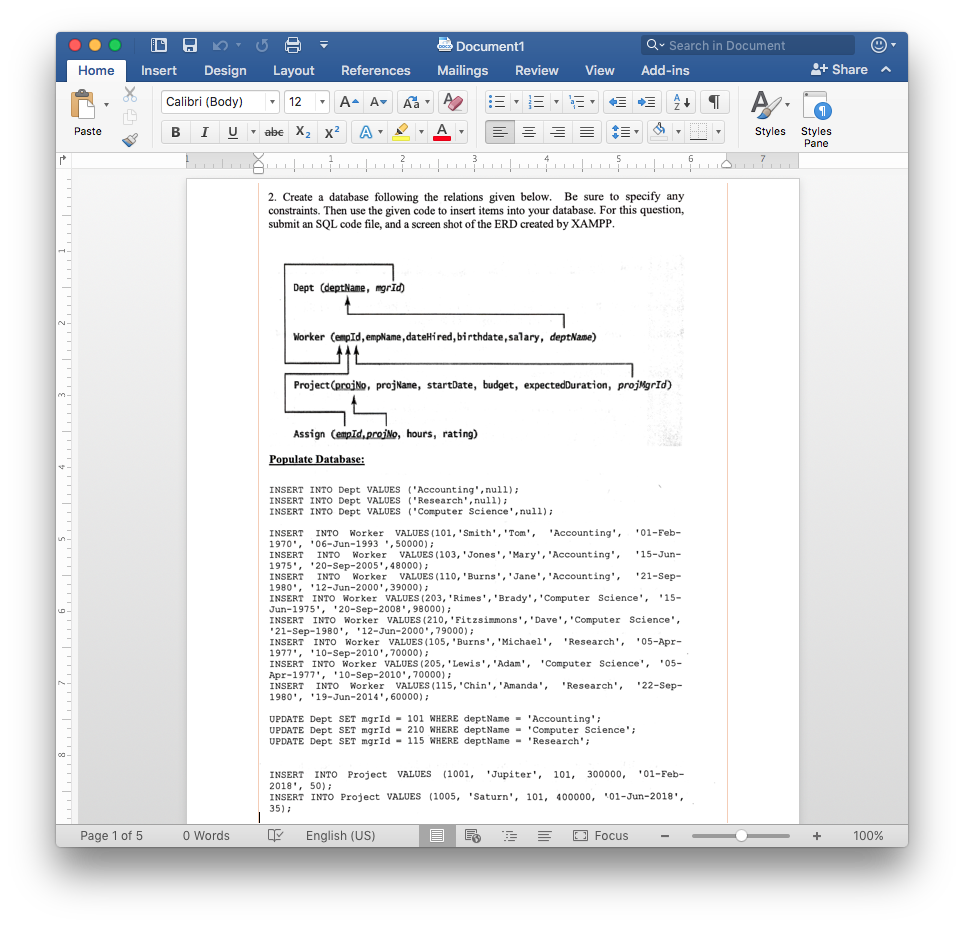
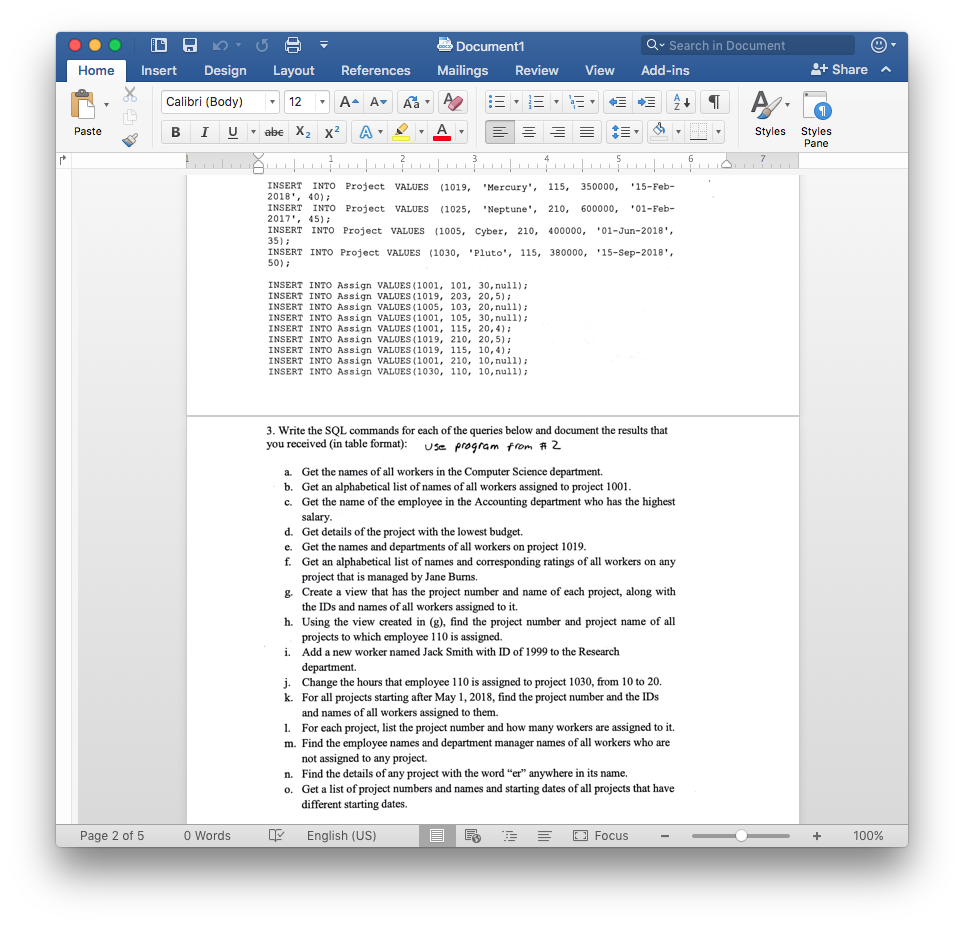

Document Q Search in Document Home InsertDesign Layot References Mailings Review View Add-ins Share ^ Calibri (Body) 12 AAv A, Paste Styles Styles Pane 2. Create a database following the relations given below. Be sure to specify any constraints. Then use the given code to insert items into your database. For this question, submit an SQL code file, and a screen shot of the ERD created by XAMPP Dept (deptName, mgrId) Worker (empId, empWame, dateHired, birthdate, salary, deptName) Project (praiNo, projNane, startDate, budget, expectedDuration, projMgrId) Assign (empId,proiNo, hours, rating) ulate Database INSERT INTO Dept VALUES ('Accounting,null) INSERT INTO Dept VALUES 'Research,null)i INSERT INTO Dept VALUES "Computer Science,null)i INSERT INTO Worker VALUES (101, 'Smith', 'Tom''Accounting01-Feb- 1970, 06-Jun-1993,50000) INSERT INTO Worker VALUES (103,'Jones','Mary, 'Accounting'15-Jun- 1975'20-Sep-2005,48000) INSERT INTO Worker VALUES (110, Burns','Jane 'Accounting', 21-Sep- 1980, 12-Jun-2000,39000) INSERT INTO Worker VALUES (203, 'Rimes', 'Brady,'Computer Science'15- Jun-1975', '20-Sep-2008,98000) INSERT INTO Worker VALUES (210, 'Fitzsimmons' Dave, Computer Science, 21-Sep-1980',12-Jun-2000,79000) INSERT INTO Worker VALUES (105, Burns', 'Michael 'Research', 05-Apr- 1977','10-Sep-2010,70000) INSERT INTO Worker VALUES (205, 'Lewis'"Adam'Computer Science05- Apr-1977', '10-Sep-2010,70000) INSERT INTO Worker VALUES(115, "Chin', Amanda 1980', '19-Jun-2014, 60000) Research 22-Sep- UPDATE Dept SET mgrId-101 WHERE deptName-'Accounting UPDATE Dept SET mgrId210 WHERE deptName'Computer Science UPDATE Dept SET mgrId 115 WHERE deptName Research INSERT INTO Project VALUES (1001, Jupiter 101, 300000,'01-Feb- 2018', 50) INSERT INTO Project VALUES (1005, "Saturn, 101, 400000, 01-Jun-2018 35)1 Page 1 of 5 0 Words English (US) [] Focus 100%
Step by Step Solution
There are 3 Steps involved in it

Get step-by-step solutions from verified subject matter experts
 Study Help