







Question: DATABASES BELOW: CREATE TABLE Categories ( CategoryID INT PRIMARY KEY IDENTITY, CategoryName VARCHAR(255) NOT NULL UNIQUE ); CREATE TABLE Products ( ProductID INT PRIMARY KEY
DATABASES BELOW:
CREATE TABLE Categories ( CategoryID INT PRIMARY KEY IDENTITY, CategoryName VARCHAR(255) NOT NULL UNIQUE );
CREATE TABLE Products ( ProductID INT PRIMARY KEY IDENTITY, CategoryID INT REFERENCES Categories (CategoryID), ProductCode VARCHAR(10) NOT NULL UNIQUE, ProductName VARCHAR(255) NOT NULL, Description TEXT NOT NULL, ListPrice MONEY NOT NULL, DiscountPercent MONEY NOT NULL DEFAULT 0.00, DateAdded DATETIME DEFAULT NULL );
CREATE TABLE Customers ( CustomerID INT PRIMARY KEY IDENTITY, EmailAddress VARCHAR(255) NOT NULL UNIQUE, Password VARCHAR(60) NOT NULL, FirstName VARCHAR(60) NOT NULL, LastName VARCHAR(60) NOT NULL, ShippingAddressID INT DEFAULT NULL, BillingAddressID INT DEFAULT NULL );
CREATE TABLE Addresses ( AddressID INT PRIMARY KEY IDENTITY, CustomerID INT REFERENCES Customers (CustomerID), Line1 VARCHAR(60) NOT NULL, Line2 VARCHAR(60) DEFAULT NULL, City VARCHAR(40) NOT NULL, State VARCHAR(2) NOT NULL, ZipCode VARCHAR(10) NOT NULL, Phone VARCHAR(12) NOT NULL, Disabled INT NOT NULL DEFAULT 0 );
CREATE TABLE Orders ( OrderID INT PRIMARY KEY IDENTITY, CustomerID INT REFERENCES Customers (CustomerID), OrderDate DATETIME NOT NULL, ShipAmount MONEY NOT NULL, TaxAmount MONEY NOT NULL, ShipDate DATETIME DEFAULT NULL, ShipAddressID INT NOT NULL, CardType VARCHAR(50) NOT NULL, CardNumber CHAR(16) NOT NULL, CardExpires CHAR(7) NOT NULL, BillingAddressID INT NOT NULL );
CREATE TABLE OrderItems ( ItemID INT PRIMARY KEY IDENTITY, OrderID INT REFERENCES Orders (OrderID), ProductID INT REFERENCES Products (ProductID), ItemPrice MONEY NOT NULL, DiscountAmount MONEY NOT NULL, Quantity INT NOT NULL );
CREATE TABLE Administrators ( AdminID INT PRIMARY KEY IDENTITY, EmailAddress VARCHAR(255) NOT NULL, Password VARCHAR(255) NOT NULL, FirstName VARCHAR(255) NOT NULL, LastName VARCHAR(255) NOT NULL );
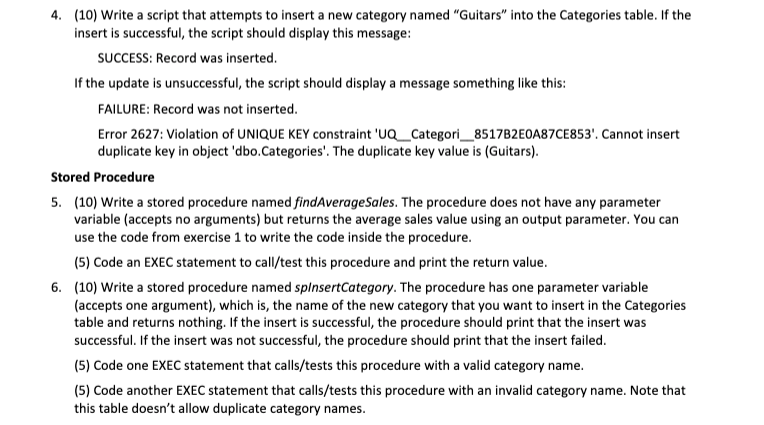
4. (10) Write a script that attempts to insert a new category named "Guitars" into the Categories table. If the insert is successful, the script should display this message: SUCCESS: Record was inserted. If the update is unsuccessful, the script should display a message something like this: FAILURE: Record was not inserted. Error 2627: Violation of UNIQUE KEY constraint 'NQ_Categori_8517B2E0A87CE853'. Cannot insert duplicate key in object 'dbo. Categories'. The duplicate key value is (Guitars). Stored Procedure 5. (10) Write a stored procedure named findAverageSales. The procedure does not have any parameter variable (accepts no arguments) but returns the average sales value using an output parameter. You can use the code from exercise 1 to write the code inside the procedure. (5) Code an EXEC statement to call/test this procedure and print the return value. 6. (10) Write a stored procedure named spinsertCategory. The procedure has one parameter variable (accepts one argument), which is the name of the new category that you want to insert in the Categories table and returns nothing. If the insert is successful, the procedure should print that the insert was successful. If the insert was not successful, the procedure should print that the insert failed. (5) Code one EXEC statement that calls/tests this procedure with a valid category name. (5) Code another EXEC statement that calls/tests this procedure with an invalid category name. Note that this table doesn't allow duplicate category names. 4. (10) Write a script that attempts to insert a new category named "Guitars" into the Categories table. If the insert is successful, the script should display this message: SUCCESS: Record was inserted. If the update is unsuccessful, the script should display a message something like this: FAILURE: Record was not inserted. Error 2627: Violation of UNIQUE KEY constraint 'NQ_Categori_8517B2E0A87CE853'. Cannot insert duplicate key in object 'dbo. Categories'. The duplicate key value is (Guitars). Stored Procedure 5. (10) Write a stored procedure named findAverageSales. The procedure does not have any parameter variable (accepts no arguments) but returns the average sales value using an output parameter. You can use the code from exercise 1 to write the code inside the procedure. (5) Code an EXEC statement to call/test this procedure and print the return value. 6. (10) Write a stored procedure named spinsertCategory. The procedure has one parameter variable (accepts one argument), which is the name of the new category that you want to insert in the Categories table and returns nothing. If the insert is successful, the procedure should print that the insert was successful. If the insert was not successful, the procedure should print that the insert failed. (5) Code one EXEC statement that calls/tests this procedure with a valid category name. (5) Code another EXEC statement that calls/tests this procedure with an invalid category name. Note that this table doesn't allow duplicate category names
Step by Step Solution
There are 3 Steps involved in it

Get step-by-step solutions from verified subject matter experts
 Study Help