



Question: de beste And The Title: A Simple Calculator und Graph of Special Festi Objects Develop a simple call Stahy voltage across capacita circuit Equipment IBM
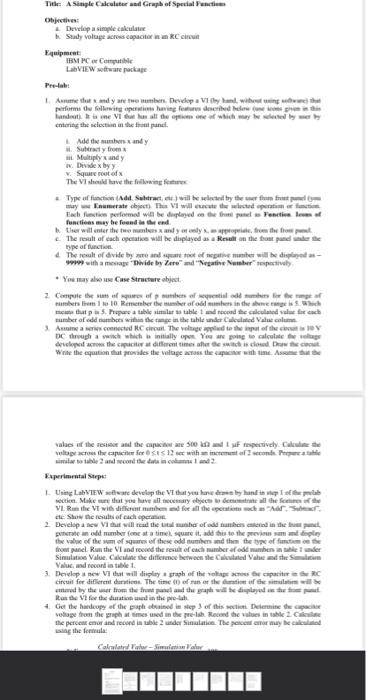
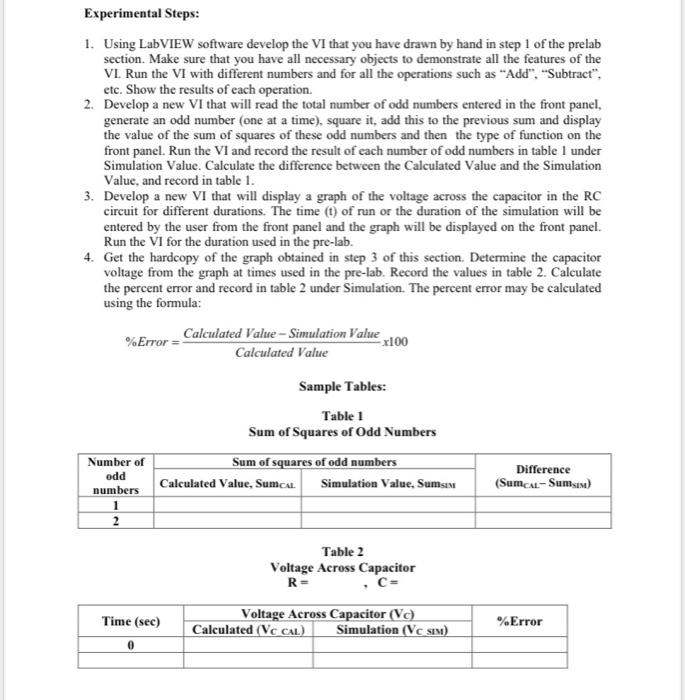
de beste And The Title: A Simple Calculator und Graph of Special Festi Objects Develop a simple call Stahy voltage across capacita circuit Equipment IBM PC Compte LVIEW ware package perform the following operation for described up Banda Vi bulu all the time which may be by merby entering the clock in the panel Add the bandy Sutraty from Multiply andy 1. Divide by Square feet of The Visherve the following Type of function Ad Selerat) will be led by the from may Enumerate object. The VI will the peace Each function performed will be displayed on the fuel Pentium functions may be fundet end ther will enter the many app from the front The result of each will be displayed as a the front and type of function The result of divide by zero and que tot el pie manier will be displayed - with my hide by Zeredetine Number * You may alone Case Structure ahjet 2 Compute the af of old me rambers from 1 to Remember se number of alumbers in the menges em that pas. Prepare a table simular tahle 1 de calculated sale for auch number of odd numbers within the tange in the table under Calculated Valec Ana serie connected Circut. The voltage applied to the spot of the chose DC through a wich which initially open you are going to calculate the age det at the capacitat different time there is closed. Det Write the equation that provides the voltage to the with me. Assume values of the rest and the capacitete so frespectively. Calea veloped the SES 12 wheels imetable and record the data in com1 and 2 Experimental Stop rectie Make ut you have allery by the theme VL Run the VT with different for all the per Star 2. Develop a sew Vi hat will read the albero dumbes end in de buurt pererten odd number one to time sure to add his to the preview malale the the type of front panel.Rathe VI Simulation 3 med by the brother and the graph will helyed the Rose for the dead in the Get the hardcopy of the plained in sip of this section Determine the vorlage from the times used in the presh Record the values in the 2. the percentner and record in table under Simulation. The percent or may be called Calnilaittats - Experimental Steps: 1. Using LabVIEW software develop the VI that you have drawn by hand in step 1 of the prelab section. Make sure that you have all necessary objects to demonstrate all the features of the VI. Run the VI with different numbers and for all the operations such as "Add", "Subtract", etc. Show the results of each operation. 2. Develop a new VI that will read the total number of odd numbers entered in the front panel, generate an odd number one at a time), square it, add this to the previous sum and display the value of the sum of squares of these odd numbers and then the type of function on the front panel. Run the VI and record the result of each number of odd numbers in table I under Simulation Value. Calculate the difference between the Calculated Value and the Simulation Value, and record in table 1. 3. Develop a new VI that will display a graph of the voltage across the capacitor in the RC circuit for different durations. The time (t) of run or the duration of the simulation will be entered by the user from the front panel and the graph will be displayed on the front panel. Run the VI for the duration used in the pre-lab. 4. Get the hardcopy of the graph obtained in step 3 of this section. Determine the capacitor voltage from the graph at times used in the pre-lab. Record the values in table 2. Calculate the percent error and record in table 2 under Simulation. The percent error may be calculated using the formula: %Error Calculated Value Simulation Value x100 Calculated Value Sample Tables: Table 1 Sum of Squares of Odd Numbers Number of odd Sum of squares of odd numbers Calculated Value, Sumat Simulation Value, Sumsen Difference (Sumcal-Sumsin) numbers 1 2 Table 2 Voltage Across Capacitor RE C= Time (sec) Voltage Across Capacitor (Vc) Calculated (VC CAL) Simulation (Vc sin) %Error 0 de beste And The Title: A Simple Calculator und Graph of Special Festi Objects Develop a simple call Stahy voltage across capacita circuit Equipment IBM PC Compte LVIEW ware package perform the following operation for described up Banda Vi bulu all the time which may be by merby entering the clock in the panel Add the bandy Sutraty from Multiply andy 1. Divide by Square feet of The Visherve the following Type of function Ad Selerat) will be led by the from may Enumerate object. The VI will the peace Each function performed will be displayed on the fuel Pentium functions may be fundet end ther will enter the many app from the front The result of each will be displayed as a the front and type of function The result of divide by zero and que tot el pie manier will be displayed - with my hide by Zeredetine Number * You may alone Case Structure ahjet 2 Compute the af of old me rambers from 1 to Remember se number of alumbers in the menges em that pas. Prepare a table simular tahle 1 de calculated sale for auch number of odd numbers within the tange in the table under Calculated Valec Ana serie connected Circut. The voltage applied to the spot of the chose DC through a wich which initially open you are going to calculate the age det at the capacitat different time there is closed. Det Write the equation that provides the voltage to the with me. Assume values of the rest and the capacitete so frespectively. Calea veloped the SES 12 wheels imetable and record the data in com1 and 2 Experimental Stop rectie Make ut you have allery by the theme VL Run the VT with different for all the per Star 2. Develop a sew Vi hat will read the albero dumbes end in de buurt pererten odd number one to time sure to add his to the preview malale the the type of front panel.Rathe VI Simulation 3 med by the brother and the graph will helyed the Rose for the dead in the Get the hardcopy of the plained in sip of this section Determine the vorlage from the times used in the presh Record the values in the 2. the percentner and record in table under Simulation. The percent or may be called Calnilaittats - Experimental Steps: 1. Using LabVIEW software develop the VI that you have drawn by hand in step 1 of the prelab section. Make sure that you have all necessary objects to demonstrate all the features of the VI. Run the VI with different numbers and for all the operations such as "Add", "Subtract", etc. Show the results of each operation. 2. Develop a new VI that will read the total number of odd numbers entered in the front panel, generate an odd number one at a time), square it, add this to the previous sum and display the value of the sum of squares of these odd numbers and then the type of function on the front panel. Run the VI and record the result of each number of odd numbers in table I under Simulation Value. Calculate the difference between the Calculated Value and the Simulation Value, and record in table 1. 3. Develop a new VI that will display a graph of the voltage across the capacitor in the RC circuit for different durations. The time (t) of run or the duration of the simulation will be entered by the user from the front panel and the graph will be displayed on the front panel. Run the VI for the duration used in the pre-lab. 4. Get the hardcopy of the graph obtained in step 3 of this section. Determine the capacitor voltage from the graph at times used in the pre-lab. Record the values in table 2. Calculate the percent error and record in table 2 under Simulation. The percent error may be calculated using the formula: %Error Calculated Value Simulation Value x100 Calculated Value Sample Tables: Table 1 Sum of Squares of Odd Numbers Number of odd Sum of squares of odd numbers Calculated Value, Sumat Simulation Value, Sumsen Difference (Sumcal-Sumsin) numbers 1 2 Table 2 Voltage Across Capacitor RE C= Time (sec) Voltage Across Capacitor (Vc) Calculated (VC CAL) Simulation (Vc sin) %Error 0
Step by Step Solution
There are 3 Steps involved in it

Get step-by-step solutions from verified subject matter experts