







Question: Debug through each line of your code. Execute the instruction Take a screenshot of the code and register window Record the line number, instruction, Register
- Debug through each line of your code.
- Execute the instruction
- Take a screenshot of the code and register window
- Record the line number, instruction, Register values in the answer sheet.
- Also, add the screenshot
- Then explain the register contents.
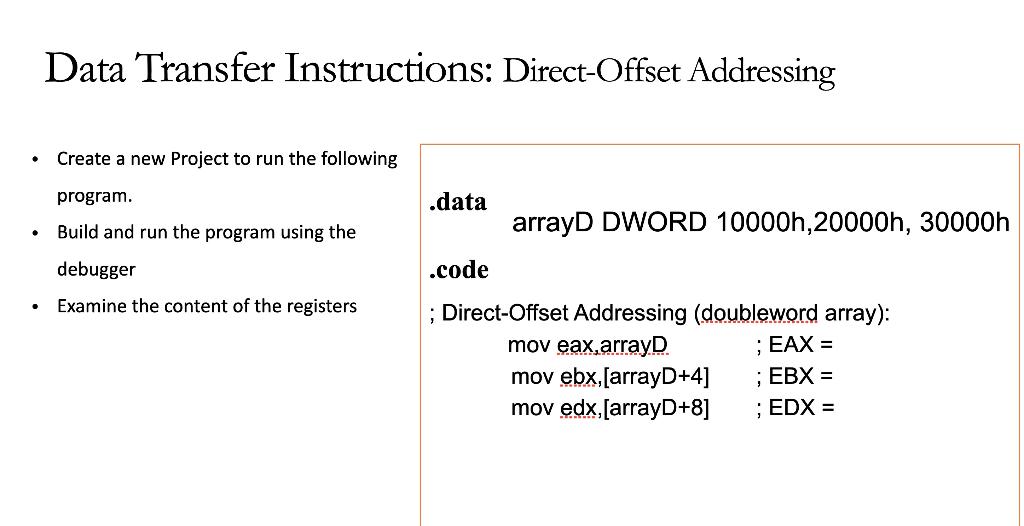
Data Transfer Instructions: Direct-Offset Addressing . Create a new Project to run the following program. .data Build and run the program using the arrayD DWORD 10000h, 20000h, 30000h .code debugger Examine the content of the registers ; Direct-Offset Addressing (doubleword array): mov eax,arrayD ; EAX = mov ebx, (arrayD+4] ; EBX = mov edx,[arrayD+8] ; EDX = Data Transfer Instructions: Direct-Offset Addressing . Create a new Project to run the following program. .data Build and run the program using the arrayD DWORD 10000h, 20000h, 30000h .code debugger Examine the content of the registers ; Direct-Offset Addressing (doubleword array): mov eax,arrayD ; EAX = mov ebx, (arrayD+4] ; EBX = mov edx,[arrayD+8] ; EDX =
Step by Step Solution
There are 3 Steps involved in it

Get step-by-step solutions from verified subject matter experts
 Study Help