







Question: //DebugHW.cpp file #include using namespace std; int main() { int x = 45, y = 24, z = 19, w, a; double num1 = 4.8,
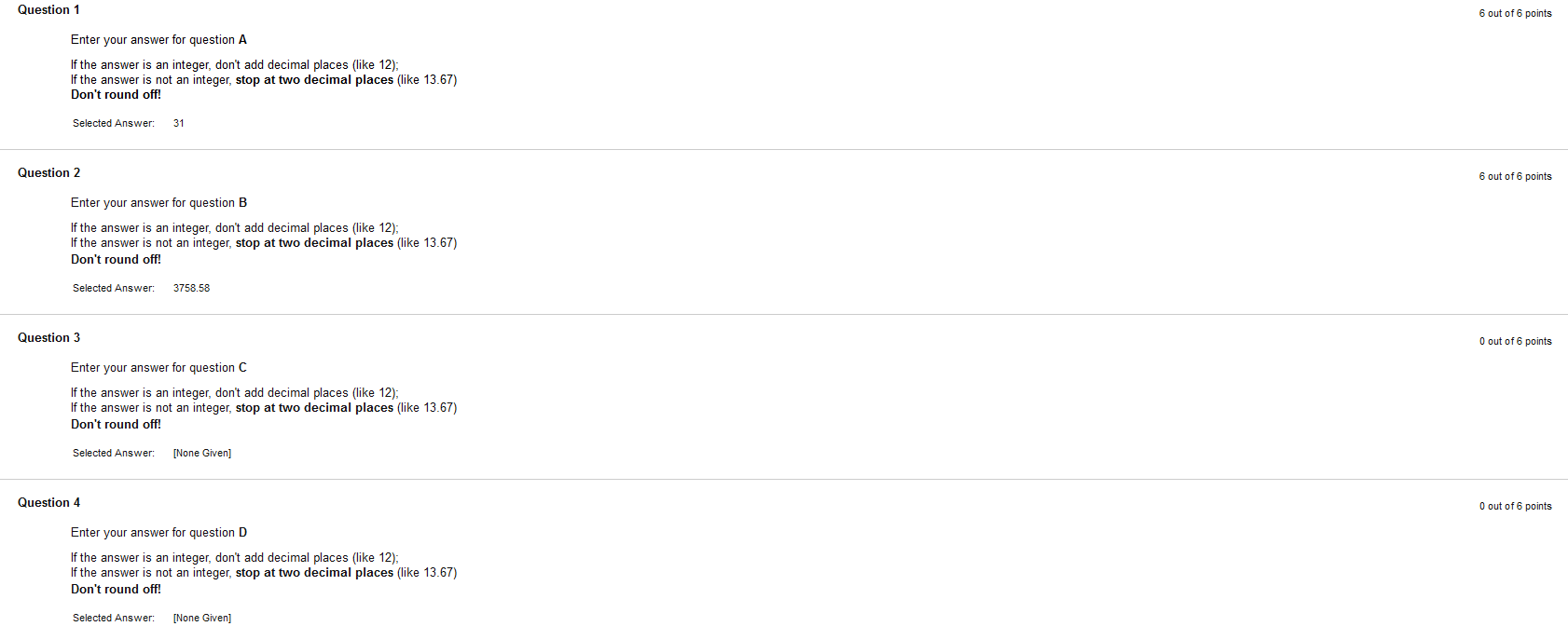
//DebugHW.cpp file #include using namespace std; int main() { int x = 45, y = 24, z = 19, w, a; double num1 = 4.8, num2 = 185.2, num3, num4 = 1; w = 26 + y % x % z; //w = 31 num3 = num2 / num1 + w * 120; for (int count = 1; count 6) num4 *= -1; cout I am trouble to find the answer in this assignments I drops some code. It was finding the answer in the code. I just can find two answer of 1 and 2. Thank You Sir,
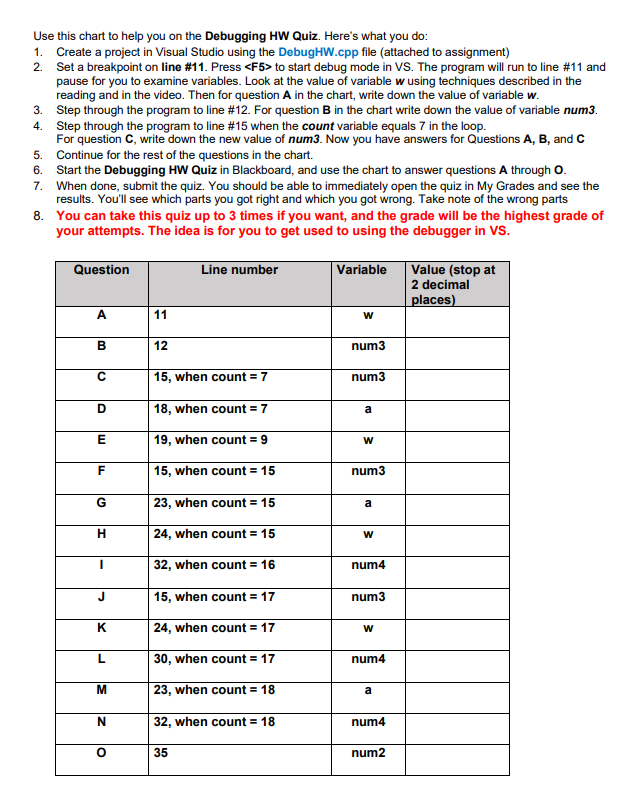
Question 1 6 out of 6 points Enter your answer for question A If the answer is an integer, don't add decimal places like 12); If the answer is not an integer, stop at two decimal places (like 13.67) Don't round off! Selected Answer: 31 Question 2 6 out of 6 points Enter your answer for question B If the answer is an integer, don't add decimal places (like 12); If the answer is not an integer, stop at two decimal places (like 13.67) Don't round off! Selected Answer: 3758.58 Question 3 0 out of 6 points Enter your answer for question C If the answer is an integer, don't add decimal places (like 12); If the answer is not an integer, stop at two decimal places like 13.67) Don't round off! Selected Answer: [None Given] Question 4 0 out of 6 points Enter your answer for question D If the answer is an integer, don't add decimal places (like 12); If the answer is not an integer, stop at two decimal places (like 13.67) Don't round off! Selected Answer: [None Given] Use this chart to help you on the Debugging HW Quiz. Here's what you do: 1. Create a project in Visual Studio using the DebugHW.cpp file (attached to assignment) 2. Set a breakpoint on line #11. Press to start debug mode in VS. The program will run to line #11 and pause for you to examine variables. Look at the value of variable w using techniques described in the reading and in the video. Then for question A in the chart, write down the value of variable w. 3. Step through the program to line #12. For question B in the chart write down the value of variable num3. 4. Step through the program to line #15 when the count variable equals 7 in the loop. For question C, write down the new value of num3. Now you have answers for Questions A, B, and C 5. Continue for the rest of the questions in the chart. 6. Start the Debugging HW Quiz in Blackboard, and use the chart to answer questions A through O. 7. When done, submit the quiz. You should be able to immediately open the quiz in My Grades and see the results. You'll see which parts you got right and which you got wrong. Take note of the wrong parts 8. You can take this quiz up to 3 times if you want, and the grade will be the highest grade of your attempts. The idea is for you to get used to using the debugger in VS. Question Line number Variable Value (stop at 2 decimal places) A 11 w B 12 num3 15, when count = 7 num3 D 18, when count = 7 a E 19, when count = 9 w F 15, when count = 15 num3 G 23, when count = 15 a H 24, when count = 15 W 1 32, when count = 16 num4 J 15, when count = 17 num3 K 24, when count = 17 w L 30, when count = 17 num4 M 23, when count = 18 a N 32, when count = 18 num4 o 35 num2 Step by Step Solution
There are 3 Steps involved in it
1 Expert Approved Answer
Step: 1 Unlock

Question Has Been Solved by an Expert!
Get step-by-step solutions from verified subject matter experts
Step: 2 Unlock
Step: 3 Unlock
 Study Help