







Question: Decision trees can be constructed in R using C5.0 algorithm - an improvement of the C4.5 algorithm. To prepare for this Assignment: Go to the
Decision trees can be constructed in R using C5.0 algorithm - an improvement of the C4.5 algorithm.
To prepare for this Assignment:
Go to the UCI Machine Learning Repository, which hosts free datasets to be used by the machine learning and data mining community (http://archive.ics.uci.edu/ml/).
On the top right corner, click on View ALL Data Sets. Then, click on the link for the lenses dataset.
On the top left corner of the lenses dataset page, you will see two links for download. Click on Data Folder and you will see two links: lenses.names and lenses.data.
Lenses.names contains a description of the dataset. A refined description also can be found in the lenses data description file linked to Week 3 module. The lenses.data contains the data of 24 patients along with a recommendation on the type of lenses the patient should use.
Download the data file and convert it to .csv file and name the file lenses.csv.
To complete this Assignment:
Using RStudio:
Load lenses.csv dataset and store it into a local R variable named lenses using read.csv R command.
Display the content of the lenses variable by typing the variable name in RStudio. Note that all data values in the lenses variable are numeric.
Clean up the data in lenses by replacing all numeric values with descriptive labels as outlined in the lenses data description file linked to Week 3 module. In this data cleaning activity, you can use the replace R command.
Build the decision tree model using the following steps:
Create two sets of data; training data and testing data. For this activity, use the seed value of 10203, and use 20 instances/rows out of the 24 instances/rows for training data and the remaining 4 instances/rows for testing data.
Train the decision tree. Evaluate the decision tree model.
Submit a report that includes:
The R commands you used to:
Clean up the data in lenses by replacing all numeric values with descriptive labels.
Train the decision tree. Make sure to also include the outcome of Summary command, either by copying and pasting the outcome to the report or by taking a screenshot of it.
Evaluate the decision tree model. Make sure to also include the outcome of CrossTable command, either by copying and pasting the outcome to the report or by taking a screenshot of it.
Your analyses and explanation of the decision tree model. Answer the following questions:
Was it easy or difficult to build the decision tree model?
Is it intuitive or hard to understand and interpret?
What are the possible decisions that the tree can make?
What is the best-case scenario and what is the worst case scenario of using the model you generated?
Are there any risky decisions or consequences that can result from that model?
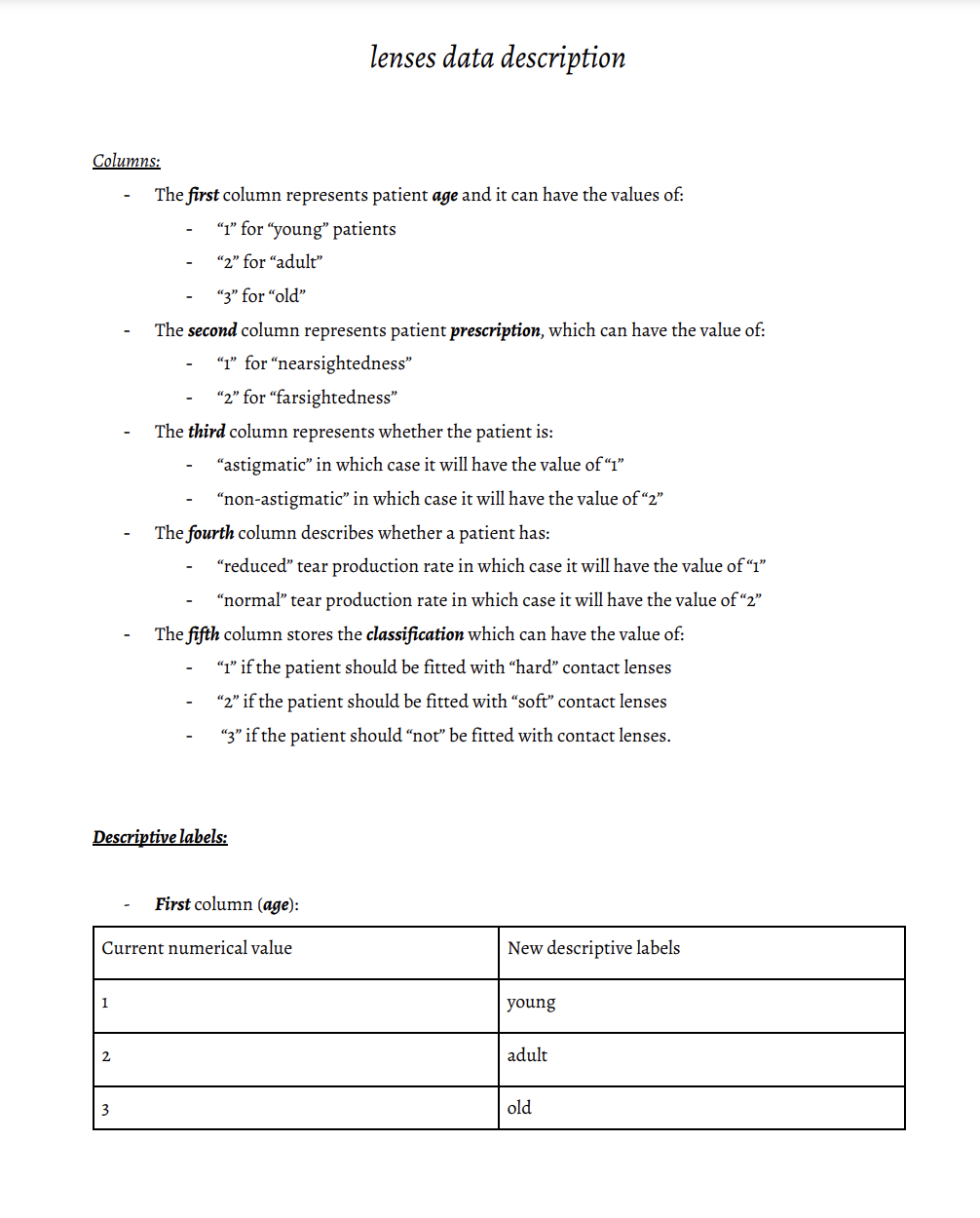
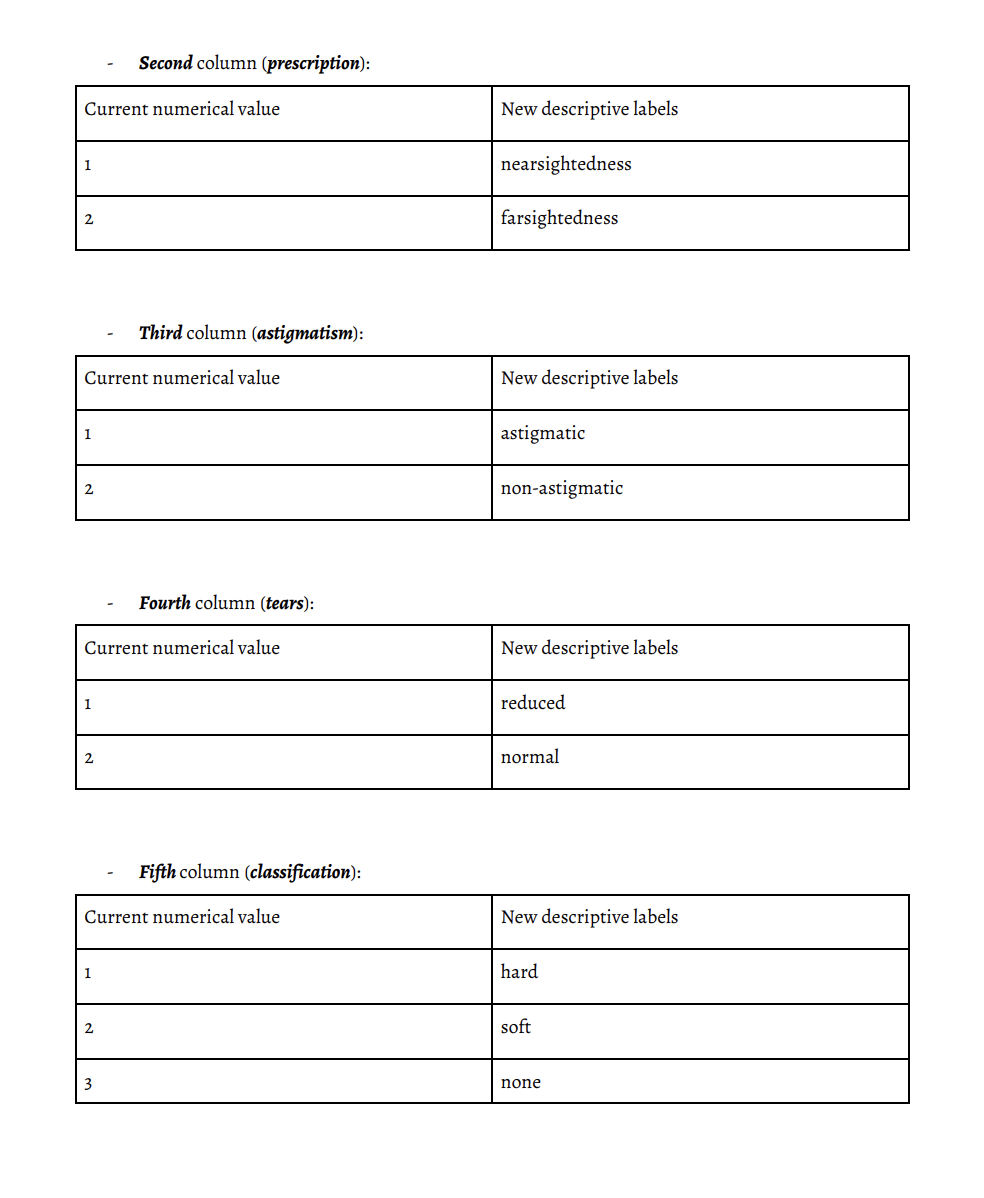
Columns: - The first column represents patient age and it can have the values of: - "1" for "young" patients - " 2 " for "adult" - " "3" for "old" - The second column represents patient prescription, which can have the value of: - "1" for "nearsightedness" - "2" for "farsightedness" - The third column represents whether the patient is: - "astigmatic" in which case it will have the value of " 1 " - "non-astigmatic" in which case it will have the value of " 2 " - The fourth column describes whether a patient has: - "reduced" tear production rate in which case it will have the value of " 1 " - "normal" tear production rate in which case it will have the value of " 2 " - The fifth column stores the classification which can have the value of: - " " 1 " if the patient should be fitted with "hard" contact lenses - " "2" if the patient should be fitted with "soft" contact lenses - " 3 " if the patient should "not" be fitted with contact lenses. Descriptive labels: - First column (age): Second column (prescription): Third column (astigmatism): Fourth column (tears): Fifth column (classification)
Step by Step Solution
There are 3 Steps involved in it

Get step-by-step solutions from verified subject matter experts
 Study Help