







Question: def main ( ) : customer _ count = 0 customers = [ ] quantities = [ ] discount _ rates = [ ] final
def main:
customercount
customers
quantities
discountrates
finalbills
sentinelvalue
while True:
customername inputEnter customer name or to end: formatsentinelvalue
if customername strsentinelvalue:
break
while True:
try:
quantity intinputEnter quantity ordered:
if quantity :
break
else:
printInvalid quantity. Please enter a positive integer."
except ValueError:
printInvalid input. Please enter a positive integer."
customers.appendcustomername
quantities.appendquantity
# Calculate discounts and final bills
for quantity in quantities:
discountrate
if quantity and quantity :
discountrate
elif quantity and quantity :
discountrate
elif quantity and quantity :
discountrate
elif quantity and quantity :
discountrate
elif quantity and quantity :
discountrate
else:
discountrate
priceperball
cost quantity priceperball
finalbill cost discountrate
discountrates.appenddiscountrate
finalbills.appendfinalbill
# Output results
print
Customer Information and Bills:"
for i in rangecustomercount:
printfName: customersi
printfQuantity Ordered: quantitiesi
printfDiscount Rate: discountratesi:f
printfFinal Bill: $finalbillsi:f
if namemain:
main
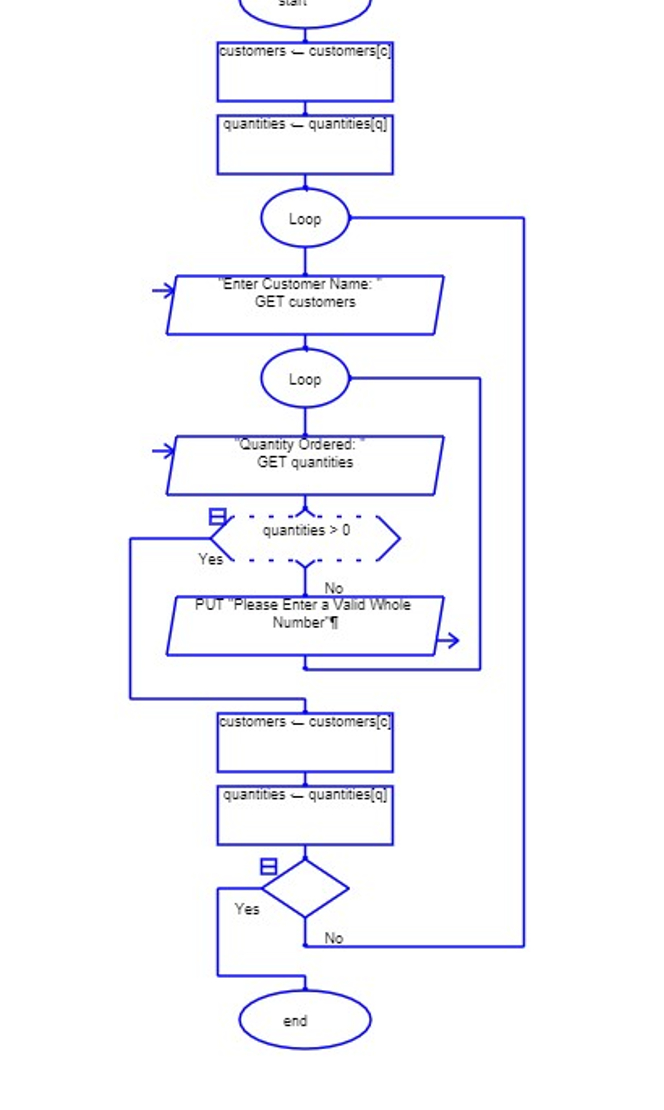
PLEASE CONVERT THIS PYTHON TO A FLOWCHART USING RAPTOR AVALONIA.
Please upload screenshots of the flowchart made using Raptor Avalonia.
An example of the flowchart in Raptor is attached. PLEASE provide the answer by uploading pictures of completed flowchart using RAPTOR.
Step by Step Solution
There are 3 Steps involved in it
1 Expert Approved Answer
Step: 1 Unlock

Question Has Been Solved by an Expert!
Get step-by-step solutions from verified subject matter experts
Step: 2 Unlock
Step: 3 Unlock
 Study Help