







Question: def merge(list1, list2): #write your code here def mergeSort(numList): #write your code here 3.pdf names or given started code on your script - The file
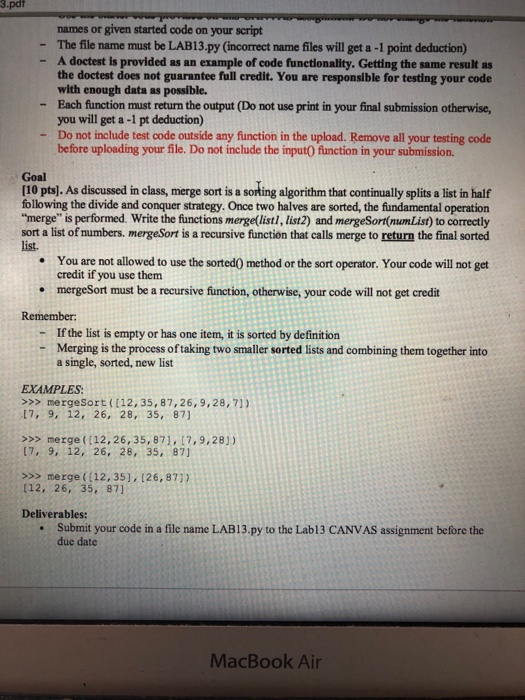
3.pdf names or given started code on your script - The file name must be LAB13-py (incorect name files will get a -1 point deduction) A doctest is provided as an example of code functionality. Getting the same result as the doctest does not guarantee full credit. You are responsible for testing your code with enough data as possible. Each function must return the output (Do not use print in your final submission otherwise, you will get a -1 pt deduction) Do not include test code outside any function in the upload. Remove all your testing code before uploading your file. Do not include the input0 function in your submission. - - - Goal [10 pts). As discussed in class, merge sort is a soting algorithm that continually splits a list in half following the divide and conquer strategy. Once two halves are sorted, the fundamental operation "merge" is performed. Write the functions merge(listl, list2) and mergeSort(numList) to correctly sort a list of numbers. mergeSort is a recursive function that calls merge to return the final sorted list. You are not allowed to use the sorted0 method or the sort operator. Your code will not get credit if you use them mergeSort must be a recursive function, otherwise, your code will not get credit . Remember If the list is empty or has one item, it is sorted by definition Merging is the process of taking two smaller sorted lists and combining them together into a single, sorted, new list - - EXAMPLES >> mergesort ([12,35,87,26,9,28,7) 17,9, 12, 26, 28, 35, 87 >>> merge ([12,26,35,871, 17,9,28)) 17, 9, 12, 26, 28, 35, 871 >>> merge ((12,35], [26, 871) [12, 26, 35, 871 Deliverables: Submit your code in a file name LAB13.py to the Lab13 CANVAS assignment before the due date MacBook Air
Step by Step Solution
There are 3 Steps involved in it

Get step-by-step solutions from verified subject matter experts
 Study Help