



Question: Defensive security involves focusing on reactive measures to breaches and includes processes such as finding system vulnerabilities, patching security flaws, and retiring software that introduces
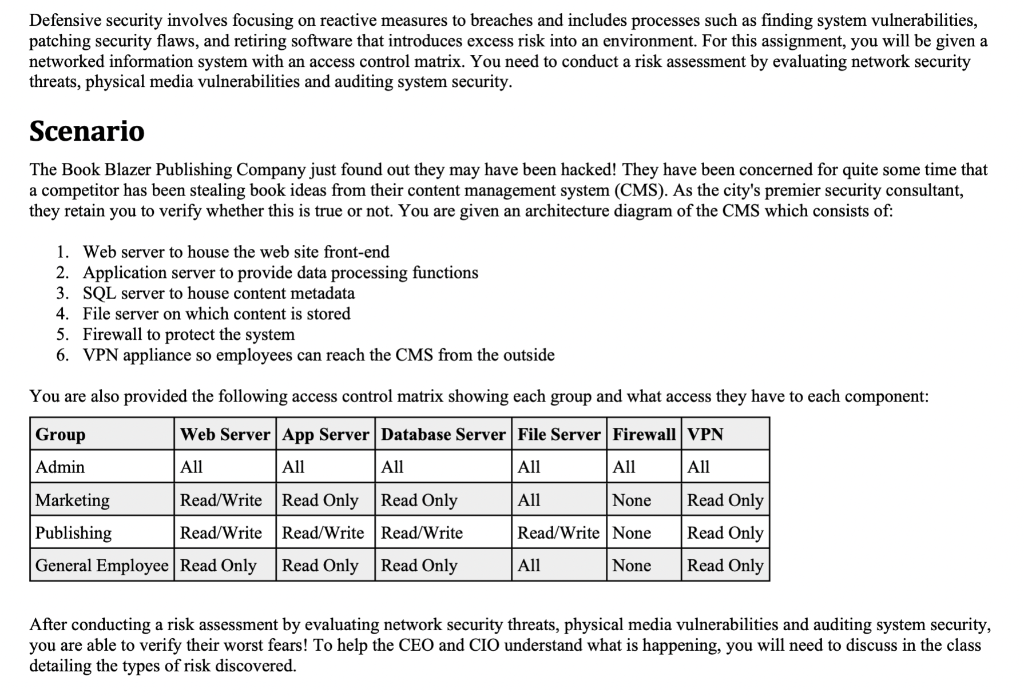
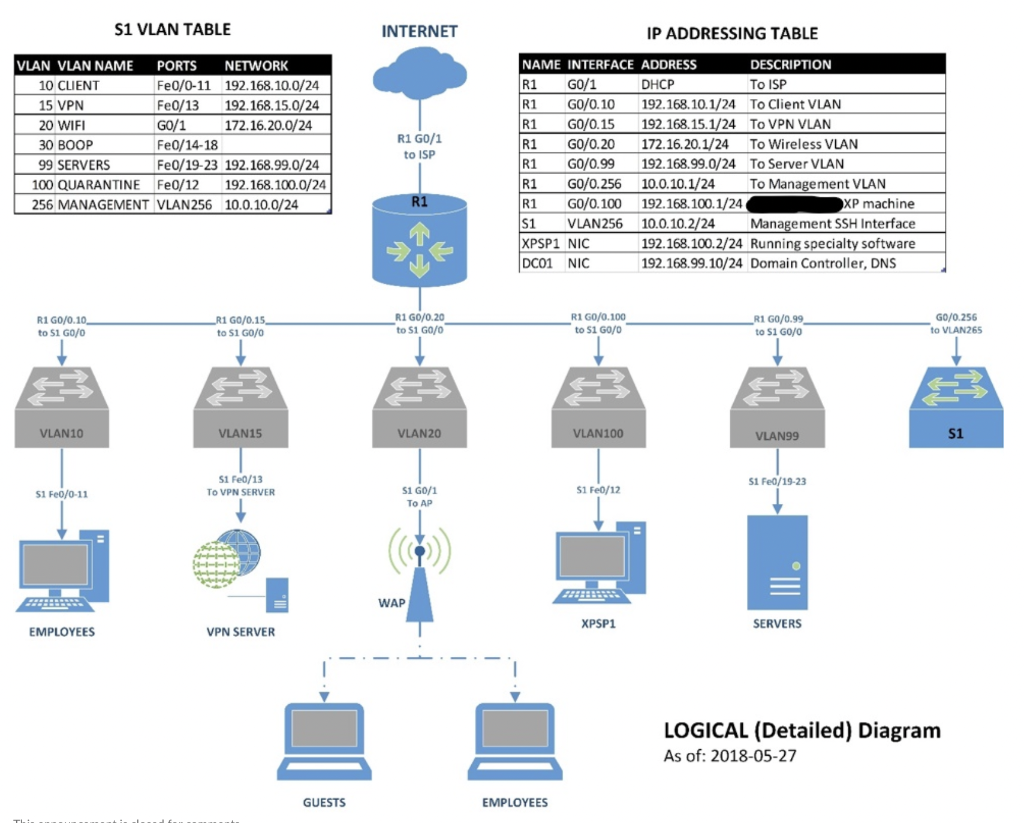
Defensive security involves focusing on reactive measures to breaches and includes processes such as finding system vulnerabilities, patching security flaws, and retiring software that introduces excess risk into an environment. For this assignment, you will be given a networked information system with an access control matrix. You need to conduct a risk assessment by evaluating network security threats, physical media vulnerabilities and auditing system security. Scenario The Book Blazer Publishing Company just found out they may have been hacked! They have been concerned for quite some time that a competitor has been stealing book ideas from their content management system (CMS). As the city's premier security consultant, they retain you to verify whether this is true or not. You are given an architecture diagram of the CMS which consists of: 1. Web server to house the web site front-end 2. Application server to provide data processing functions 3. SQL server to house content metadata 4. File server on which content is stored 5. Firewall to protect the system 6. VPN appliance so employees can reach the CMS from the outside You are also provided the following access control matrix showing each group and what access they have to each component: After conducting a risk assessment by evaluating network security threats, physical media vulnerabilities and auditing system security, you are able to verify their worst fears! To help the CEO and CIO understand what is happening, you will need to discuss in the class detailing the types of risk discovered. INTERNET IP ADDRESSING TABLE \begin{tabular}{|llll|} \hline \multicolumn{2}{|l|}{ NAME INTERFACE } & ADDRESS & \multicolumn{2}{l|}{ DESCRIPTION } \\ \hline R1 & G0/1 & DHCP & To ISP \\ \hline R1 & G0/0.10 & 192.168.10.1/24 & To Client VLAN \\ \hline R1 & G0/0.15 & 192.168.15.1/24 & To VPN VLAN \\ \hline R1 & G0/0.20 & 172.16.20.1/24 & To Wireless VLAN \\ \hline R1 & G0/0.99 & 192.168.99.0/24 & To Server VLAN \\ \hline R1 & G0/0.256 & 10.0.10.1/24 & To Management VLAN \\ \hline R1 & G0/0.100 & 192.168.100.1/24 & \\ \hline S1 & VLAN256 & 10.0.10.2/24 & Management SSH Interface \\ \hline XPSP1 & NIC & 192.168.100.2/24 & Running specialty software \\ \hline DC01 & NIC & 192.168.99.10/24 & Domain Controller, DNS \\ \hline \end{tabular} Defensive security involves focusing on reactive measures to breaches and includes processes such as finding system vulnerabilities, patching security flaws, and retiring software that introduces excess risk into an environment. For this assignment, you will be given a networked information system with an access control matrix. You need to conduct a risk assessment by evaluating network security threats, physical media vulnerabilities and auditing system security. Scenario The Book Blazer Publishing Company just found out they may have been hacked! They have been concerned for quite some time that a competitor has been stealing book ideas from their content management system (CMS). As the city's premier security consultant, they retain you to verify whether this is true or not. You are given an architecture diagram of the CMS which consists of: 1. Web server to house the web site front-end 2. Application server to provide data processing functions 3. SQL server to house content metadata 4. File server on which content is stored 5. Firewall to protect the system 6. VPN appliance so employees can reach the CMS from the outside You are also provided the following access control matrix showing each group and what access they have to each component: After conducting a risk assessment by evaluating network security threats, physical media vulnerabilities and auditing system security, you are able to verify their worst fears! To help the CEO and CIO understand what is happening, you will need to discuss in the class detailing the types of risk discovered. INTERNET IP ADDRESSING TABLE \begin{tabular}{|llll|} \hline \multicolumn{2}{|l|}{ NAME INTERFACE } & ADDRESS & \multicolumn{2}{l|}{ DESCRIPTION } \\ \hline R1 & G0/1 & DHCP & To ISP \\ \hline R1 & G0/0.10 & 192.168.10.1/24 & To Client VLAN \\ \hline R1 & G0/0.15 & 192.168.15.1/24 & To VPN VLAN \\ \hline R1 & G0/0.20 & 172.16.20.1/24 & To Wireless VLAN \\ \hline R1 & G0/0.99 & 192.168.99.0/24 & To Server VLAN \\ \hline R1 & G0/0.256 & 10.0.10.1/24 & To Management VLAN \\ \hline R1 & G0/0.100 & 192.168.100.1/24 & \\ \hline S1 & VLAN256 & 10.0.10.2/24 & Management SSH Interface \\ \hline XPSP1 & NIC & 192.168.100.2/24 & Running specialty software \\ \hline DC01 & NIC & 192.168.99.10/24 & Domain Controller, DNS \\ \hline \end{tabular}
Step by Step Solution
There are 3 Steps involved in it

Get step-by-step solutions from verified subject matter experts