Question: /*Define a function createColorBox()' that takes in two parameters: a color string (e.g., blue) and a numeric size (in pixels, e.g., 100). The function shoukld
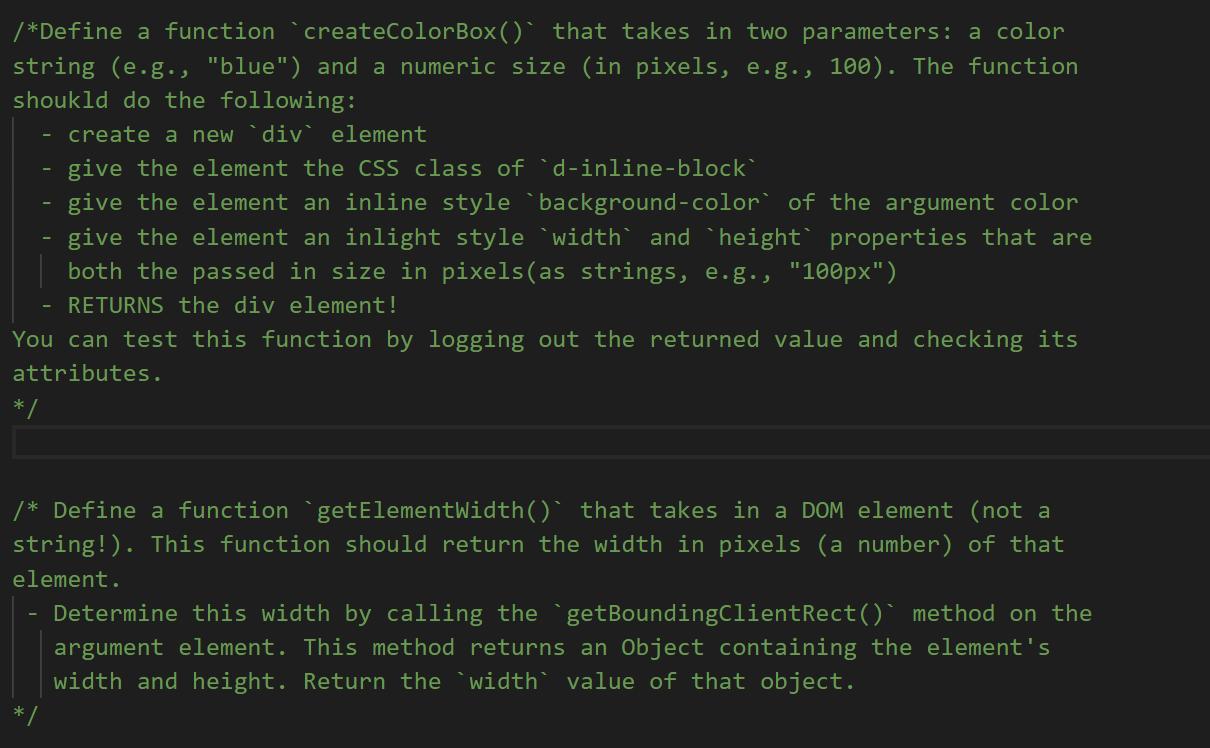
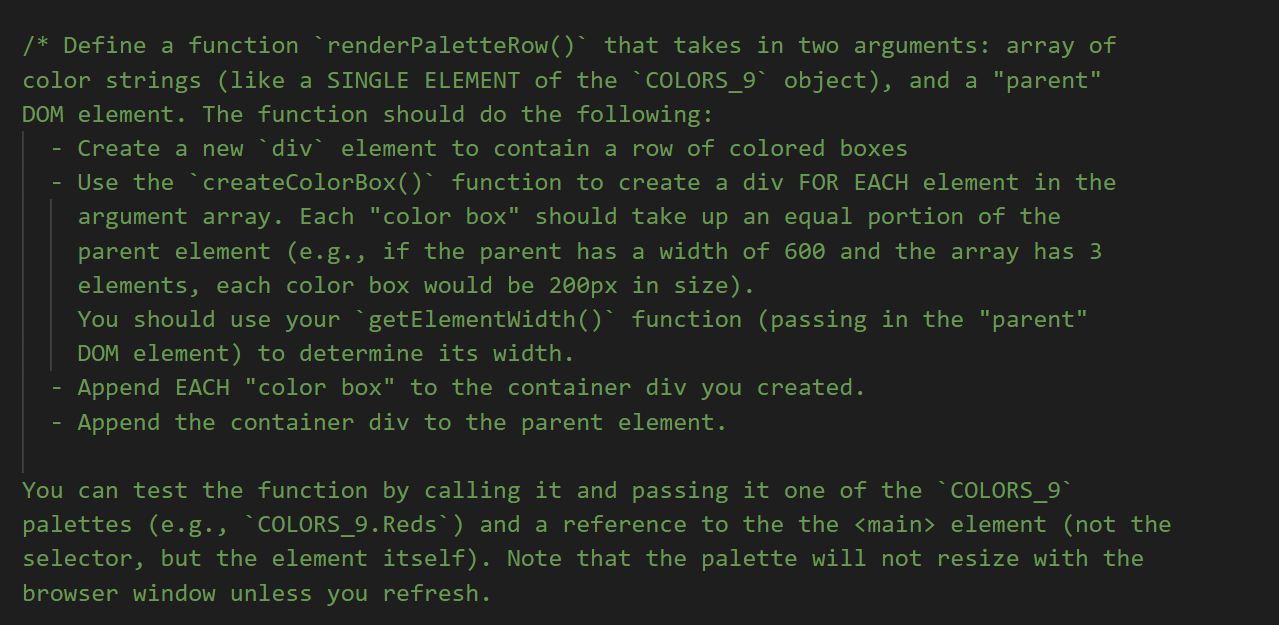

/*Define a function createColorBox()' that takes in two parameters: a color string (e.g., "blue") and a numeric size (in pixels, e.g., 100). The function shoukld do the following: create a new diy element give the element the CSS class of d-inline-block give the element an inline style "background-color of the argument color give the element an inlight style "width' and `height properties that are both the passed in size in pixels(as strings, e.g., "100px") RETURNS the div element! You can test this function by logging out the returned value and checking its attributes. */ /* Define a function getElementWidth()' that takes in a DOM element (not a string!). This function should return the width in pixels (a number) of that element. Determine this width by calling the getBoundingClientRect() method on the argument element. This method returns an Object containing the element's width and height. Return the "width" value of that object. /* Define a function `renderPaletteRow()' that takes in two arguments: array of color strings (like a SINGLE ELEMENT of the `COLORS_9' object), and a "parent" DOM element. The function should do the following: - Create a new div element to contain a row of colored boxes Use the createColorBox() function to create a div FOR EACH element in the argument array. Each "color box" should take up an equal portion of the parent element (e.g., if the parent has a width of 600 and the array has 3 elements, each color box would be 200px in size). You should use your `getElementWidth() function (passing in the "parent" DOM element) to determine its width. Append EACH "color box" to the container div you created. Append the container div to the parent element. You can test the function by calling it and passing it one of the `COLORS_9" palettes (e.g., *COLORS_9. Reds) and a reference to the the element (not the selector, but the element itself). Note that the palette will not resize with the browser window unless you refresh. TOI C010/Brewer = const COLORS_9 { Spectral: ['#d53e4f', '#f46d43', '#fdae61', '#fee08b', '#ffffbf', '#e6f598', '#abdda4', '#66c2a5', '#3288bd'], Reds: ['#fff5f0', '#fee0d2', '#fcbbal', '#fc9272', '#fb6a4a', '#ef3b2c', '#cb1810', '#a50f15','#670000'], Blues: ['#f7fbff', '#deebf7', '#c6dbef','#9ecael', '#6baed6','#4292c6', '#2171b5', '#08519c', '#08306b'], Greens: ['#f7fcf5', '#e5f5e0', '#c7e9co', '#a1d99b', '#74c476','#41ab5d', '#238b45', '#006d2c', '#00441b'], Purples: ['#fcfbfd', '#efedf5', '#dadaeb', '#bcbddc','#9e9ac8', '#807dba', '#6a51a3', '#54278f','#3f007d'], }; /*Define a function createColorBox()' that takes in two parameters: a color string (e.g., "blue") and a numeric size (in pixels, e.g., 100). The function shoukld do the following: create a new diy element give the element the CSS class of d-inline-block give the element an inline style "background-color of the argument color give the element an inlight style "width' and `height properties that are both the passed in size in pixels(as strings, e.g., "100px") RETURNS the div element! You can test this function by logging out the returned value and checking its attributes. */ /* Define a function getElementWidth()' that takes in a DOM element (not a string!). This function should return the width in pixels (a number) of that element. Determine this width by calling the getBoundingClientRect() method on the argument element. This method returns an Object containing the element's width and height. Return the "width" value of that object. /* Define a function `renderPaletteRow()' that takes in two arguments: array of color strings (like a SINGLE ELEMENT of the `COLORS_9' object), and a "parent" DOM element. The function should do the following: - Create a new div element to contain a row of colored boxes Use the createColorBox() function to create a div FOR EACH element in the argument array. Each "color box" should take up an equal portion of the parent element (e.g., if the parent has a width of 600 and the array has 3 elements, each color box would be 200px in size). You should use your `getElementWidth() function (passing in the "parent" DOM element) to determine its width. Append EACH "color box" to the container div you created. Append the container div to the parent element. You can test the function by calling it and passing it one of the `COLORS_9" palettes (e.g., *COLORS_9. Reds) and a reference to the the element (not the selector, but the element itself). Note that the palette will not resize with the browser window unless you refresh. TOI C010/Brewer = const COLORS_9 { Spectral: ['#d53e4f', '#f46d43', '#fdae61', '#fee08b', '#ffffbf', '#e6f598', '#abdda4', '#66c2a5', '#3288bd'], Reds: ['#fff5f0', '#fee0d2', '#fcbbal', '#fc9272', '#fb6a4a', '#ef3b2c', '#cb1810', '#a50f15','#670000'], Blues: ['#f7fbff', '#deebf7', '#c6dbef','#9ecael', '#6baed6','#4292c6', '#2171b5', '#08519c', '#08306b'], Greens: ['#f7fcf5', '#e5f5e0', '#c7e9co', '#a1d99b', '#74c476','#41ab5d', '#238b45', '#006d2c', '#00441b'], Purples: ['#fcfbfd', '#efedf5', '#dadaeb', '#bcbddc','#9e9ac8', '#807dba', '#6a51a3', '#54278f','#3f007d'], }









 Study Help