







Question: DemoController.java: import java.awt.*; import java.awt.event.*; import javax.swing.event.*; /** * This demonstrates the controller in a model-view-controller pattern. * Adapted from Figures 14.23 and 14.34. *
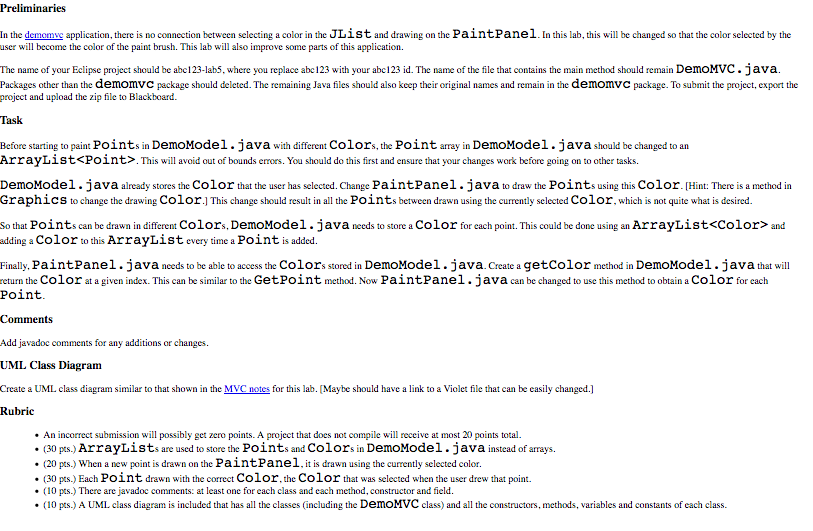
DemoController.java:
import java.awt.*; import java.awt.event.*; import javax.swing.event.*;
/** * This demonstrates the controller in a model-view-controller pattern. * Adapted from Figures 14.23 and 14.34. * @author Tom Bylander */ public class DemoController implements ListSelectionListener, MouseMotionListener { /** * The model of this MVC example */ private DemoModel model; /** * The view of this MVC example */ private DemoView view;
public DemoController(DemoModel model, DemoView view) { this.model = model; this.view = view; }
/** * Add a point to the model when the user drags the mouse, and * repaint the window. Need more logic to draw solid lines. */ public void mouseDragged(MouseEvent event) { Point point = event.getPoint(); // find point model.addPoint(point); view.repaint(); } // end method mouseDragged
/** * This method doesn't do anything, but it needs to be * here to implement MouseMotionListener. */ public void mouseMoved(MouseEvent event) { // this method intentionally left blank }
/** * Update the model when the user selects a color, and repaint the * window. */ public void valueChanged(ListSelectionEvent event) { Color color = view.getSelectedColor(); model.setSelectedColor(color); view.repaint(); } }
DemoModel.java:
import java.awt.*;
/** * The DemoModel class holds the information that is used by the GUI. * Ask yourself the question, what data would be needed to recreate * the state of the GUI? This data is what should be stored in the * model. *
* The instance variables are from Fig. 14.34. * @author Tom Bylander */ public class DemoModel { /** * The number of points */ private int pointCount;
/** * An array of 10000 java.awt.Point references */ private Point[] points; /** * The color selected by the user */ private Color selectedColor; public DemoModel() { pointCount = 0; points = new Point[10000]; selectedColor = Color.CYAN; } /** * Add a Point to the points array. * @param point the Point to be added to points. */ public void addPoint(Point point) { // doesn't avoid out-of-bounds errors points[pointCount] = point; pointCount++; } /** * Returns point at index i. * Returns null if no such point exists. * @param i */ public Point getPoint(int i) { if (i >= 0 && i
DemoMVC.java:
import java.awt.*; import java.awt.event.*; import javax.swing.*; import javax.swing.event.*;
/** * This demonstrates the model-view-controller design pattern. * Adapted from Figures 14.23 and 14.34. * @author Tom Bylander */ public class DemoMVC { /** * main method starts the application */ public static void main(String[] args) { DemoModel model = new DemoModel(); DemoView view = new DemoView(model); DemoController controller = new DemoController(model, view); // register controller as the listener view.registerListener(controller); // start it up view.setDefaultCloseOperation(JFrame.EXIT_ON_CLOSE); view.setSize(400, 300); view.setVisible(true); } }
DemoView.java:
import java.awt.*; import java.awt.event.*; import javax.swing.*; import javax.swing.event.*;
/** . * The view is responsible for displaying the information. * The view includes the list of colors and a panel for painting * with the mouse. The panel is implemented as a separate class so that the * painting is relatively flicker-free. * @author Tom Bylander */ public class DemoView extends JFrame { /** * the model of this MVC example */ private DemoModel model; /** * the JPanel where the user can paint */ private PaintPanel mousePanel; /** * for displaying a list of colors */ private JList colorList; /** * the panel where the JList will be placed */ private JPanel listPanel;
/** * the String names of the colors that the user can select */ private static final String[] colorNames = {"Black", "Blue", "Cyan", "Dark Gray", "Gray", "Green", "Light Gray", "Magenta", "Orange", "Pink", "Red", "White", "Yellow"}; /** * the Colors that the user can select */ private static final Color[] colors = {Color.BLACK, Color.BLUE, Color.CYAN, Color.DARK_GRAY, Color.GRAY, Color.GREEN, Color.LIGHT_GRAY, Color.MAGENTA, Color.ORANGE, Color.PINK, Color.RED, Color.WHITE, Color.YELLOW};
/** * Create and organize the components of the window. */ public DemoView(DemoModel model) { super("Illustrate Model-View-Controller"); this.model = model;
/* CENTER: Add a panel that the user can draw on. */ mousePanel = new PaintPanel(model); mousePanel.setBackground(Color.WHITE); add(mousePanel, BorderLayout.CENTER);
/* WEST: Add a list so the user can select a color. */ listPanel = new JPanel(); add(listPanel, BorderLayout.WEST); colorList = new JList(colorNames); colorList.setVisibleRowCount(5); colorList.setSelectionMode(ListSelectionModel.SINGLE_SELECTION); listPanel.add(new JScrollPane(colorList), BorderLayout.CENTER); } // end constructor
/** * Register the controller as the listener to the JList and the * MousePanel. * @param listener */ public void registerListener(DemoController listener) { colorList.addListSelectionListener(listener); mousePanel.addMouseMotionListener(listener); }
/** * @return The color selected by the user. */ public Color getSelectedColor() { return colors[colorList.getSelectedIndex()]; }
/** * Sets the background color of the JList and calls super.paint(g) * to paint the components. */ public void paint(Graphics g) { listPanel.setBackground(model.getSelectedColor()); super.paint(g); // This will paint the components. } // end method paint }
DemoPanel.java:
import java.awt.Graphics; import java.awt.Point; import javax.swing.JPanel;
/** * This is part of the view allowing the mouse to paint a JPanel. * This is modified from Fig 14.34. * @author Deitel & Associates, Inc. * @author Tom Bylander */ public class PaintPanel extends JPanel { /** * The model of this MVC example (it stores the points) */ private DemoModel model;
/** * Store the model that holds the points to be drawn. * @param model */ public PaintPanel(DemoModel model) { this.model = model; } // end PaintPanel constructor
/** * Draw ovals in a 4-by-4 bounding box at specified locations on * the panel. */ public void paintComponent(Graphics g) { super.paintComponent(g); // clears drawing area int i = 0; Point point = model.getPoint(0); while (point != null) { g.fillOval(point.x, point.y, 4, 4); i++; point = model.getPoint(i); } } // end method paintComponent } // end class PaintPanel
Step by Step Solution
There are 3 Steps involved in it

Get step-by-step solutions from verified subject matter experts
 Study Help