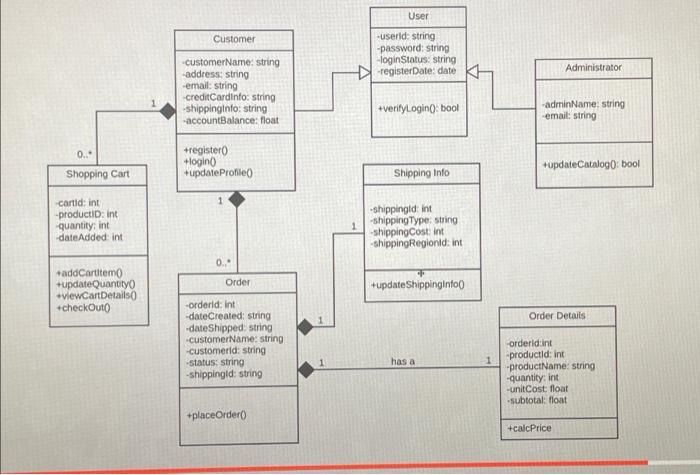
Question: describe the relationship back and forth between the entities and explain the minimum and maximum cardinalities. You can use the text boxes to add the

describe the relationship back and
forth between the entities and explain the minimum and maximum cardinalities. You
can use the text boxes to add the relationships on the interface itself or write them on the submission text box.
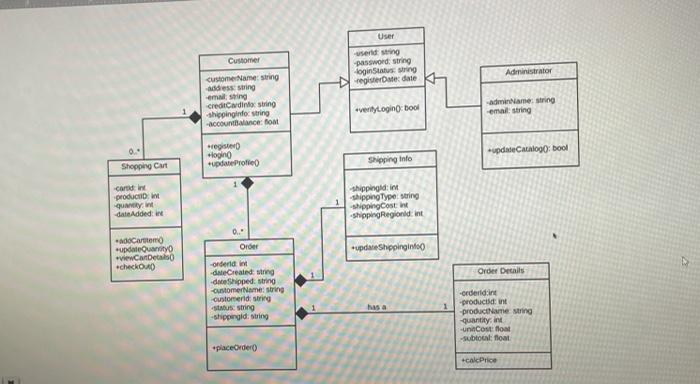
describe the relationship back and forth between
Customer User user string password, string login String registere date Administrator customeName: String addess string emaling creditadino string shippingindo String ACOBie om very login tool admin Name: string emal string register login +updateProfiel de Catalog: bool Shipping into Shopping Cart Cardin producent quantity date Added: shippingid in shippingType string shipping Cost Shipping Regioni int 0.- Order adoCartom update viewCartet checkOAD updateShippinginio Order Details -orderline date Created:string de Shipped string CustomerName string customerid string Susting -shippingid String has a order: products in -productName string Quantity in -un costos -subtotal: float placeOrdero calcPrice User Customer -userid: string -password: string login Status: string -register Date: date Administrator -customerName: string -address: string email: string creditcardinfo: string -shippinginfo: string -account Balance: float +verifyLogin(); bool admin Name string email: string 0... +registero login + update Profile +updateCatalog: bool Shopping Cart Shipping Info cortid: int -productio: int -Quantity: int date Added: int -shippingid: int -shipping Type: string shipping Cost: shipping Regionid:int 0... Order addCartitemo +update Quantity viewCartDetails +checkOuto +update Shippinginto Order Details -orderld: int -date Created: string -dateShipped: string customerName: string customerid: string status: string -shippingid: string has a -orderidint productld: int -productName: string -quantity: int -unitCost float -subtotal: float placeOrdero +calcPrice Customer User user string password, string login String registere date Administrator customeName: String addess string emaling creditadino string shippingindo String ACOBie om very login tool admin Name: string emal string register login +updateProfiel de Catalog: bool Shipping into Shopping Cart Cardin producent quantity date Added: shippingid in shippingType string shipping Cost Shipping Regioni int 0.- Order adoCartom update viewCartet checkOAD updateShippinginio Order Details -orderline date Created:string de Shipped string CustomerName string customerid string Susting -shippingid String has a order: products in -productName string Quantity in -un costos -subtotal: float placeOrdero calcPrice User Customer -userid: string -password: string login Status: string -register Date: date Administrator -customerName: string -address: string email: string creditcardinfo: string -shippinginfo: string -account Balance: float +verifyLogin(); bool admin Name string email: string 0... +registero login + update Profile +updateCatalog: bool Shopping Cart Shipping Info cortid: int -productio: int -Quantity: int date Added: int -shippingid: int -shipping Type: string shipping Cost: shipping Regionid:int 0... Order addCartitemo +update Quantity viewCartDetails +checkOuto +update Shippinginto Order Details -orderld: int -date Created: string -dateShipped: string customerName: string customerid: string status: string -shippingid: string has a -orderidint productld: int -productName: string -quantity: int -unitCost float -subtotal: float placeOrdero +calcPrice

Step by Step Solution

There are 3 Steps involved in it

1 Expert Approved Answer
Step: 1 Unlock blur-text-image

Question Has Been Solved by an Expert!

Get step-by-step solutions from verified subject matter experts

Step: 2 Unlock
Step: 3 Unlock

Students Have Also Explored These Related General Management Questions!