







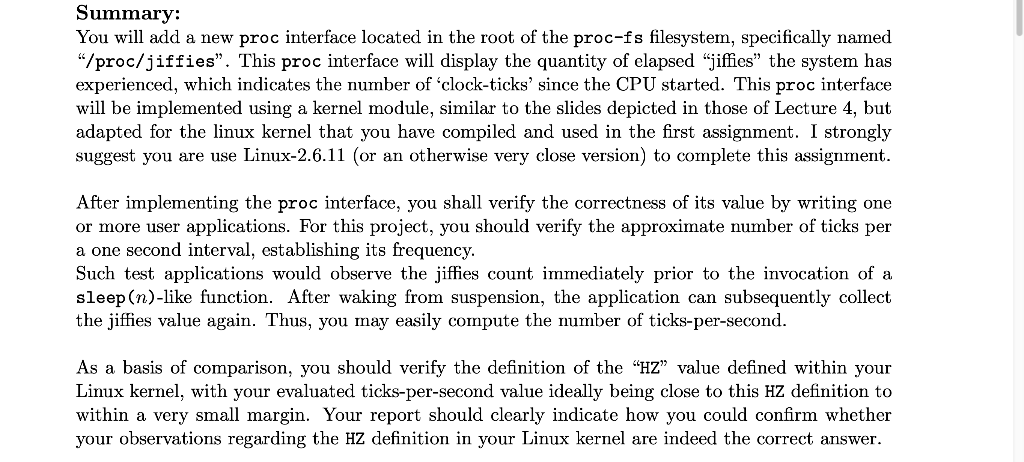
Question: *Design a kernel module that creates a /proc file named jiffies that display the quantity of clapsed jiffies the system has experienced, which indicates the
*Design a kernel module that creates a /proc file named jiffies that display the quantity of clapsed "jiffies" the system has experienced, which indicates the number of clock-ticks since the CPU started.
*PLeas help for only jiffies.c file (which I struggle on)
#include
#include
#include
#include
#define procfs_name "jiffies"
struct proc_dir_entry *proc_file;
int procfile_read(char *buffer,
char **buffer_location,
off_t offset, int buffer_length, int *eof, void *data) {
int ret;
printk(KERN_INFO "procfile_read (/proc/%s) called ", procfs_name);
// Disallow use of the 'offset' parameter.
if (offset > 0) {
ret = 0;
} else {
// TODO: write the value of the jiffies global into the specified
// buffer
return sprintf(buffer, Value of jiffies=%lu , jiffies);
}
return ret;
}
int init_module() {
// Create /proc entry via create_proc_entry()
proc_file = create_proc_read_entry(procfs_name, 0444, NULL);
if (proc_file == NULL) {
// Validate whether proc_dir_entry pointer returned above is valid;
// if not, emit a log-level error message, remove the proc entry via
// remove_proc_entry(), and return a function valid consistent with the
// kernel's standard (i.e., -errno; or, in this case, -ENOMEM)
remove_proc_entry(procfs_name, &proc_root);
printk(KERN_ALERT "Error: Could not initialize %s ", procfs_name);
return -ENOMEM;
}
// TODO:
// utilize proc_dir_entry pointer to setup the interface/filelength;
// utilize the THIS_MODULE object, which is generated automatically
// See: https://stackoverflow.com/questions/19467150/what-is-the-significance-of-this-module-in-linux-kernel-module-drivers
// for slightly more information
printk(KERN_INFO "/proc/%s created ", procfs_name);
return 0;
}
void cleanup_module() {
remove_proc_entry(procfs_name, &proc_root);
printk(KERN_INFO "/proc/%s removed ", procfs_name);
}
MODULE_LISENCE("GPL 2");
________________________________________________________
Makefile
obj-m += jiffies.o
all: make -C /lib/modules/$(shell uname -r)/build M=$(PWD) modules
clean: make -C /lib/modules/$(shell uname -r)/build M=$(PWD) clean
______________________________
Summary: You will add a new proc interface located in the root of the proc-fs filesystem, specifically named "/proc/jiffies. This proc interface will display the quantity of elapsed "jiffies" the system has experienced, which indicates the number of 'clock-ticks' since the CPU started. This proc interface will be implemented using a kernel module, similar to the slides depicted in those of Lecture 4, but adapted for the linux kernel that you have compiled and used in the first assignment. I strongly suggest you are use Linux-2.6.11 (or an otherwise very close version) to complete this assignment. After implementing the proc interface, you shall verify the correctness of its value by writing one or more user applications. For this project, you should verify the approximate number of ticks per a one second interval, establishing its frequency. Such test applications would observe the jiffies count immediately prior to the invocation of a sleep(n)-like function. After waking from suspension, the application can subsequently collect the jiffies value again. Thus, you may easily compute the number of ticks-per-second. As a basis of comparison, you should verify the definition of the HZ" value defined within your Linux kernel, with your evaluated ticks-per-second value ideally being close to this HZ definition to within a very small margin. Your report should clearly indicate how you could confirm whether your observations regarding the HZ definition in your Linux kernel are indeed the correct answer. Summary: You will add a new proc interface located in the root of the proc-fs filesystem, specifically named "/proc/jiffies. This proc interface will display the quantity of elapsed "jiffies" the system has experienced, which indicates the number of 'clock-ticks' since the CPU started. This proc interface will be implemented using a kernel module, similar to the slides depicted in those of Lecture 4, but adapted for the linux kernel that you have compiled and used in the first assignment. I strongly suggest you are use Linux-2.6.11 (or an otherwise very close version) to complete this assignment. After implementing the proc interface, you shall verify the correctness of its value by writing one or more user applications. For this project, you should verify the approximate number of ticks per a one second interval, establishing its frequency. Such test applications would observe the jiffies count immediately prior to the invocation of a sleep(n)-like function. After waking from suspension, the application can subsequently collect the jiffies value again. Thus, you may easily compute the number of ticks-per-second. As a basis of comparison, you should verify the definition of the HZ" value defined within your Linux kernel, with your evaluated ticks-per-second value ideally being close to this HZ definition to within a very small margin. Your report should clearly indicate how you could confirm whether your observations regarding the HZ definition in your Linux kernel are indeed the correct
Step by Step Solution
There are 3 Steps involved in it

Get step-by-step solutions from verified subject matter experts
 Study Help