







Question: Design a six ( decimal ) digit stopwatch using a Nios 2 coding language with start / resume , stop, and reset control buttons. The
Design a six decimal digit stopwatch using a Nios coding language with startresume stop, and reset control buttons. The functions for each of the input buttons are as follows:
STARTRESUME This button is used to trigger start the counting on the stopwatch, from an initial state of :: When this input is activated, the stopwatch advances every centisecond counting up and displaying the elapsed time from a minimum of ::up to a maximum of ::minutes, seconds and hundredths of a second and then looping back to :: The counting process should continue running until any other input SET or RESET is activated. A second press of the STARTRESUME button should not affect the current clock time count If the STARTRESUME input is activated from a previous steady display on the stopwatch, then the stopwatch resumes counting from the displayed value.
ET This button is used to stop the stopwatch counting and to hold the display. When this button is pressed the stopwatch stops counting at the very instance and displays the lap time in minutes continuously, until any other input RESUME or RESET is pressed. The difference between a regular pause of the stopwatch and using the lap time is that for the lap time, the stopwatch is still counting while displaying the lap time, even though the time displayed does not change. While the stopwatch is in SETmode there should be an L displayed on HEX
RESETThis button is used to reset the stopwatch display to :: When this button is pressed, your stopwatch is reset to zero the display should read :: irrespective of the state of your counter, and should hold this state until the STARTRESUMEbutton is activated. While the stopwatch is in RESETmode there should be an R displayed on HEX
GENERAL The current clock count MUST ALWAYS be displayed on the red LEDs LEDR KEY MUST NOT be used because it is reserved for use as a reset mechanism for the DE Media Computer.
INPUTOUTPUT INTERFACE
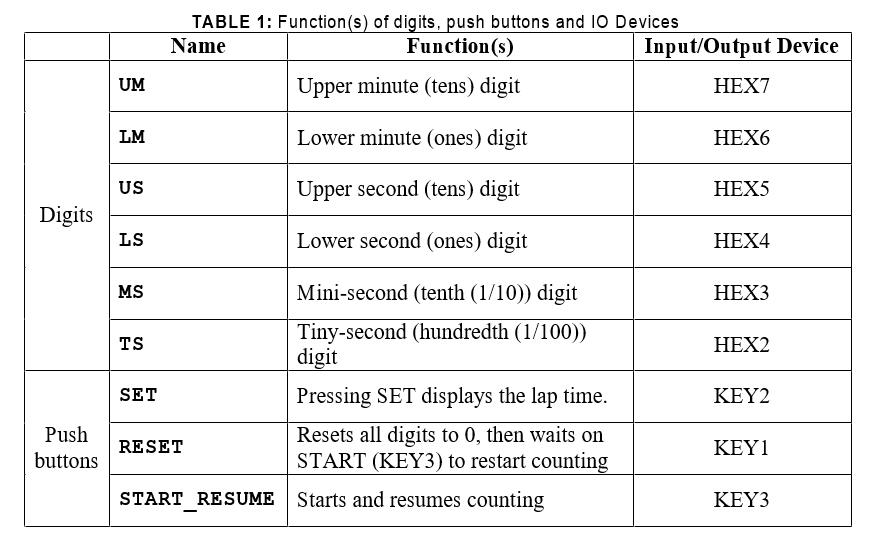
Use the push buttons, KEY and the segment display LEDs HEX available on the DE board as indicated in TABLE below.
How to Track Time? Use the MHz internal clock on the DE board as the reference for computing time. Hint: If I have a clock running at MHz how many clock cycles will I observe in second? The intellectual challenge here is to do the necessary clock division within your NIOS assembly code to increment the counter every second.
Table describes the functionality of digits, push buttons and inputoutput devices on the stopwatch. Figure shows the stopwatch display from the toplevel design.
TABLE : Functions of digits, push buttons and IO Devices the table image is attach
Step by Step Solution
There are 3 Steps involved in it
1 Expert Approved Answer
Step: 1 Unlock

Question Has Been Solved by an Expert!
Get step-by-step solutions from verified subject matter experts
Step: 2 Unlock
Step: 3 Unlock
 Study Help