







Question: Design a web server using python socket module, which will accept user ID and password from a clients socket program. If both user ID and
Design a web server using python socket module, which will accept user ID and password from a clients socket program. If both user ID and password match the predefined values, then open the attached text file (story.txt), and send its content to the client program. If incorrect user id and/or password are entered, then do not grant access to the file. For incorrect entries, provide two more chances.
Steps:
Create a webServer.py program. This is connection oriented program, therefore, use listen(), accept() methods.
Create a client.py program. This should read user input (user ID, password) and send to the server. For python version 2.x use raw_input(), for python version 3.x use input().
In the server program, run your loop for 3 times if entry does not match, otherwise, run it only once and break the loop
To avoid File Not Found exception, save the story.txt file in the same folder with your python files. In addition, use command prompt/terminal to navigate to the folder and run your code. Do not use absolute path within your code.
Server program must run all the time, if client fails to authenticate within 3 attempts, then only client program terminates. Server program disconnects the client and listens to new client connection.
Track the number of attempts on both sides using some variables and decrement the counter.
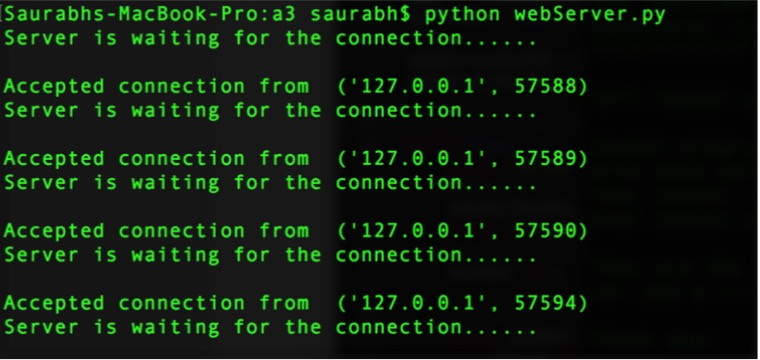
e.g., the server side output should look like this screenshot (right), where the server listens, accept connection, serve the client, and again enters the listening mode:
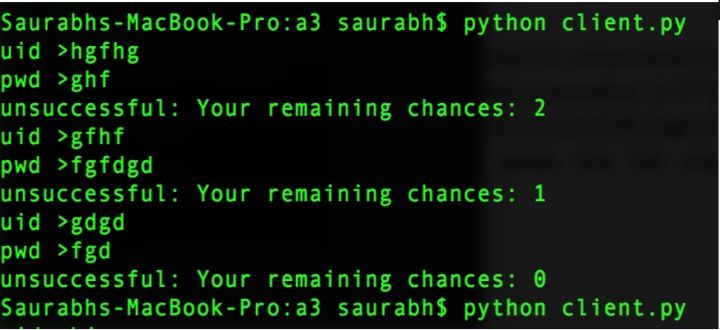
client.py for 3 unsuccessful logins. This should terminate, and you need to rerun the client program:
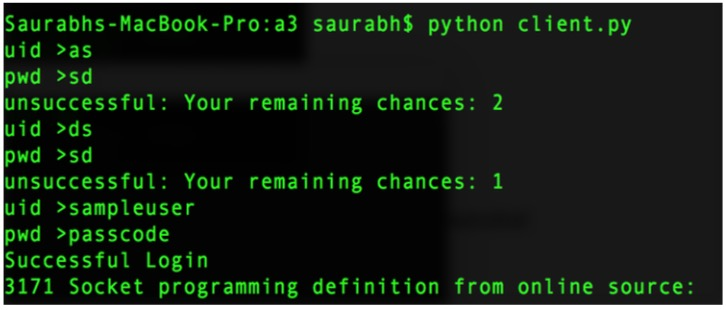
client.py screen for successful login. On 3rd or the last attempt client successfully logs in and the server sends the file content 3171....:
Saurabhs-MacBook-Pro:a3 saurabh$ python webServer.py Server is waiting for the connection. . . Accepted connection from ('127.0.0.1' 57588) Server is waiting for the connection. .. . . . Accepted connection from ('127.0.0.1' 57589) Server is waiting for the connection. . . . . . Accepted connection from ('127.0.0.1. 57590) Server is waiting for the connection... . . . Accepted connection from ('127.0.0.1', 57594) Server is waiting for the connection. . . . . . Saurabhs-MacBook-Pro:a3 saurabh$ python webServer.py Server is waiting for the connection. . . Accepted connection from ('127.0.0.1' 57588) Server is waiting for the connection. .. . . . Accepted connection from ('127.0.0.1' 57589) Server is waiting for the connection. . . . . . Accepted connection from ('127.0.0.1. 57590) Server is waiting for the connection... . . . Accepted connection from ('127.0.0.1', 57594) Server is waiting for the connection
Step by Step Solution
There are 3 Steps involved in it

Get step-by-step solutions from verified subject matter experts
 Study Help