







Question: Design and implement a simple burger takeout for class 209. The purpose of this lab is to gain experience in python's class, class variable,
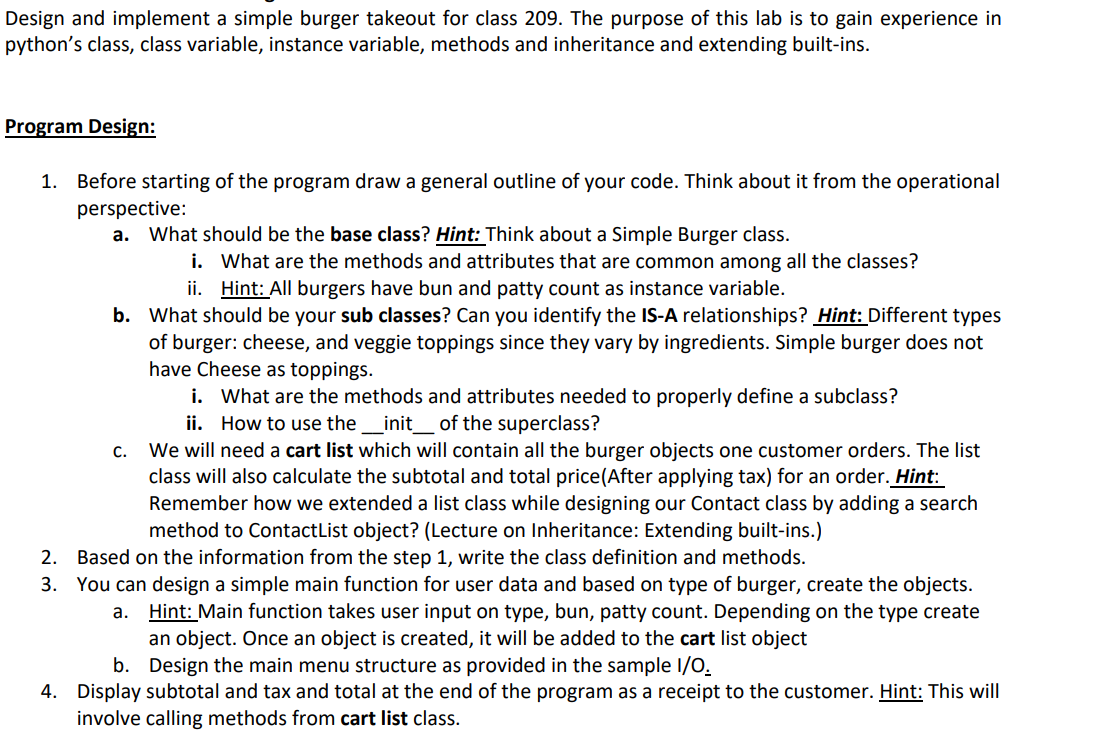
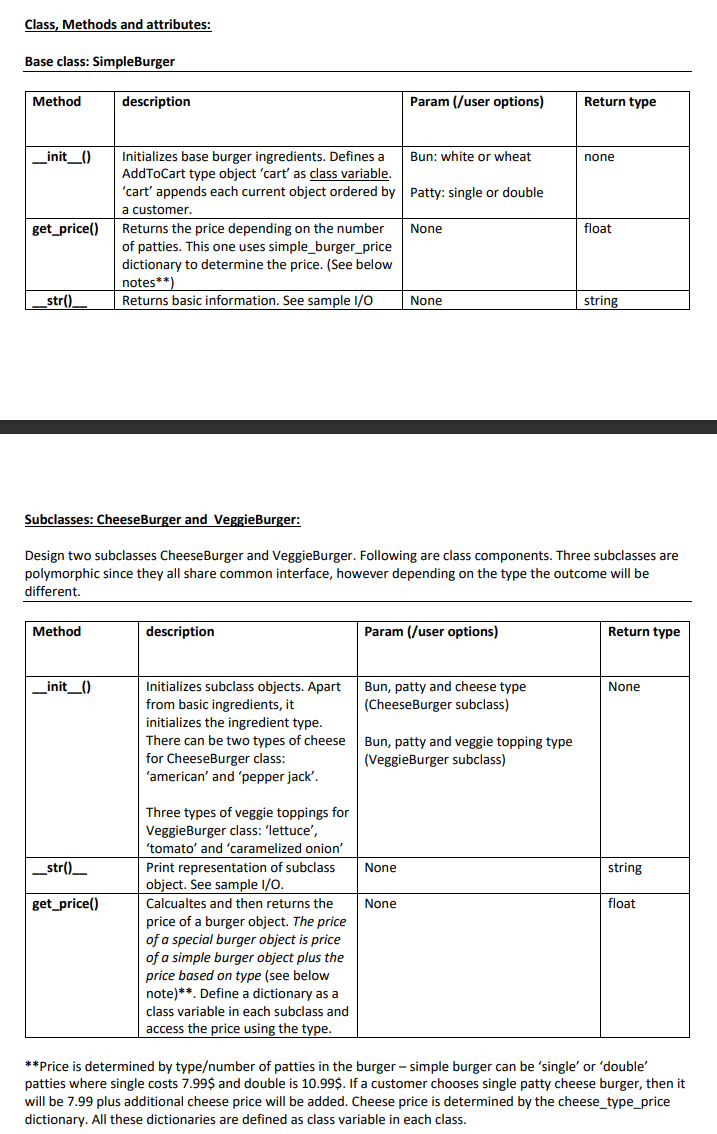
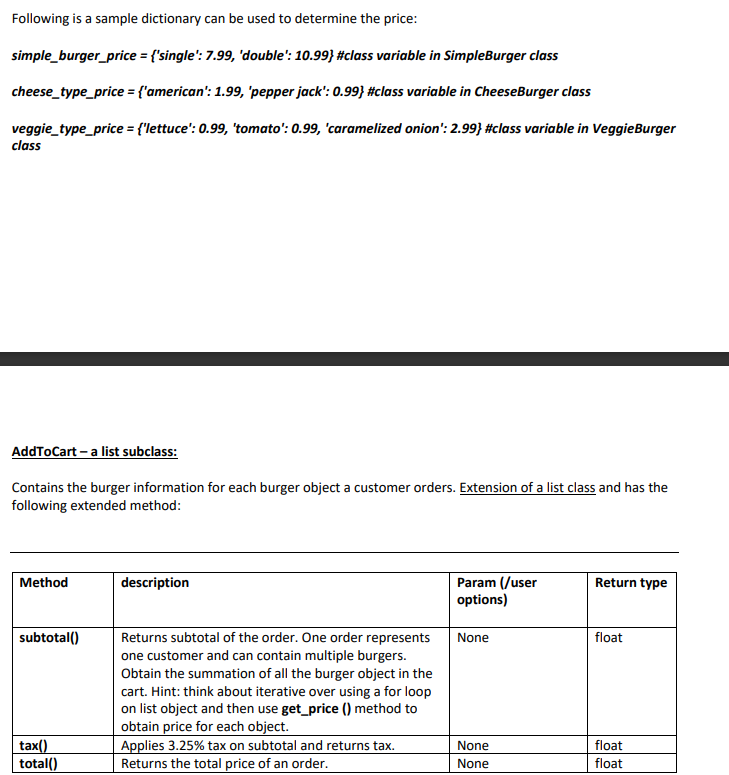
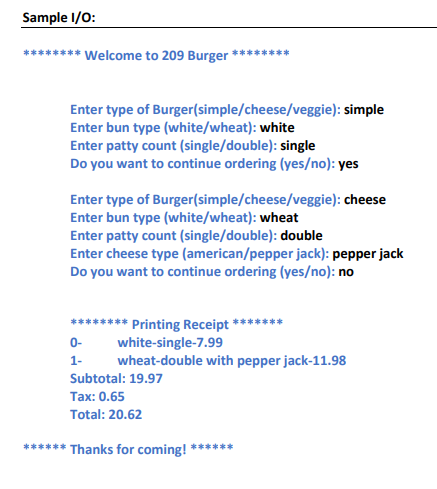
Design and implement a simple burger takeout for class 209. The purpose of this lab is to gain experience in python's class, class variable, instance variable, methods and inheritance and extending built-ins. Program Design: 1. Before starting of the program draw a general outline of your code. Think about it from the operational perspective: a. What should be the base class? Hint: Think about a Simple Burger class. i. What are the methods and attributes that are common among all the classes? ii. Hint: All burgers have bun and patty count as instance variable. b. What should be your sub classes? Can you identify the IS-A relationships? Hint: Different types of burger: cheese, and veggie toppings since they vary by ingredients. Simple burger does not have Cheese as toppings. C. i. What are the methods and attributes needed to properly define a subclass? ii. How to use the _init___ of the superclass? We will need a cart list which will contain all the burger objects one customer orders. The list class will also calculate the subtotal and total price (After applying tax) for an order. Hint: Remember how we extended a list class while designing our Contact class by adding a search method to Contact List object? (Lecture on Inheritance: Extending built-ins.) 2. Based on the information from the step 1, write the class definition and methods. 3. You can design a simple main function for user data and based on type of burger, create the objects. a. Hint: Main function takes user input on type, bun, patty count. Depending on the type create an object. Once an object is created, it will be added to the cart list object b. Design the main menu structure as provided in the sample I/O. 4. Display subtotal and tax and total at the end of the program as a receipt to the customer. Hint: This will involve calling methods from cart list class. Class, Methods and attributes: Base class: SimpleBurger Method _init__() get_price() Method description Returns the price depending on the number of patties. This one uses simple_burger_price dictionary to determine the price. (See below notes**) _str()____ Returns basic information. See sample 1/0 None _init_() _str()_ get_price() Initializes base burger ingredients. Defines a AddToCart type object 'cart' as class variable. 'cart' appends each current object ordered by Patty: single or double a customer. None description Initializes subclass objects. Apart from basic ingredients, it initializes the ingredient type. There can be two types of cheese for CheeseBurger class: 'american' and 'pepper jack'. Param (/user options) Subclasses: CheeseBurger and VeggieBurger: Design two subclasses Cheese Burger and VeggieBurger. Following are class components. Three subclasses are polymorphic since they all share common interface, however depending on the type the outcome will be different. Three types of veggie toppings for VeggieBurger class: 'lettuce', 'tomato' and 'caramelized onion' Print representation of subclass object. See sample I/O. Calcualtes and then returns the price of a burger object. The price of a special burger object is price of a simple burger object plus the price based on type (see below note)**. Define a dictionary as a class variable in each subclass and access the price using the type. Bun: white or wheat Param (/user options) Bun, patty and cheese type (CheeseBurger subclass) None Bun, patty and veggie topping type (VeggieBurger subclass) None Return type none float string Return type None string float **Price is determined by type/number of patties in the burger-simple burger can be 'single' or 'double' patties where single costs 7.99$ and double is 10.99$. If a customer chooses single patty cheese burger, then it will be 7.99 plus additional cheese price will be added. Cheese price is determined by the cheese_type_price dictionary. All these dictionaries are defined as class variable in each class. Following is a sample dictionary can be used to determine the price: simple_burger_price = {'single': 7.99, 'double': 10.99} #class variable in SimpleBurger class cheese_type_price = {'american': 1.99, 'pepper jack': 0.99} #class variable in CheeseBurger class veggie_type_price = {"lettuce': 0.99, 'tomato': 0.99, 'caramelized onion': 2.99} #class variable in VeggieBurger class AddToCart - a list subclass: Contains the burger information for each burger object a customer orders. Extension of a list class and has the following extended method: Method subtotal() tax() total() description Returns subtotal of the order. One order represents one customer and can contain multiple burgers. Obtain the summation of all the burger object in the cart. Hint: think about iterative over using a for loop on list object and then use get_price () method to obtain price for each object. Applies 3.25% tax on subtotal and returns tax. Returns the total price of an order. Param (/user options) None None None Return type float float float Sample I/O: ****** Welcome to 209 Burger Enter type of Burger(simple/cheese/veggie): simple Enter bun type (white/wheat): white Enter patty count (single/double): single Do you want to continue ordering (yes/no): yes Enter type of Burger(simple/cheese/veggie): cheese Enter bun type (white/wheat): wheat Enter patty count (single/double): double Enter cheese type (american/pepper jack): pepper jack Do you want to continue ordering (yes/no): no 0- 1- ****** Printing Receipt' white-single-7.99 wheat-double with pepper jack-11.98 Subtotal: 19.97 Tax: 0.65 Total: 20.62 ****** Thanks for coming! **
Step by Step Solution
There are 3 Steps involved in it

Get step-by-step solutions from verified subject matter experts
 Study Help