







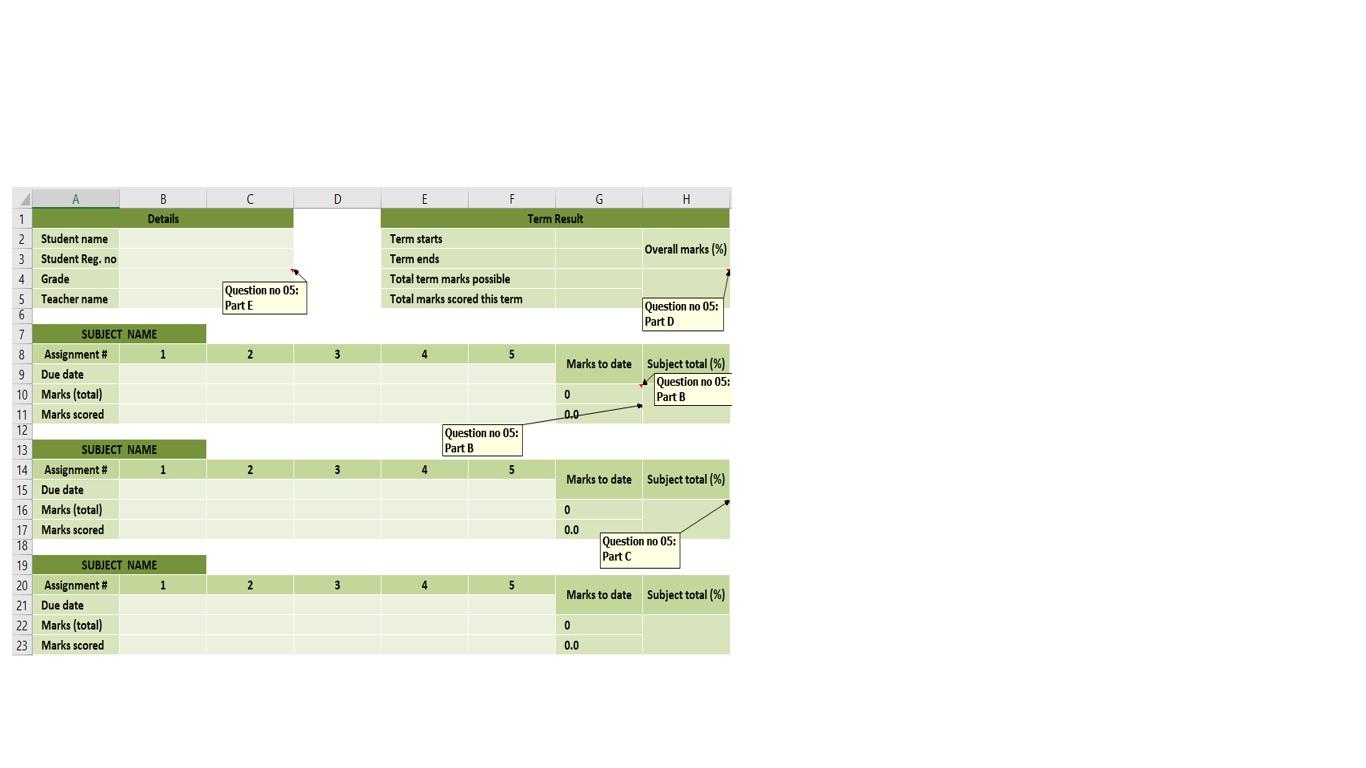
Question: Design the following student assignment grading template on your computer using MS Excel. Fill the cells with student name, student Reg. no and teacher name.
Design the following student assignment grading template on your computer using MS Excel. Fill the cells with student name, student Reg. no and teacher name. Assume the term starts, term ends and assignment due dates yourself. But the assignment due dates should lie within the term duration. Assume the Marks (total) for all assignments yourself. (Note: write down the formulae for each part of question and Paste the complete image of filled excel sheet using snipping tool in your answer sheet)
- Calculate the sum of Marks (total) and Marks scored against the field of Marks to date using formula.
- Determine the Subject total (%) in percentage form for all subjects using formula.
- Find the overall marks (%) in percentage using formula.
- Refer the following table for grade allocation using formula.
D E F G H Term Result Term starts Overall marks (%) Term ends Total term marks possible Total marks scored this term Question no 05: Parte Question no 05: Part 1 3 5 Marks to date Subject total (%) Question no 05: 0 Part B 0.0 A B 1 Details 2 Student name 3 Student Reg.no 4 Grade 5 Teacher name 6 7 SUBJECT NAME 8 Assignment # 1 9 Due date 10 Marks (total) 11 Marks scored 12 13 SUBJECT NAME 14 Assignment # 1 15 Due date 16 Marks (total) 17 Marks scored 18 19 SUBJECT NAME 20 Assignment # 1 21 Due date 22 Marks (total) 23 Marks scored Question no 05: Part B 2 3 5 Marks to date Subject total (%) 0 0.0 Question no 05: Part 2 3 5 Marks to date Subject total (%) 0 0.0
Step by Step Solution
There are 3 Steps involved in it

Get step-by-step solutions from verified subject matter experts
 Study Help