







Question: Design using eNSP , a corporate network that connects a headquarters to two branch offices. For routing you may use either static routing or dynamic
Design using eNSP, a corporate network that connects a headquarters to two branch offices. For routing you may use either static routing or dynamic routing (OSPF). Have at least one end device in each of the branches and one server in the headquarters.
side note: for the routers, i am using the static routing. i have no problem pinging each routers and configuring them. However, i have no idea on how to configure the 2 PCs and the server. the goal is for the PCs and the router being able to ping each other. Having the static routing as a backup. I'm confused on how the ip address for both PCs and the server should work so they can ping one another
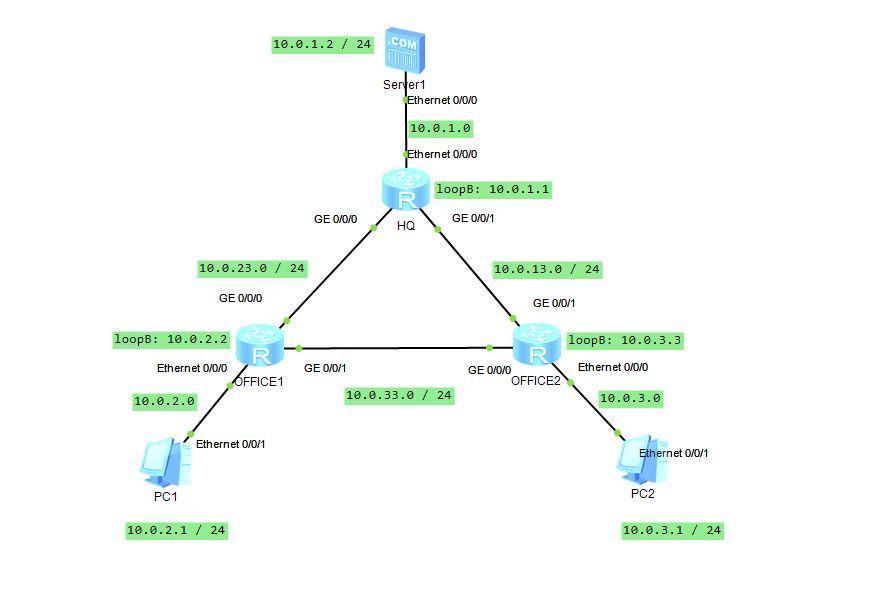
10.0.1.2 / 24 .COM Serter1 Ethernet 0/0/0 10.0.1.0 Ethernet 0/0/0 loopB: 10.0.1.1 R GE 0/0/0 GE 0/0/1 HQ 10.0.23.0 / 24 10.0.13.0 / 24 GE 0/0/0 GE 0/0/1 loopB: 10.0.2.2 R Ethernet 0/0/0 OFFICE1 10.0.2.0 loopB: 10.0.3.3 Ethernet 0/0/0 GE 0/0/1 R GE 0/0/0 OFFICE2 10.0.33.0 / 24 10.0.3.0 Ethernet 0/0/1 Ethernet 0/0/1 PC1 PC2 10.0.2.1 / 24 10.0.3.1 / 24 10.0.1.2 / 24 .COM Serter1 Ethernet 0/0/0 10.0.1.0 Ethernet 0/0/0 loopB: 10.0.1.1 R GE 0/0/0 GE 0/0/1 HQ 10.0.23.0 / 24 10.0.13.0 / 24 GE 0/0/0 GE 0/0/1 loopB: 10.0.2.2 R Ethernet 0/0/0 OFFICE1 10.0.2.0 loopB: 10.0.3.3 Ethernet 0/0/0 GE 0/0/1 R GE 0/0/0 OFFICE2 10.0.33.0 / 24 10.0.3.0 Ethernet 0/0/1 Ethernet 0/0/1 PC1 PC2 10.0.2.1 / 24 10.0.3.1 / 24
Step by Step Solution
There are 3 Steps involved in it

Get step-by-step solutions from verified subject matter experts
 Study Help